HDMI
HDMI
TV
EN
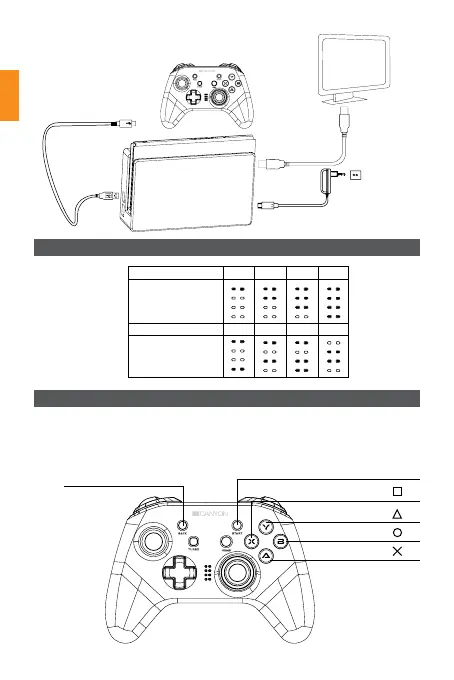
Note: The Nintendo Switch console only supports 2 wired
controllers. USB 3.0 does not support a wired controller
The original
adapter
Power Plug
switch charging dock
Switch the tablet
Сhannel indicators
PS3 wireless mode connection Settings:
Corresponds SELECT key
Corresponds START key
Corresponds
key
Corresponds
key
Corresponds
key
Corresponds
key
1. Insert the receiver into the PS3 USB port.
2. Press the «HOME» button, for each operation mode LED1, LED2, LED3, and LED4
will flash in pairs, when the connection is successful they will stay on.
3. Press HOME to confirm
Player number 1 2 3 4
Glowing LEDs
Player number 5 6 7 8
Glowing LEDs


 To Next Page