Guidance:
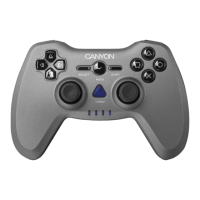
The gamepad supports both Xinput and DirectInput modes. You can switch between these
two modes by pressing the Middle crystal button for about 5-8 seconds. Originally, the
gamepad is set in the DirectInput mode.
In the Xinput mode, the gamepad uses the standard Windows Xinput gamepad driver. It is
not necessary to install the software.
Xinput is the most current input standard for games on the Windows operating system.
Most newer games and old Xbox 360 PC games support gamepad using Xinput. If your
game supports Xinput gamepads and your gamepad is in the Xinput mode, vibration
feedback and all gamepad controls should operate normally, If your game supports Xinput
gamepads and your gamepad is in the DirectInput mode, the gamepad cannot work unless
it is switched to the Xinput mode. In the Xinput mode, the gamepad uses the standard
Windows Xinput gamepad drivers; so it is not necessary to install the driver unless you will
be using the gamepad in the Dinput mode. DirectInput is an older input standard for games
on the Windows operating system. Most older games on PC that support gamepads use
DirectInput. If your game supports DirectInput gamepads and your gamepad is in the Xinput
mode, most features on the gamepad will function except for the left and right .
1. To charge gamepad, connect it to an AC adapter or a USB port on the working console
using the USB cable.
2. Gamepad has the charge&play function, which means it can be charged while gaming.
Troubleshooting
Warranty
System
USB jack
32 bit/64 bit CPU
64 Mb or larger memory
Windows
Direct X9.0 or newer version
Dimensions 157*99*60 mm
Net weight 0,316 kg
Operating temperature -5°C - 40°C
Operating humidity 20% - 90%
Working voltage 5V for USB; 3V-5V for PS2
Working current 10 mA-130 mA for USB; 35 mA-160 mA for PS2
The gamepad doesn’t work
» Check the USB connection.
» The gamepad works best when plugged into a full-powered USB port. If you use a
USB hub it must have its own power supply.
» Try plugging the gamepad into a different USB port.
» Restart the computer/console.
» This product comes with 24-months limited warranty.
» For more information about usage and warranty, please refer to
www.canyon.eu/support
Technical specications
en


 To Next Page