m@COIN-OP,
INC.
.WiR VEL VS. CdPC0.u
2
:I
.,.,.
PC BOARD WIRING CONNECTIONS
WARNING
Improper installation of the connector
harness (JAMMA I USBNIDEO) to the
PC board connector may cause
damage to the PC board..
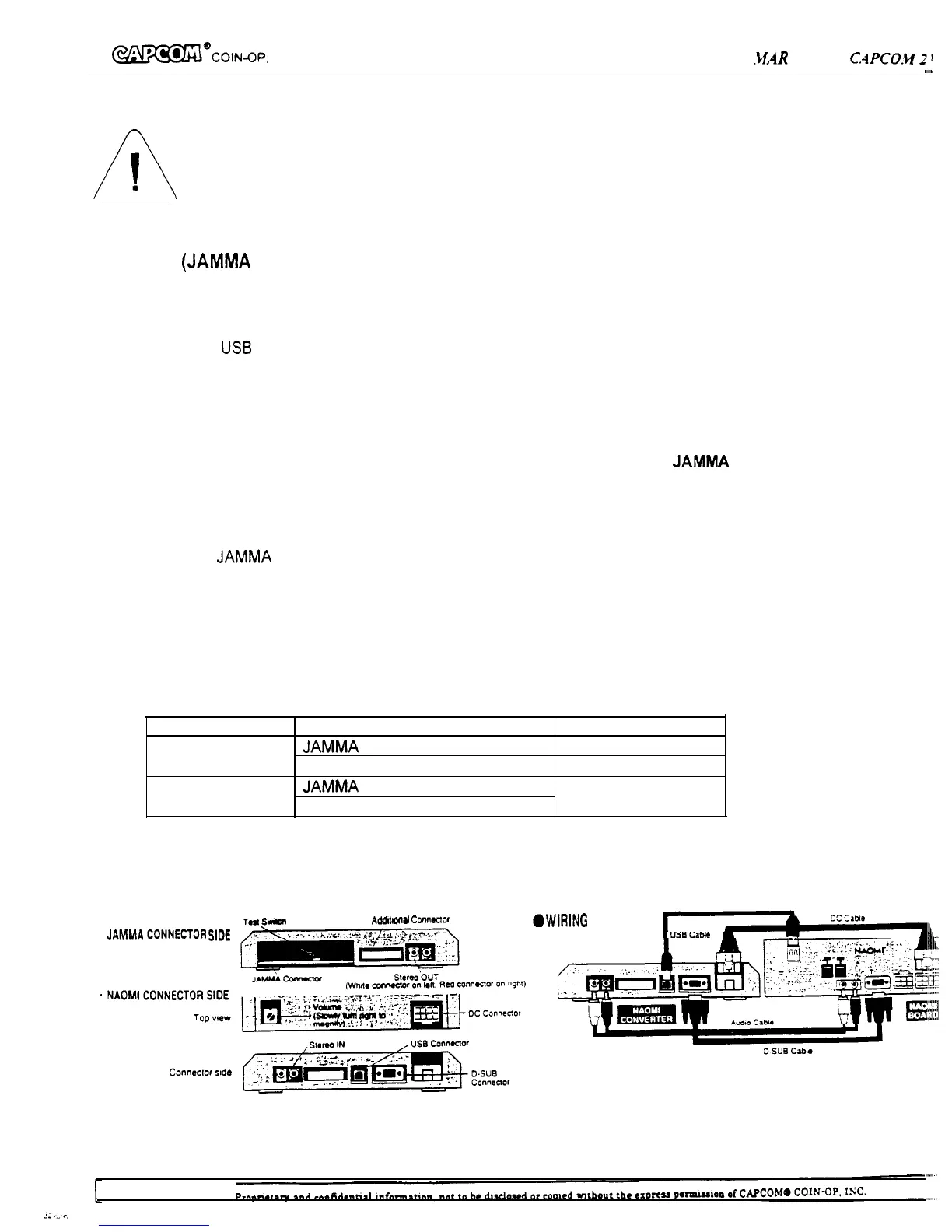
30. Attach Power, US6 cable, Audio cable and Video cable to NAOMI Board.
31. Connect other end to NAOMI-COVERTER Board.
32. If you are installing the game equipped with High-Resolution monitor, connect the Video cable to the monitor.
A standard low-resolution video signal is supplied through the
JAMMA
connector on the
NAOMI-CONVETER, if your cabinet is not equipped with a high-resolution monitor.
The NAOMI-CONVERTER Board will not convert video signal frequency and signal level.
33. Connect the
JAMMA
harness connector to the edge connector on the NAOMI-CONVERTER Board.
34. If you elect to use Q-Sound Audio Amplifier or similar stereo amplifier board, connect audio cable to audio
output on the NAOMI-CONVERTER Board.
Audio volume control is located on the NAOMI-CONVERTER Board.
Sound setting and output terminal (please refer to GAME CONFIGURATION to set the SOUND MODE)
SOUND MODE
OUTPUT TERMINAL SOUND
STEREO
JAMMA HARNESS ONLY
MONAURAL
STEREO OUT
STEREO
MONAURAL
JAMMA HARNESS ONLY
MONAURAL
STEREO OUT
l CONNECTOR LOCATIONS
TWs-
Add~t”,“~l
Connector
-wWlNG
DIAGRAM
.
JAMMA
CONNECTm
sKE


 To Next Page