-COIN-OP,
INC.
. 3lK MONlTbR CABINET
The NAOMI board is capable of producing a screen resolution that is three times as high as the
CP-SYSTEM
II
board.
To achieve the maximum performance, it is essential to install the board in a cabinet equipped with a 31K
monitor that is capable of high resolution graphics. (Ex. “BLAST CITY” “MEGALO 410” etc. from Sega)
To enjoy NAOMI’s graphics at their best, please use the cabinet with 31 K monitor.
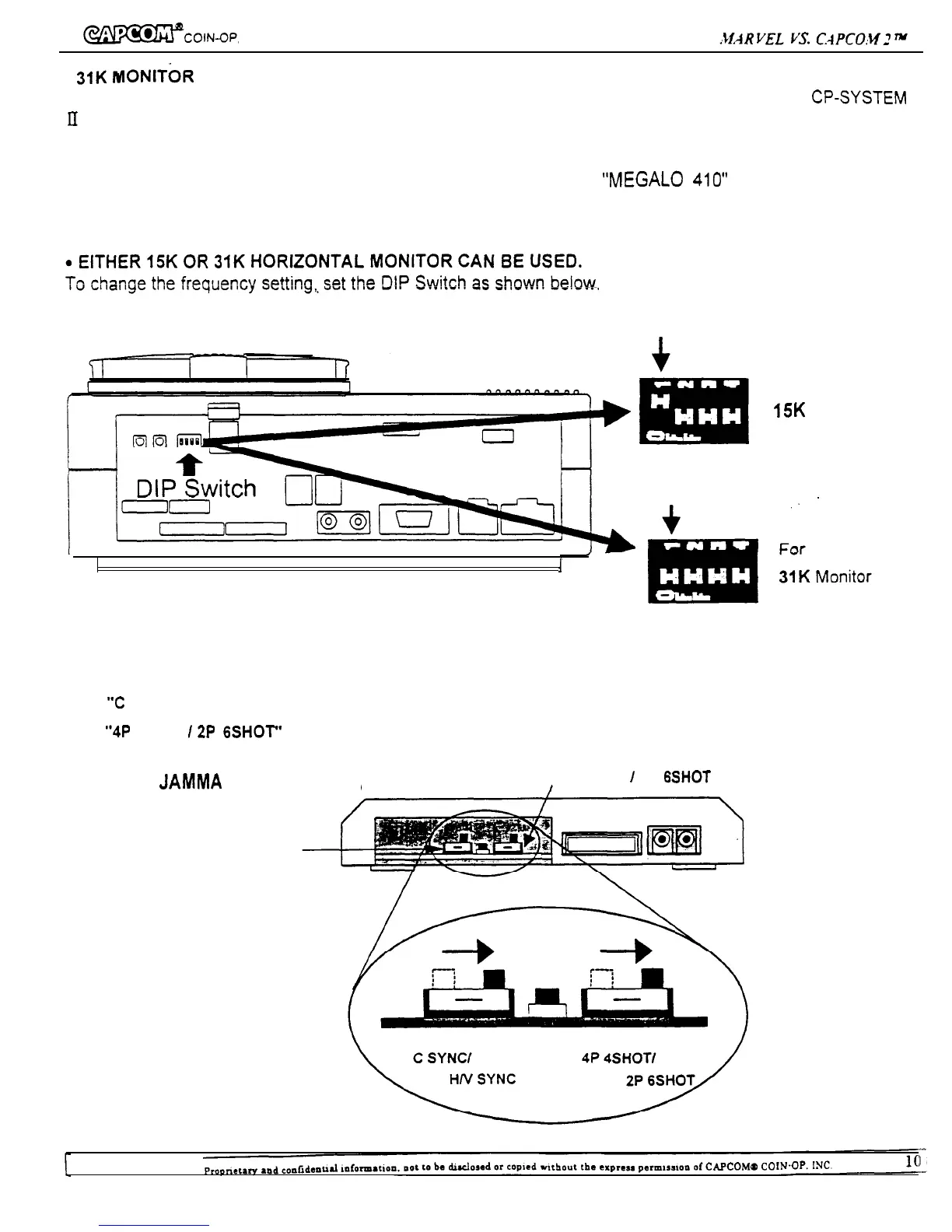
Turn this switch “ON”
I
For
15K Monitor
Turn this switch “OFF”.
Naomi converter slide switch setting for “MARVEL VS.CAPCOM 2”
Please confirm that the switches are set in proper position as shown below.
1.
“C
SYNC/H/V SYNC” switch is on right position.
2.
“4P
4SHOT
/2P
6SHOT” switch is on right position.
[View from JAMMA
connector side]
4P 4SHOT
I
2P 6SHOf select switch
C
SYNC/H/V SYNC select
switch


 To Next Page