,’
~*COIN-OP,
INC.
.UAR
VEL VS.
~4PcO.U
2
=
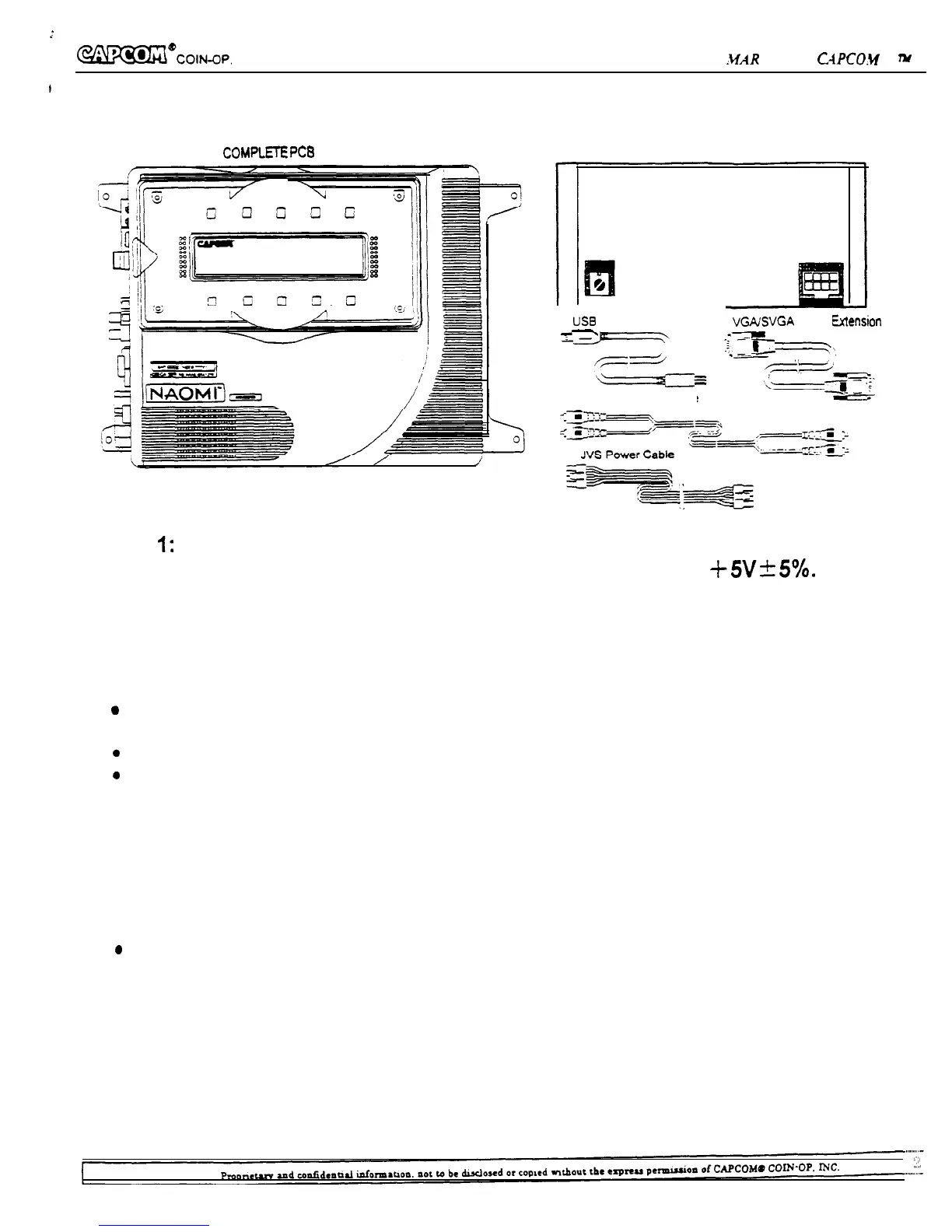
PCB & Cables
POWER STONE
COMPLETE
PC8 NAOMI CONVERTER
US8
A-B Cable
-
G’
VGAJSVGA Video Extension Cable
--v
‘--#7-y
---,
‘-l/
/=--
Audio Extension Cable
Note
1:
Please make sure your power supply supports 7A or more.
Note 2: Please make sure your power supply voltage is at +5V-C5%.
CAUTION
For your safety, please read and abide by the following instructions when handling the
P.C. board.
*
Make sure the power is off before installing the board or changing the settings of the board.
l
Do not damage the wiring cables.
0
Do not disassemble the case.
0
Do not touch the board, connectors or the harness with wet hands.
Please keep the following instructions to keep the P.C. board in good condition.
l
Do not block the ventilation slots.
l
Do not keep the board in extremely cold/hot places.
l
Do not drop or bump the board.
l
Do not spill any liquids on the case.
l
Do not disassemble the case.
a
Always keep the connectors clean.
l
Do not disconnect the connectors, cables, or the harness while the power is on.
WARNING
Plug the game into a property grounded outlet to prevent shock hazards and assure proper game
operation. Do not use a cheater plug to defeat the power cord’s grounding pin. Do not cut off the
ground pin.


 To Next Page