19
Please keep this instruction manual for future reference Instruction manual CM465
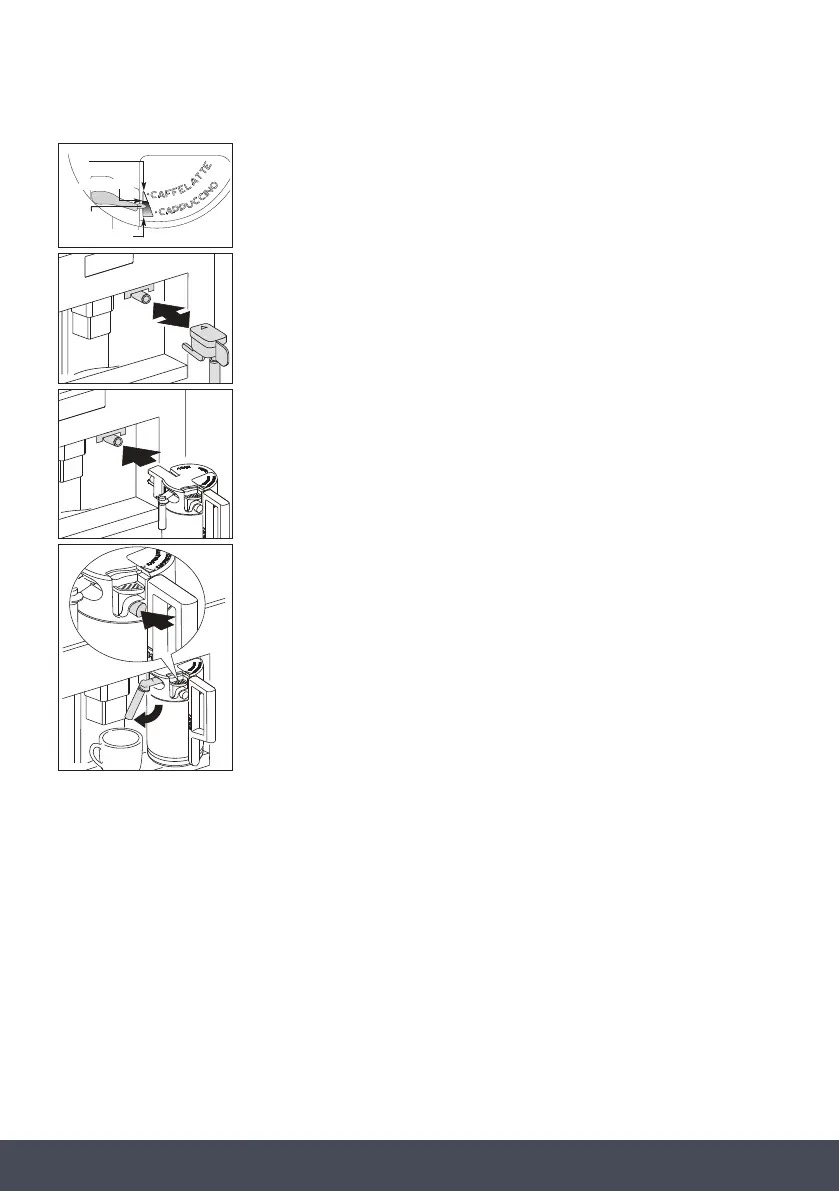
5. Position the frothed milk regulator (N2) between the words
CAPPUCCINO and CAFFELATTE printed on the milk container lid.
6. The quantity of froth can be adjusted by moving the regulator
towards the word CAFFELATTE for a denser froth. Moving it towards
the word CAPPUCCINO obtains a less dense froth.
7. Remove the hot water spout and attach the milk container to the
nozzle.
8. Position the milk spout and then place a sufciently large cup under
the coffee and milk spouts.
9. Press the ‘Cappuccino deliver’ touch key (12). “CAPPUCCINO” is
displayed and after a few seconds, frothed milk ows out of the milk
spout into the cup below (delivery stops automatically).
10. The appliance delivers coffee.
11. The cappuccino is now ready. Sweeten to taste and, if desired,
sprinkle the froth with a little cocoa powder.
NOTES:
1. While making cappuccino, the ow of frothed milk or coffee can be
interrupted by pressing the ‘Cappuccino deliver’ touch key (12).
2. If the milk in the container nishes while delivering frothed milk,
remove the container and add milk. Then re-attach it and press the
‘Cappuccino deliver’ touch key (12) to request cappuccino again.
3. To ensure the complete cleanliness and hygiene of the milk frother,
always clean the circuits in the milk container lid after making
cappuccino. “PRESS CLEAN!” ashes on the display.
› Place a recipient under the milk spout.
› Press the CLEAN button on the lid (N3) and hold down for at
least 5 seconds to start the cleaning function.
The appliance displays the message “CLEANING” above a
progressive bar. You should not release the CLEAN button until
the bar is complete indicating that cleaning is concluded.
"Less dense" froth
NO froth
"Denser" froth
frothed milk
regulator
N3


 To Next Page
 Loading...


