Instruction manual DD610BK
23
Please keep this instruction manual for future reference
OPERATING THE KEYS:
A cooking setting can only be switched on via the touch control after a pan has been detected on
the hob and the power display shows 0.
The following controls (described below) require the press of a key to be followed by the press of
a subsequent key. The next key will need to be pressed within 10 seconds, otherwise the selection
will be deleted.
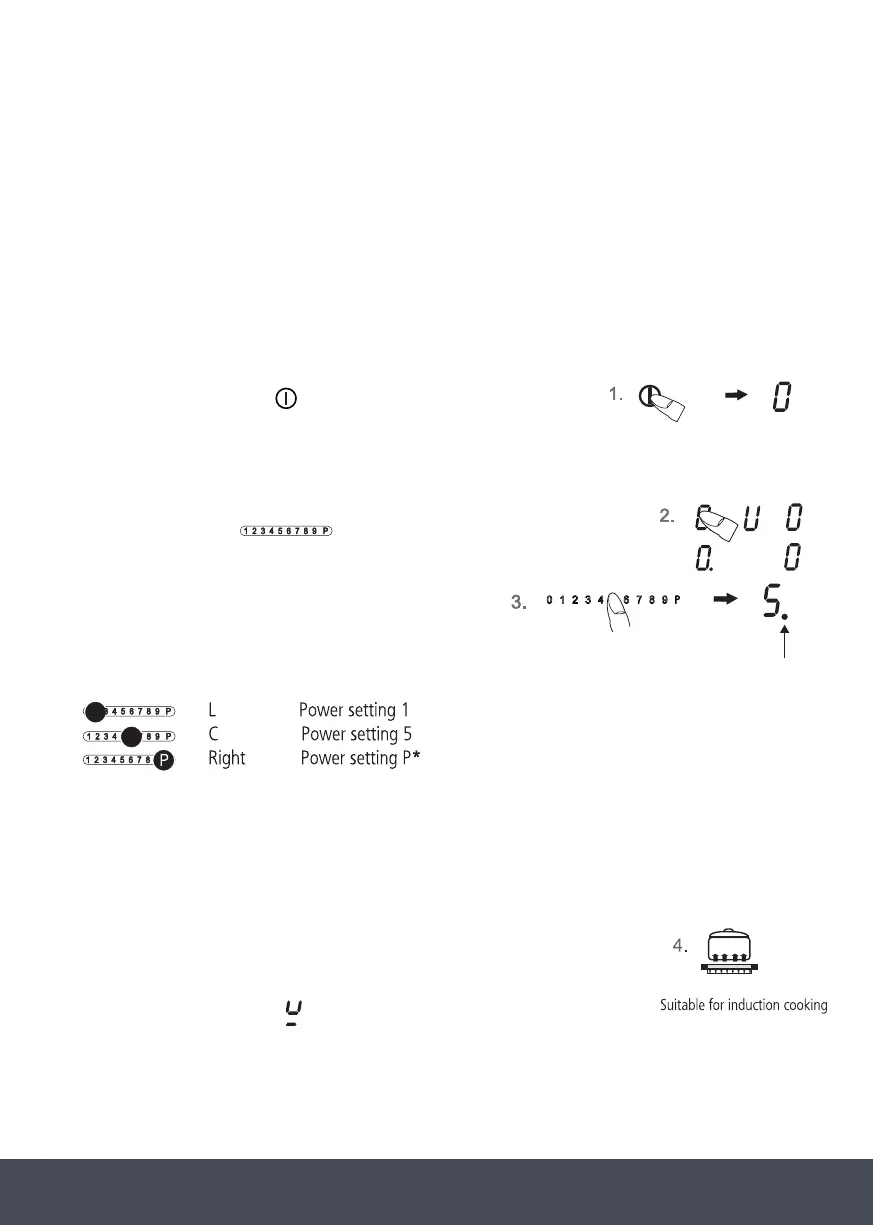
SWITCHING ON THE HOB AND COOKING ZONES :
1. Press the ON/OFF key
(approx. 1 sec) until the power setting
shows 0. A short signal will sound meaning the controls are ready for operation. The pan
recognition recognises which cooking zone has a pan set up and shows 0 in the corresponding
power display.
2. The touch control
must be activated immediately afterwards.
A power setting will turn on.
3. Use the power setting display (as a key)
to select a cooking zone. The standby dot of the selected
cooking zone will light up.
Move your nger over the touch control to select a power setting or to switch on an additional
cooking zone.
IMPORTANT:
The standby dot of the selected cooking zone must light up.
4. Immediately place suitable cookware on the cooking zone. The pan
recognition device will activate the induction coil and the pot will heat up.
If no pot is placed on the cooking zone, the display will alternate between
the power level set and the
symbol. If no pot is placed on the cook zone it
will switch off after 10 minutes.
*The power boost function is activated immediately. See ‘Power Boost’ section for further
information.
Standby dot
eft
entre


 To Next Page
 Loading...