Instruction manual DD610BK
32
Please keep this instruction manual for future reference
KEEP WARM FUNCTION:
PERMANENT PAN RECOGNIT ION
A cooking setting can only be switched on via the slider (touch control) after a
pan has been detected on the hob and the power display shows 0.
6
POWER BOOST IN THE TOUCH CONTROL (7)
8
8
The most recent setting can be recovered if the hob is switched off unintentionally.
CH ILD SAFETY 9
KEEP WARM KEY: 0
To keep warm.
GRILL KEY: (11)
Grill function with a griddle plate for induction.
/ 12
These keys are used to set the timer and the automatic switch-off function of the
cooking zones as well as the automatic delay stop of the fan
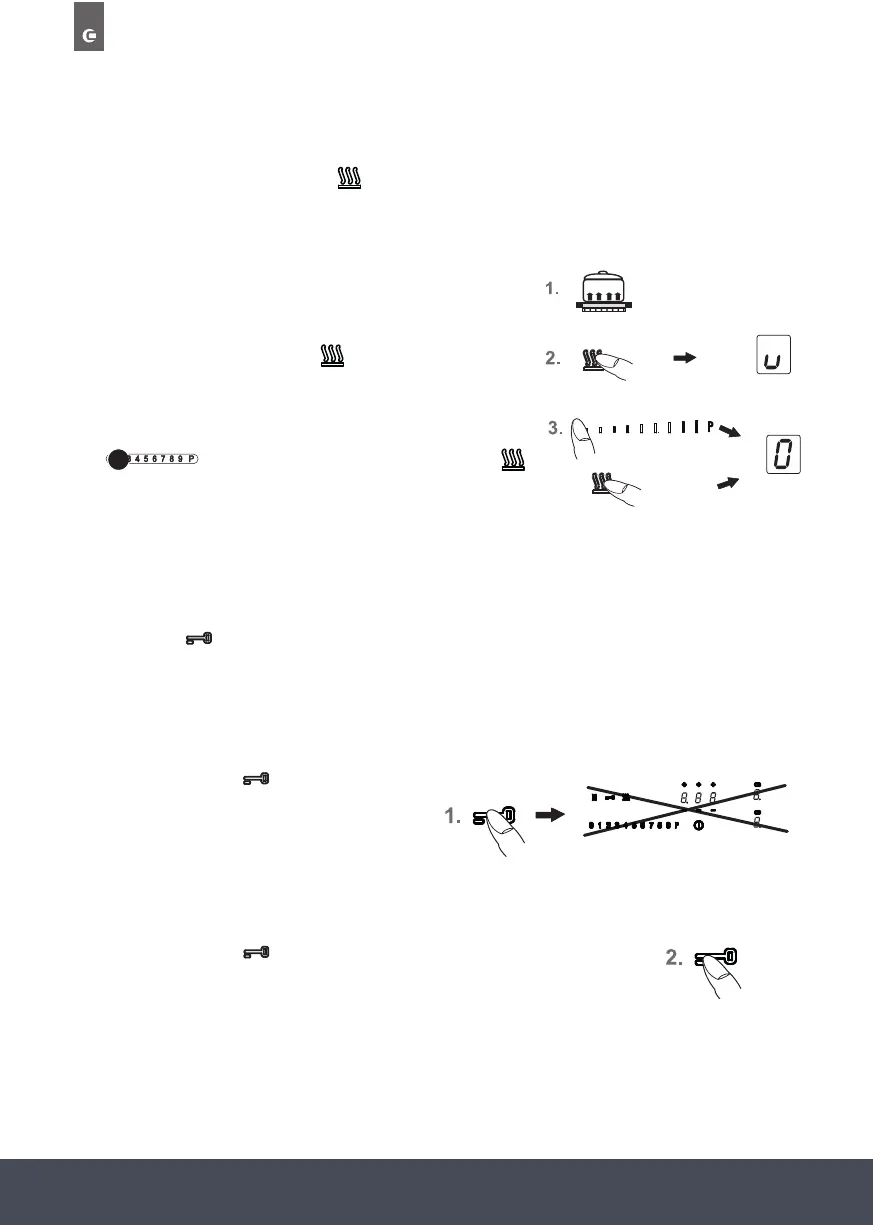
With this function you can use one of the cooking zones to keep food warm (70°C), help with
baking or control the boiling. The respective cooking zone is operated at a low power level.
1. Cookware is placed on a cooking zone and a power level
(e.g. 3) is selected.
2. By pressing the Warming key
PERMANENT PAN RECOGNIT ION
A cooking setting can only be switched on via the slider (touch control) after a
pan has been detected on the hob and the power display shows 0.
6
POWER BOOST IN THE TOUCH CONTROL (7)
8
8
The most recent setting can be recovered if the hob is switched off unintentionally.
CH ILD SAFETY 9
KEEP WARM KEY: 0
To keep warm.
GRILL KEY: (11)
Grill function with a griddle plate for induction.
/ 12
These keys are used to set the timer and the automatic switch-off function of the
cooking zones as well as the automatic delay stop of the fan
select the Keep
Warm function.
3. To switch off the function, press the touch control
Kochstufe
Verminderung
Min
Max
10Min
Module(Powermanagement)
Min
Max
KEEP WARM FUNCTION:
n
1.
2. By pressing the Warming key select the
Keep Warm function.
3. To switch off the function, press the touch
control on the far left or
press the Warming key .
:
.
lock key will light up brightly
lock key will light up with a
dimmed light.
on the far left or press the Warming key
PERMANENT PAN RECOGNIT ION
A cooking setting can only be switched on via the slider (touch control) after a
pan has been detected on the hob and the power display shows 0.
6
POWER BOOST IN THE TOUCH CONTROL (7)
8
8
The most recent setting can be recovered if the hob is switched off unintentionally.
CH ILD SAFETY 9
KEEP WARM KEY: 0
To keep warm.
GRILL KEY: (11)
Grill function with a griddle plate for induction.
/ 12
These keys are used to set the timer and the automatic switch-off function of the
cooking zones as well as the automatic delay stop of the fan
.
The keep-warm function is available for 120 minutes, after
which the cooking zone will be switched off.
LOCKING:
Kochstufe
Verminderung
Min
Max
10Min
Module(Powermanagement)
Min
Max
KEEP WARM FUNCTION:
n
1.
2. By pressing the Warming key select the
Keep Warm function.
3. To switch off the function, press the touch
control on the far left or
press the Warming key .
:
.
lock key will light up brightly
lock key will light up with a
dimmed light.
The lock can be used to lock key operation and cooking level settings. Only the ON/OFF key can
be used to switch the hob off.
ACTIVATING THE LOCK:
1. Press the Lock key
Kochstufe
Verminderung
Min
Max
10Min
Module(Powermanagement)
Min
Max
KEEP WARM FUNCTION:
n
1.
2. By pressing the Warming key select the
Keep Warm function.
3. To switch off the function, press the touch
control on the far left or
press the Warming key .
:
.
lock key will light up brightly
lock key will light up with a
dimmed light.
.
The lock key will light up brightly.
The controls are locked.
SWITCHING OFF THE LOCK:
2. Press the Lock key to deactivate the function. The lock key will
light up with a dimmed light.
NOTE:
› An activated lock will remain activated even if the hob is switched off. It must therefore be
de-activated when cooking is re-commenced.
› In the event of a power cut the lock will be cancelled, i.e. deactivated.
Kochstufe
Verminderung
Min
Max
10Min
Module(Powermanagement)
Min
Max
KEEP WARM FUNCTION:
n
1.
2. By pressing the Warming key select the
Keep Warm function.
3. To switch off the function, press the touch
control on the far left or
press the Warming key .
:
.
lock key will light up brightly
lock key will light up with a
dimmed light.
Kochstufe
Verminderung
Min
Max
10Min
Module(Powermanagement)
Min
Max
KEEP WARM FUNCTION:
n
1.
2. By pressing the Warming key select the
Keep Warm function.
3. To switch off the function, press the touch
control on the far left or
press the Warming key .
:
.
lock key will light up brightly
lock key will light up with a
dimmed light.
Kochstufe
Verminderung
Min
Max
10Min
Module(Powermanagement)
Min
Max
KEEP WARM FUNCTION:
n
1.
2. By pressing the Warming key select the
Keep Warm function.
3. To switch off the function, press the touch
control on the far left or
press the Warming key .
:
.
lock key will light up brightly
lock key will light up with a
dimmed light.
Kochstufe
Verminderung
Min
Max
10Min
Module(Powermanagement)
Min
Max
KEEP WARM FUNCTION:
n
1.
2. By pressing the Warming key select the
Keep Warm function.
3. To switch off the function, press the touch
control on the far left or
press the Warming key .
:
.
lock key will light up brightly
to deactivate the
lock key will light up with a
dimmed light.


 To Next Page
 Loading...