Instruction manual DD610BK
33
Please keep this instruction manual for future reference
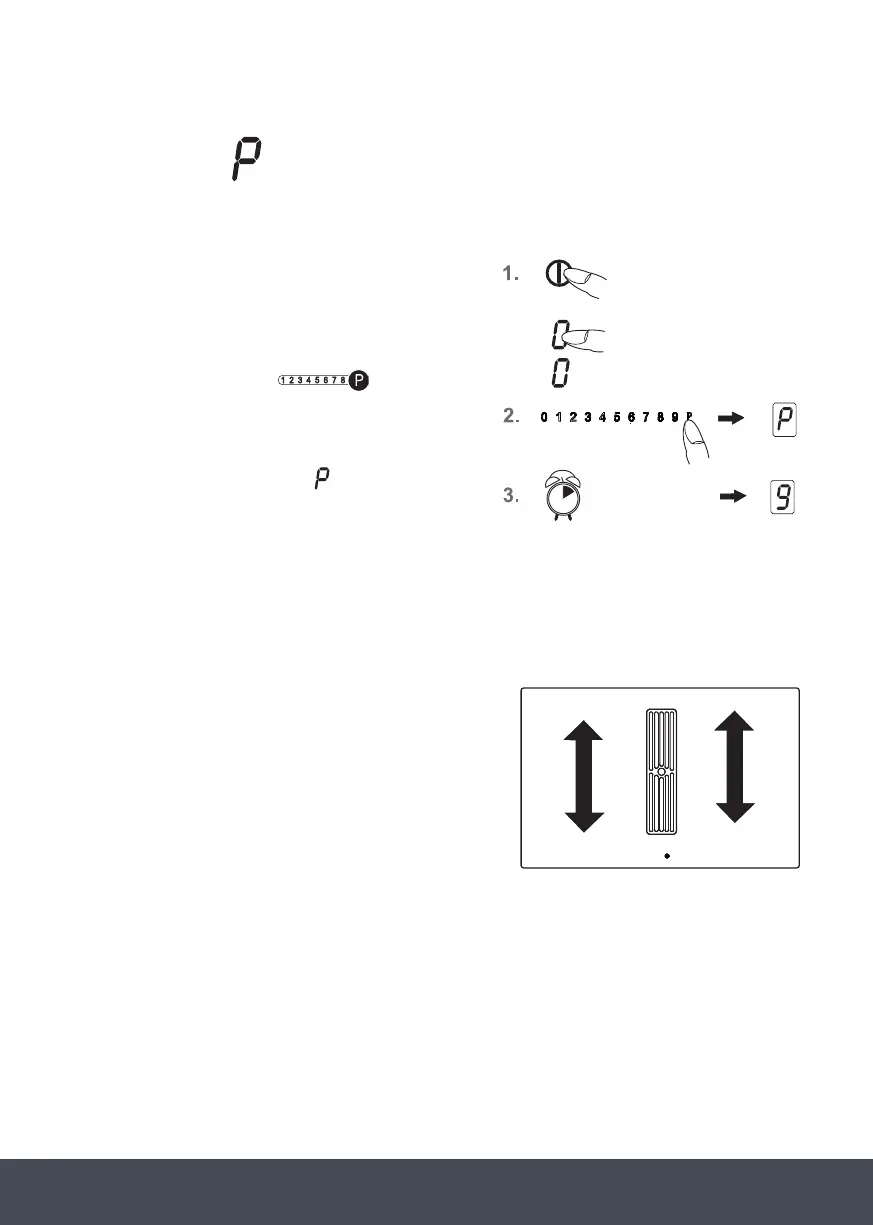
POWER BOOST
The power boost setting makes additional power available for induction cooking zones. A large
quantity of water can be brought to the boil very quickly.
1. Switch on the hob. Use the power setting display
(as a key) to select a cooking zone. The stand-by
dot of the cooking zone selected will light up.
2. Press the touch control
:
1. Use the power setting display
(as a key) to select a cooking zone. The stand-by
dot of the cooking zone selected will light up.
2.the ou on the far
right. The power boost setting will be activated.
3.After 10 minutes the power boost setting will
switch off automatically. The will go off and
the power level will switch down to 9.
to
on the far
right. The power boost setting will be activated.
3. After 10 minutes the power boost setting will
switch off automatically. The
will go off and the
power level will switch down to 9.
NOTE:
Press the respective touch control to prematurely
switch off the power boost setting.
POWER MANAGEMENT:
For technical reasons two cooking zones always comprise
a module and have a maximum
power level.
If this power range is exceeded when a higher power
setting level or the power boost function is switched on
the power management system will reduce the power
setting of the corresponding cooking zone of the module.
The display for this cooking zone will initially blink, after
which the highest possible power setting will be
consistently displayed.
:
1. Use the power setting display
(as a key) to select a cooking zone. The stand-by
dot of the cooking zone selected will light up.
2.the ou on the far
right. The power boost setting will be activated.
3.After 10 minutes the power boost setting will
switch off automatically. The will go off and
the power level will switch down to 9.
to
ange is exceeded when a higher power
setting level or the power boost function is switched
power setting of the corresponding cooking zone of
:
1. Use the power setting display
(as a key) to select a cooking zone. The stand-by
dot of the cooking zone selected will light up.
2.the ou on the far
right. The power boost setting will be activated.
3.After 10 minutes the power boost setting will
switch off automatically. The will go off and
the power level will switch down to 9.
to
10 min.
Modules (power management)


 To Next Page
 Loading...