Instruction manual DD610BK
34
Please keep this instruction manual for future reference
OPERATING THE DOWNDRAFT:
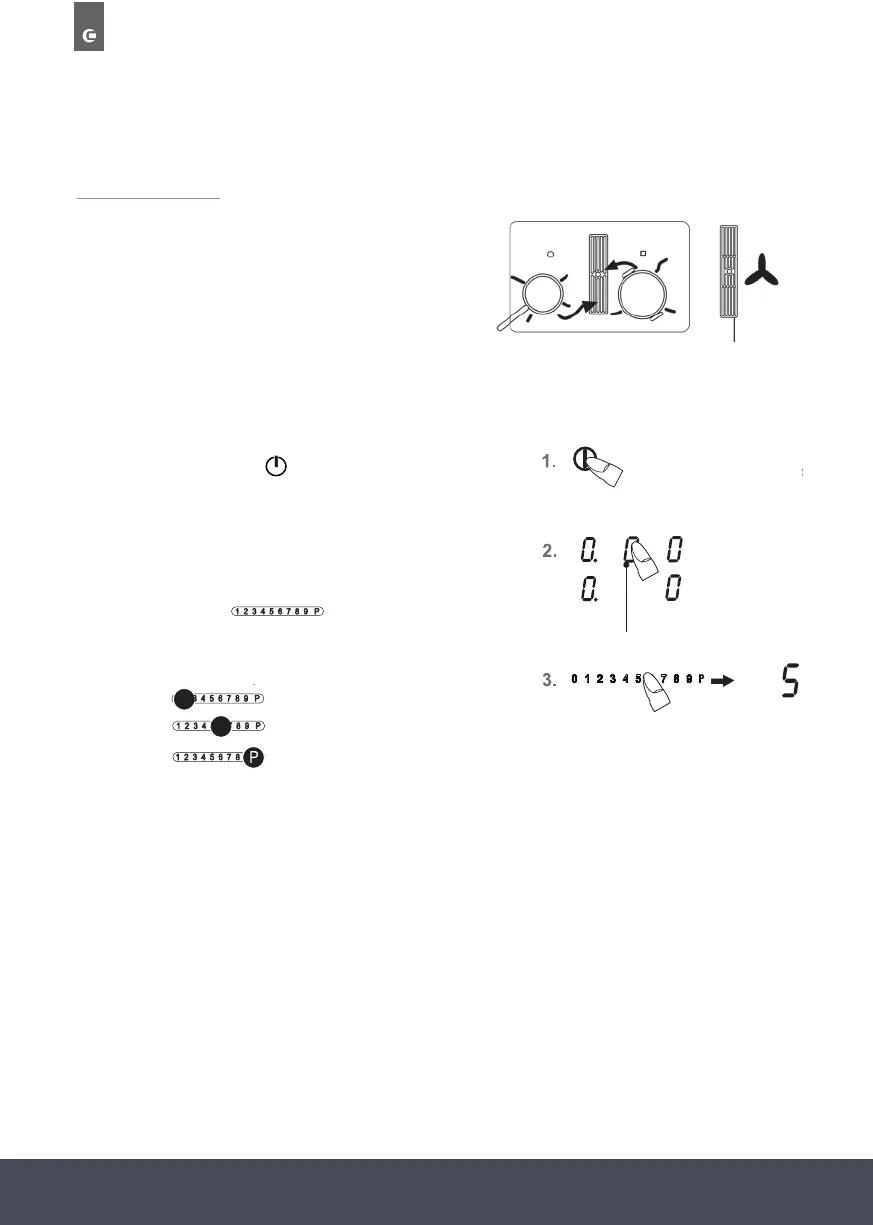
The fan is located in the middle of the hob with the
extractor facing downwards.
The black grill cover does not have to be removed.
IMPORTANT:
Do not put the cover onto the induction hob. Risk of burning.
SWITCHING THE FAN ON AND OFF:
1. Press the ON/OFF key
(approx. 1 sec.) until the fan
power setting ‘0’ appears and a short signal will sound.
The controls are ready for operation.
2. Use the power setting display (as a key) to select a
cooking zone. The standby dot will light up.
3. The touch control
The fan is located in the middle of the hob with
the extractor facing downwards.
MMiinn
M
Miinn
MMiinn
M
Miinn
MMiinn
M
Miinn
MMiinn
M
Miinn
Glass cover
Stainless
Steel cover
1.Press the ON/OFF key (approx. 1 sec.) until
the fan power setting '0' appears and a short
signal will sound. The controls are ready for
operation.
2.Use the power setting display (as a key) to select
a cooking zone. The standby dot will light up.
3.The touch control must be
activated immediately afterwards. A power
setting will be switched on.
Left Power Setting 0
Centre Power Setting 5
Right Power Setting P
Fan Indication
To change the fan level, select the fan display and then press the touch control.
IMPORTANT:
The standby dot of the cooking zone selected must light up.
must be activated
immediately afterwards. A power setting will be
switched on.
To change the fan level, select the fan display and then press the touch control.
IMPORTANT:
The standby dot of the cooking zone selected must light up.
immediately select a specific power setting:
Left
Centre
5
Right
8
Kochstufe
Verminderung
Min
Max
1x,2x,3x
Min
Max
08
02:24
03:50
05:12
06:48
02:00
02:48
03:36
6
1x,2x,3x
Min
Max
Kochstufe
Verminderung
Min
Max
1x,2x,3x
Min
Max
Kochstufe
Verminderung
Min
Max
1x,2x,3x
Min
Max
Kochstufe
Verminderung
Min
Max
1x,2x,3x
Min
Max
Kochstufe
Verminderung
Min
Max
1x,2x,3x
Min
Max
Press and keep pressed (for
approx. 3 seconds)
Power Setting 0
Power Setting 5
Power Setting P
Left
Centre
Right
The fan is located in the middle of the hob with
the extractor facing downwards.
Abdecku
Glass cover
Stainless
Steel cover
1.Press the ON/OFF key (approx. 1 sec.) until
the fan power setting '0' appears and a short
signal will sound. The controls are ready for
operation.
2.Use the power setting display (as a key) to select
a cooking zone. The standby dot will light up.
3.The touch control must be
activated immediately afterwards. A power
setting will be switched on.
Left Power Setting 0
Centre Power Setting 5
Right Power Setting P
Fan Indication
To change the fan level, select the fan display and then press the touch control.
IMPORTANT:
The standby dot of the cooking zone selected must light up.
Black


 To Next Page
 Loading...