SIMPLE™ KEY USER GUIDE SIMPLE™ KEY USER GUIDE
2 3
IMPORTANT NOTES
► You MUST have at least one existing key that already works
with your vehicle in order to use the EZ Installer™. If you have
no working keys, return the Simple™ Key to the retailer where it
was purchased.
► The emergency key blade should be cut at your convenience.
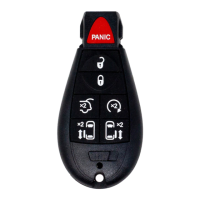
This key blade is inside the new Simple™ Key and can be used
to unlock the doors should the battery in the Fobik fail. It can be
cut at any local hardware store.
► Vehicle battery should be in good condition and fully charged
prior to pairing the new key. Turn off headlights, radio, A/C fan,
etc. to minimize battery draw during the process.
► Do not use the EZ Installer™ while the vehicle is in motion.
Unplug it from the OBD port before driving the vehicle.
► Only original remote features will work, regardless of buttons
included on the Simple™ Key. This key does not add remote
features that your vehicle did not have before.
► For your security, a tamper-evident security label is installed
over the EZ Installer™ connector. If this label is missing,
damaged, or the word “VOID” appears on the EZ Installer™,
please exchange this Simple™ Key for a new one at the retailer
where it was purchased.
► Before pairing, familiarize yourself with the Simple™ Key’s
compatibility with the make, model, and year of your vehicle on
page 3.
LET’S GET STARTED
Simple™ Key requires two steps: “ACTIVATION” and “PAIRING.” It is
important to follow these steps in order to successfully complete setup.
If you skip a step, the key WILL NOT work properly, and you’ll have to
repeat the setup process.
Find your ACTIVATION CODE in the following chart by referencing your
vehicle’s make, model, year and the button configuration of your
key’s remote.
DODGE
Challenger 2008-2014 312 3
Charger 2008-2010 312 3
Dart 2013-2016 313 7
Durango 2011-2013 312 3
Grand Caravan 2008-2019 312 3
Journey 2009-2010 312 3
Magnum 2008 312 3
Ram 2009-2012 311 312 3
2013-2014 314 312 4 3
2015-2017 314 4
COMPATIBILITY LOOKUP
MAKE/MODEL
CHRYSLER
JEEP
VOLKSWAGEN
YEAR
PRIMARY
ACTIVATION
CODE
ALTERNATE
ACTIVATION
CODE
PRIMARY
DIAL
POSITION
ALTERNATE
DIAL
POSITION
300 2008-2010 312 3
Town & Country 2008-2016 312 3
Commander 2008-2010 312 311 3
Grand Cherokee 2008-2013 312 3
Routan 2009-2014 311 312 3
Visit CKESimpleKey.com for the most up-to-date vehicle compatibility lookup.


 To Next Page
 Loading...