143
Smart TV CB 19 iTV, CB 22 iTV | 49893 / 49894IT
21. IMPOSTAZIONI DELLA SMART TV
1. Dopo essere entrati in »Interfaccia Smart TV« premere i tasti [ ▲ ▼ ] e
navigare fino a »Impostazioni«.
2. Premere il tasto [OK] per confermare l’immissione.
3. Navigare nel menu con i tasti [ ▲ ▼ t u ].
4. Con il tasto [OK] confermare l’immissione.
5. Con il tasto [ E X IT ] si torna all’ultima voce del menu.
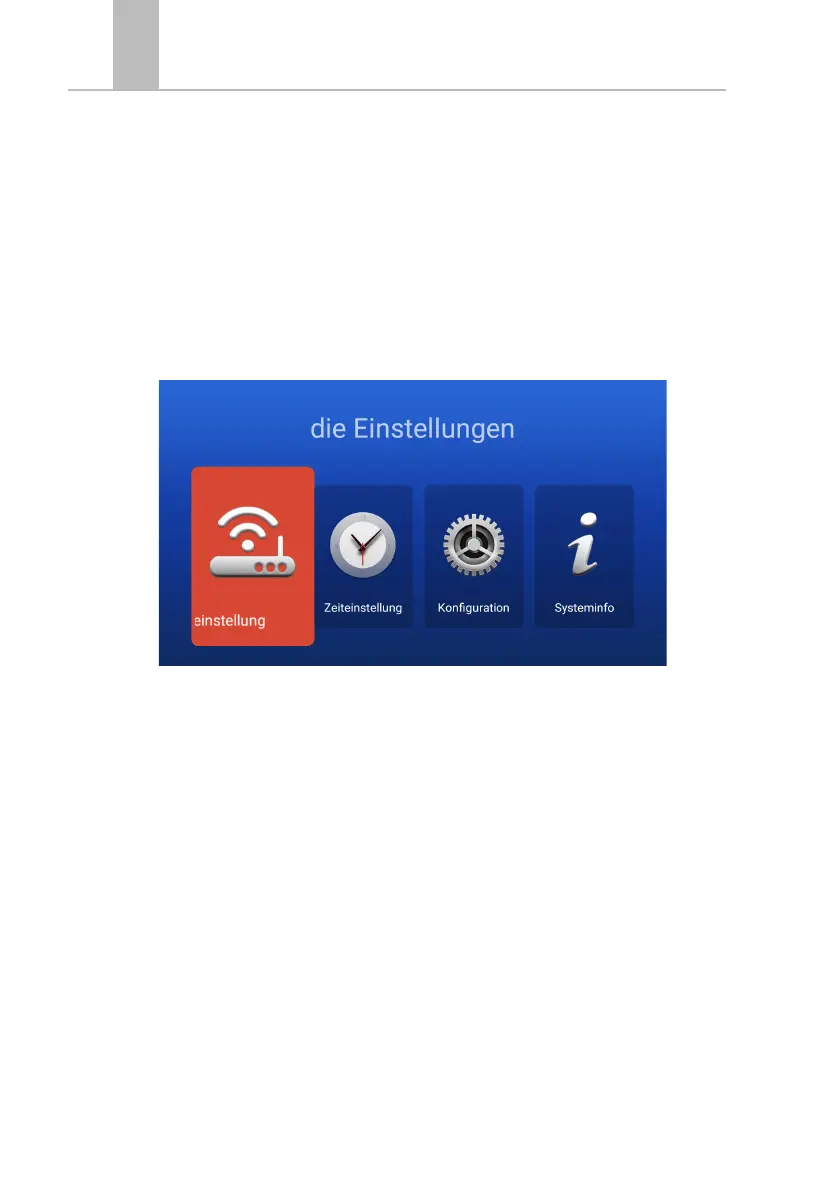
Nel menu sono disponibili le seguenti voci: Impostazione di
rete | Impostazione data e ora | Configurazione | Info di sistema
49893_49894_CARBEST_SmartTV_A5_4/1_fbg_PRINT_15-10-19.indd 143 15.10.19 18:23


 To Next Page
 Loading...