ITALIANO
FRANÇAIS
ENGLISH
NEDERLANDS
DEUTSCH
ESPAÑOL
PROGRAM
TB
FI
FS
CP
TA
TD
TC
TAL
00.000.007
CC2X24 V1.00
press both arrows
simultaneously to enter
the language submenu
“PROG/OK” to confirm
Flashing on the display. You have to enter the programming mode to program the system.
During normal operation it indicates that the "automatic repositioning" procedure is about to
take place. In this case any commands received (TA, TC, TAL or TD) will automatically start
this procedure.
This happens when an N.C. contact is activated (FI, FS, CP) during encoder programming or
automatic repositioning. Once the passive state of the security devices has been reset the gate
will start moving again automatically. It also happens if a blackout occurs during programming.
Safety device test error. Check the condition of the safety devices and make sure that the
alarm cuts in when an obstacle interferes with the beam (indication white characters on a black
background). In case of anomalies replace the damaged safety device or bridge the contact
and deactivate the safety test (option menu).
This occurs when the programmer sends a command to the motor and nothing happens (motor
1/2 doesn't move). Check the Faston connections of motor 1/2 and the condition of the fuses
"F3", "F4" and then give another opening or closing command. If the motor still doesn't move
you are faced with either a mechanical problem or a problem with the programmer.
Encoder count error motor 1/2 . If this error occurs during normal motor operation it means
that there is a problem with one of the encoder signals. Check the relative connections and
carry out automatic repositioning.
Encoder direction error motor 1/2 : The gate movement direction is different from the encoder
setting (eg. the gate moves in the closing direction while the program is carrying out the
opening stage). Check motor 1/2 power supply connections.
Current sensor error motor 1/2 . When the gate is not moving this symbol means there is a
problem with the current sensor 1/2 .
Opening this contact will provoke a travel direction inversion during the closing stage and
during the opening stage.
If the sensor intervenes during the opening direction the gate inverts the travel direction immediately
and proceeds to the fully open position. If the sensor intervenes during the closing direction the gate
automatically inverts the travel direction of a few centimetres and then stops to free the obstacle.
Alarm indications
TB
FI
FS
CP
TA
TD
TC
TAL
PROGRAM
TB
FI
FS
CP
TA
TD
TC
TAL
OUT OF POS
TB
FI
FS
CP
TA
TD
TC
TAL
SAFETY ERROR
TB
FI
FS
CP
TA
TD
TC
TAL
STOP PROG
AUTO PROG
TB
FI
FS
CP
TA
TD
TC
TAL
ERROR MOT1/2
TB
FI
FS
CP
TA
TD
TC
TAL
ERROR ENC1/2
TB
FI
FS
CP
TA
TD
TC
TAL
ERROR DIR1/2
TB
FI
FS
CP
TA
TD
TC
TAL
ERROR SENS1/2
TB
FI
FS
CP
TA
TD
TC
TAL
ACT. SAFETY EDGE
TB
FI
FS
CP
TA
TD
TC
TAL
ACTIVE SENSOR
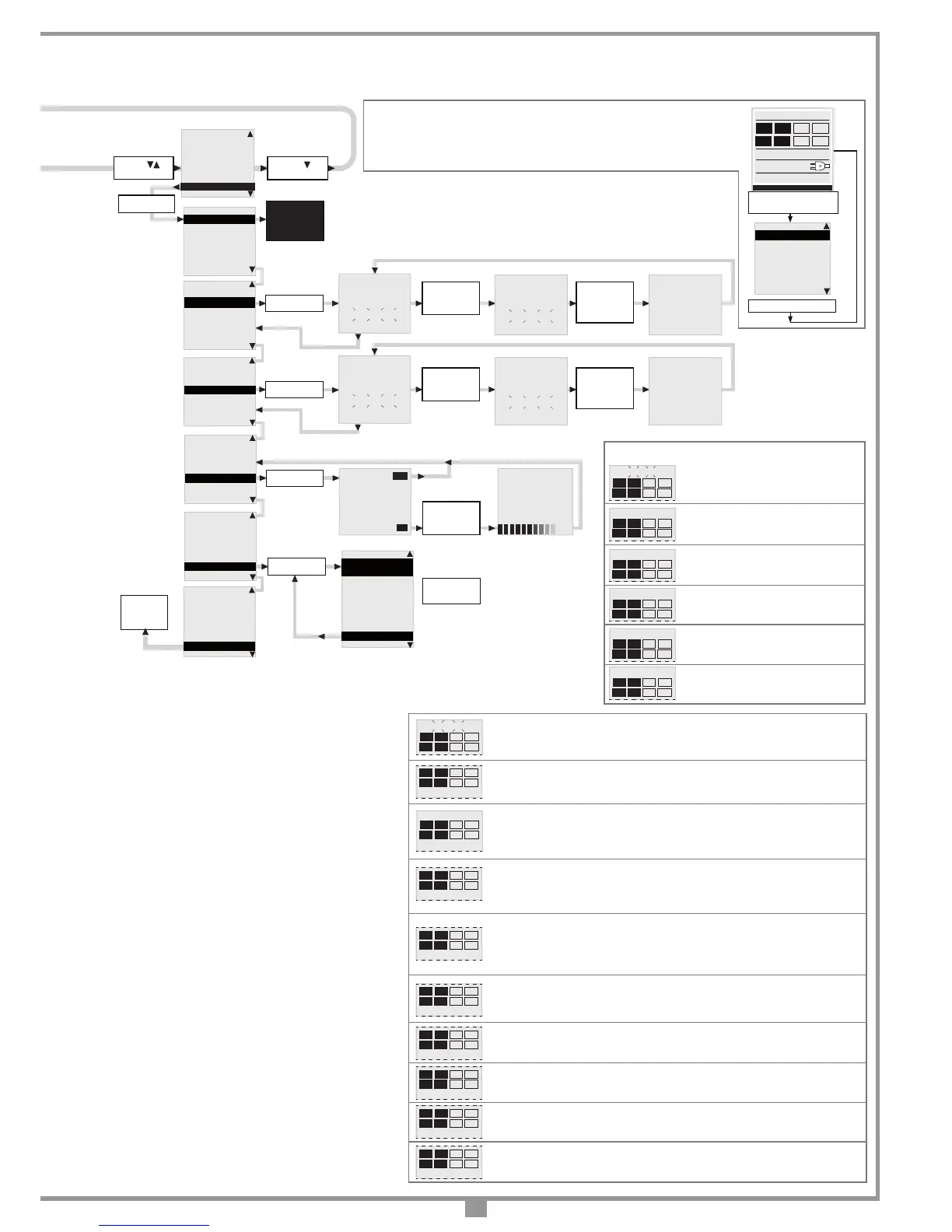
Language choice:
• Press the right and left buttons simultaneously to enter the language submenu.
• Press the right and left buttons to change the language: Italian to English.
• Press the "PROG/OK" button to conrm the choice.
Pause time programming or pause for
automatic reclosing (if activated)
Automatic programming under way
Opening stage
Block during opening
Closing stage
Block during closing
Operational indications
TB
FI
FS
CP
TA
TD
TC
TAL
PAUSE
TB
FI
FS
CP
TA
TD
TC
TAL
AUTO PROG
TB
FI
FS
CP
TA
TD
TC
TAL
OPENING
TB
FI
FS
CP
TA
TD
TC
TAL
STOP OPENING
TB
FI
FS
CP
TA
TD
TC
TAL
CLOSING
TB
FI
FS
CP
TA
TD
TC
TAL
STOP CLOSING
“PROG/OK”
to confirm
PRESS the
transmitter
channel
to memorise
PRESS the
the same
transmitter
channel
again
“PROG/OK”
to confirm
Arrow
to scroll
ENCODING: S4XX
MEMORISE
CANCEL
CLEAR ALL MEMORY
CHANNEL FUNCTION
EXIT
“PROG/OK”
to confirm
OPTIONS
SAFETY DEVICES
MOTION
DISPLAY
CALENDAR
REMOTE
MEMORISE
[Nr...]
* * * * * * * * * * * * * * *
* *
*
ACTIVATION 1
*
*
*
* * * * * * * * * * * * * * *
MEMORISE
[Nr...]
* * * * * * * * * * * * * * *
* *
*
ACTIVATION 2
*
*
*
* * * * * * * * * * * * * * *
MEMORISE
[Nr...]
* * * * * * * * * * * * * * *
*
*
*
CODE
*
*
MEMORISED
*
* * * * * * * * * * * * * * *
“PROG/OK”
to confirm
CANCEL
[Nr...]
* * * * * * * * * * * * * * *
* *
*
ACTIVATION 1
*
*
*
* * * * * * * * * * * * * * *
PRESS the
transmitter
channel
to memorise
CANCEL
[Nr...]
* * * * * * * * * * * * * * *
* *
*
ACTIVATION 2
*
*
*
* * * * * * * * * * * * * * *
PRESS the
the same
transmitter
channel
again
CANCEL
[Nr...]
* * * * * * * * * * * * * * *
*
*
*
CODE
*
*
CANCELLED
*
* * * * * * * * * * * * * * *
ENCODING: S4XX
MEMORISE
CANCEL
CLEAR ALL MEMORY
CHANNEL FUNCTION
EXIT
“PROG/OK”
to confirm
* * * * * * * * * * * * * * *
*
CANCEL
*
*
ALL MEMORY ?
*
* * * * * * * * * * * * * * *
PRESS ok to
cancel all
memory
or press exit
ENCODING: S4XX
MEMORISE
CANCEL
CLEAR ALL MEMORY
CHANNEL FUNCTION
EXIT
Arrow
to exit
EXIT
OK
* * * * * * * * * * * * * * *
*
CANCELLING
*
* * * * * * * * * * * * * * *
ENCODING: S4XX
MEMORISE
CANCEL
CLEAR ALL MEMORY
CHANNEL FUNCTION
EXIT
CHANNEL A
channel function A
CHANNEL B
channel function B
CHANNEL C
channel function C
CHANNEL D
channel function D
EXIT
ENCODING: S4XX
MEMORISE
CANCEL
CLEAR ALL MEMORY
CHANNEL FUNCTION
EXIT
“PROG/OK”
to change
the value
ENCODING: S4XX
MEMORISE
CANCEL
CLEAR ALL MEMORY
CHANNEL FUNCTION
EXIT
“PROG/OK”
to toggle the
value between
S4XX & S500
“PROG/OK”
to return to
the remote
menu
[
AB--
]
[
AB--
] [
AB--
]
[
AB--
]
[
AB--
] [
AB--
]
Note: 14
Note: 13
• Set the main operating parameters (e.g. the presence of an electric lock ON/OFF) in the options menu.
• If you have safety devices working with 8.2k contacts select the correct setting from the safety device menu.
• Before programming the gate travel distances select the correct motor in the "Motion" menu.
Notes:
7) Current sensor settings:
- Level 1 = motor electrical input + 1 amp
- Level 2 = motor electrical input + 2 amps
- Level 3 = motor electrical input + 3 amps
The programmer checks the electrical input to the motor, detecting any
eventual increase in effort above the normal operating limits and intervenes
as an additional safety device.
8) Limited opening
Select from 1 to 4:
Selection 1 = 1/3 travel distance Gate 1
Selection 2 = 1/2 travel distance Gate 1
Selection 3 = 2/3 travel distance Gate 1
Selection 4 = entire travel distance Gate 1
9) Setting the distance from the opening travel limit:
To increase or reduce this distance modify the parameter in steps from 0
to 9. By default the appliance is set to level 4 and in this way the gate will
not slam against the travel limit but will stop within a centimetre of it.
10) Gate delay
To increase or reduce this distance modify the parameter in steps from
0 to 9.
Setting the gate delay between the two gate leaves in opening and
consequently in closing.
11) Braking room
To increase or reduce this distance modify the parameter in steps from
0 to 3.
Setting the braking room towards the end of the closing stage. The
default paramter is '0', i.e, disabled.
12) Braking speed
To increase or reduce this speed modify the parameter in steps from 0 to
9.
Setting the braking speed during closing. The default paramter is '1' but
it only tales effect if paramter 11 "braking room" is set to 1, 2 or 3.
13)
Encoding
Before changing the encoding type you must substitute the memory module,
changing from S4XX to S500 and viceversa, with the power switched off.
14) Channel functions
Each radio control channel can be
"A","B","C","D" set to one of 7 available functions:
- TD sequential command - TAL limited opening
- TA open - TC close
- Block - CH2 second radio channel - No command


 To Next Page
 Loading...