EasyManua.ls Logo

CareCo EASI GO - User Manual

CareCo EASI GO
29 pages
Print Icon
To Next Page IconTo Next Page
Loading...
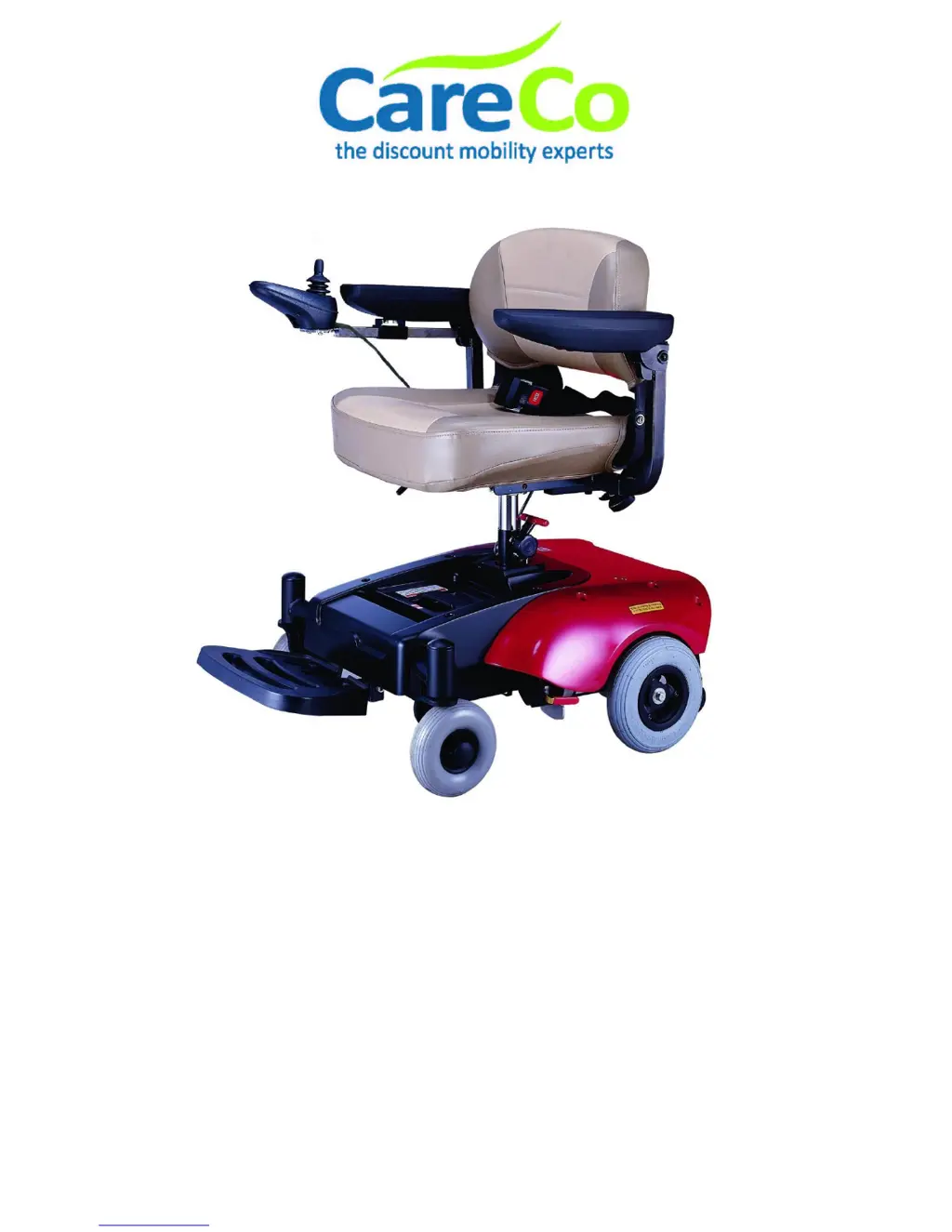
EASI GO
Owner’s Manual
CareCo (UK) Ltd
Hubert Road
Brentwood
Essex
CM14 4JE

Questions and Answers

  • K
    Krystal SotoAug 13, 2025
    What to do if my CareCo Wheelchair power chair will not drive?
    • R
      Richard GonzalesAug 13, 2025
      If your CareCo Wheelchair power chair won't drive, there are several possible causes: * Ensure the motor release levers are engaged. * Charge the batteries, making sure the setting on the charger is correct. * Unplug the charger from the wall outlet. * Reset the circuit breaker. If it trips again, repairs may be necessary.
  • L
    Lauren PierceAug 17, 2025
    Why is my CareCo Wheelchair battery indicator flashing low soon after charging?
    • S
      sharonwhiteAug 17, 2025
      If the battery indicator on your CareCo Wheelchair flashes low soon after charging, it could be due to: * Weak batteries: Consider replacing the batteries. * Charger issues: Have the charger serviced or replaced. Contact CareCo Customer Service for assistance.
  • R
    Richard SmithAug 21, 2025
    Why does my CareCo Wheelchair have limited driving distance?
    • T
      Thomas SpencerAug 21, 2025
      If your CareCo Wheelchair has a limited driving distance, it could be due to a few reasons: * The batteries may not be fully charged. Charge them overnight or for at least 10 hours. * The batteries may be weak and not holding a charge. Ensure the setting on the charger is correct. * The batteries may need replacement.
  • J
    Joan KempAug 25, 2025
    What to do if CareCo Wheelchair batteries are not charging?
    • K
      kayla53Aug 26, 2025
      If the batteries on your CareCo Wheelchair are not charging, consider the following: * The charger may not be working, consider replacing it. * The battery connections may be loose. Check all connections and secure them. * There may be no current at the wall socket. Try switching to another wall socket.
  • S
    Scott AlvaradoAug 28, 2025
    What to do if charge indicator shows low charge level soon after charging CareCo Wheelchair?
    • R
      randy41Aug 28, 2025
      If the charge indicator shows a low charge level soon after charging your CareCo Wheelchair, it could be due to: * Weak batteries: Replace the battery. * Charger not operating: Replace the charger.
  • D
    Daniel ChandlerSep 1, 2025
    What to do if my CareCo Wheelchair only has one rear wheel turning?
    • T
      Timothy HensonSep 1, 2025
      If only one rear wheel turns on your CareCo Wheelchair, it could be because one motor release lever is engaged. Disengage the motor release lever.
  • S
    sandrajohnsonSep 5, 2025
    What to do if CareCo Wheelchair does not respond to commands after recharging?
    • M
      malonedeniseSep 5, 2025
      If your CareCo Wheelchair does not respond to commands even after recharging, and the power indicator is off, it could be due to a poor battery terminal connection. Clean the terminals.
  • M
    Mark AndersonSep 9, 2025
    What causes CareCo Wheelchair batteries to draw excessive current when charging?
    • W
      William StewartSep 9, 2025
      If the batteries in your CareCo Wheelchair draw excessive current when charging, it is likely due to battery failure. Consider replacing the batteries.

Summary

Disclaimer

Preface and Introduction

Understanding Manual Symbols

Explains symbols like Warning, Attention, Suggestion used in the manual.

Safety Notice

Pre-Operation Safety Guidelines

Covers general safety rules before driving, including environment and user condition.

Safe Driving Practices

Details precautions for operating the chair while moving, including speed and passenger limits.

Prohibited Usage and Conditions

Lists situations and environments where the power chair should not be used.

Navigating Inclines and Ramps

Safety instructions for driving on slopes, ramps, and uneven terrain.

Critical Operational Warnings

Highlights key warnings like freewheel mode on gradients and weight limits.

Maximum Recommended Incline

Details the maximum safe climbing angle (6°) for the power chair based on testing.

Understanding Labels and Markings

Emphasizes reading and not removing labels on the power chair for safety reference.

Parts Information

Power Chair Component Identification

Identifies and labels key components of the power chair, such as the controller, seat, and wheels.

Operation

Joystick and Controller Functions

Explains the operation of the joystick and controller, including control functions and indicators.

Operating the Power Chair

Provides step-by-step instructions on how to operate the power chair using its controls.

Speed and Profile Adjustment

Covers using buttons to adjust speed settings and drive profiles.

Locking and Unlocking the Power Chair

Provides step-by-step instructions for locking and unlocking the power chair's control system.

Battery Charging and Maintenance Tips

Offers suggestions for optimal battery care, charging frequency, and expected battery life.

Braking System and Freewheel Warning

Explains braking and warns about freewheel mode on gradients.

Seat and Footrest Adjustments

Guides on removing the seat, adjusting seat height, and adjusting the footrest angle.

Setting and Using Freewheel Mode

Details how to engage and disengage the freewheel lever and associated warnings.

Battery Charging and Care

Battery Specifications and Handling

Describes battery type, maintenance, and warnings for handling.

Charging the Power Chair Batteries

Provides step-by-step instructions for charging the power chair batteries using the provided charger.

Battery Replacement Procedure and Warnings

Details battery replacement steps, warnings, and suggestions for proper installation.

Inspection and Maintenance

Regular Inspection Checklist

Presents a checklist for initial and periodic inspections of various power chair components.

Wheel and Tyre Inspection

Emphasizes periodic checking of wheels and tyres for wear and security.

Pre-Maintenance Safety and Storage

Stresses safety before maintenance and outlines proper storage procedures.

Power Chair Disassembly Procedure

Provides step-by-step instructions for disassembling the power chair into four main pieces.

Power Chair Assembly Procedure

Explains that assembly is the reverse of disassembly and advises studying the disassembly guide.

Troubleshooting and Specifications

Troubleshooting Common Issues

Lists common symptoms, probable causes, and solutions for power chair malfunctions.

Power Chair Specifications

Lists detailed technical specifications for the CareCo Easi Go power chair, including dimensions and weight.

Self-Help Guide for System Trips

Provides a guide to identifying and resolving system trips by counting blinks on the battery gauge.

Warranty Information

Warranty Conditions and Coverage

Outlines the terms, conditions, and coverage period for the power chair's warranty.

VIN and Serial Number Recording

Instructs users to record the power chair's identification number (VIN) and motor serial number for service.

CareCo EASI GO Specifications

General IconGeneral
FoldableYes
Maximum User Weight115kg (18 stone)
Weight Capacity115kg (18 stone)
Wheel Size12 inches
Frame MaterialAluminum

Related product manuals