6
Carlin Combustion Technology
MN70200B 101323
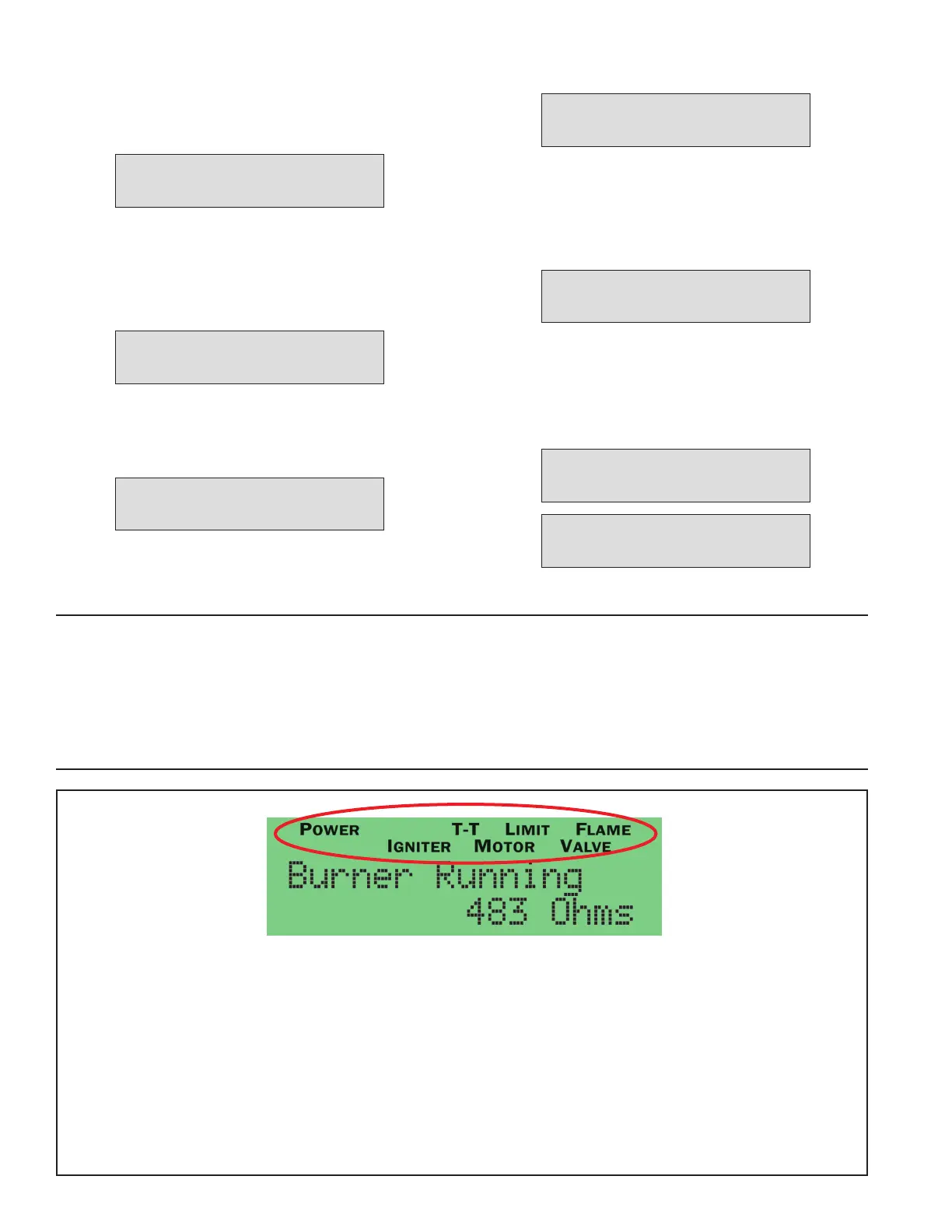
Status Icons
Status Icons will appear at the top of the 70200 display to indicate the control’s current operating condition.
POWER Indicates that the control is powered (flashes if voltage is too low or too high)
TT Displayed when the TT terminals are physically jumpered, jumpered in the set-up menu, or when thermostat
is calling for heat.
LIMIT Indicates that the burner limit circuit is powered.
IGNITOR Indicates that the ignitor is energized (flashes if ignitor not detected)
MOTOR Indicates that the motor is energized (flashes if motor not detected)
VALVE Indicates that the valve is energized (on entry to pump prime will flash if not detected)
BV Indicates vent input is active (when vent input is selected)
FLAME Indicates the CAD cell is sensing flame
Operating Sequence
With power to the control and all manual oil line valves open,
set thermostat (and limit) to call for heat. NOTE: The ther-
mostat circuit must be closed and power must be coming to
black wire from limit circuit.
Following a Pre-Purge, the control advances to Pre-Ignition.
If Pre-Purge timing is programmed above 3 seconds, control
will perform a “Valve Check” 1 second after motor starts to
check for a stuck open valve. If flame is detected during this
time, control will lockout. NOTE: For the Pre-Purge to oper-
ate, the burner must be equipped with a solenoid valve that is
wired to the violet terminal.
Control will enter Pre-Ignition*. After set timing, valve opens
and the control advances to Trial for Ignition when the count-
down clock expires.
* If Pre-Purge is set to “0” or “3”, control will enter “pre-igni-
tion” before “Pre-Purge”.
Following a 1 second delay, Trial for Ignition will initiate. The
CAD cell must sense flame or the control will go into lockout.
When flame is detected, the screen will briefly display “Flame
Detected” and then advance to “Flame Stabilization”.
NOTE: Push View Ohms button anytime during burner opera-
tion to view the CAD Ohms reading.
When the Flame Stabilize timer expires, the ignitor will turn
off and the burner will continue to fire until the Call for Heat
ends or the limit string opens. The screen will display “Burner
Running”. Note: If Smart Ignition is selected in the Setup
Menu, the screen will alternate between “Burner Running”
and “Smart Ign Active” at any time the ignitor is running in
intermittent mode.
When the Call for Heat ends (or a limit control interrupts the
burner circuit), the oil valve (if installed) will turn off within
2 seconds. The motor remains on for the Post-Purge period.
If controls gets a call for heat during Post Purge, control will
immediately enter Trial for Ignition to relight the burner. When
the Post-Purge timer expires, the control returns to Standby
mode awaiting the next call for heat.
Pre-Ignition
X X Sec
Pre-Purge
X X Sec
Trial for Ign
X X Sec
Post-Purge
X X Sec
Flame Stabilize
X X Sec
Standby 5 9 Sec
No Call for Heat
Burner Running
5 9 Sec
Pump Prime (Bleeding)
The 70200 control is equipped with a 120 second pump
prime feature. To enter Pump Prime, there must be a Call for
Heat. NOTE: If a flame is present, the control will not enter
Pump Prime mode.
To bleed the oil line, with Limit icon on, push and hold red Reset
button for 10 seconds. The display will read Pump Prime.
The motor, valve and ignitor remain on for up to 2 minutes
while in Pump Prime mode. To end Pump Prime mode, press
the red Reset button. NOTE: If flame is sensed, Pump Prime
mode ends in 5 sec.
Pump prime cannot be entered when the control is in Lockout
or Latch-up.


 To Next Page
 Loading...