EasyManua.ls Logo

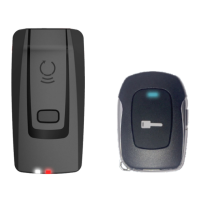
CarLink XTX-3000 - User Manual

Default Icon
50 pages
Print Icon
To Next Page IconTo Next Page
Loading...
EN-20180727-A
Rev Date: 20180727
This system must be installed by a professional.
COMPLETE INSTALLATION & PROGRAMMING GUIDE
NOTICE
The manufacturer will accept no responsability for any electrical damage resulng from
improper installaon of this product, be that either damage to the vehicle itself or to the
installed device. This device must be installed by a cered technician. Please review the
Installaon Guide carefully before beginning any work.
CLBTLR Digital RF Kit system
Question and Answer IconNeed help?

Do you have a question about the CarLink XTX-3000 and is the answer not in the manual?

Summary

Configure iDatastart HCx Remote Starter

Flash iDatastart HCx Module via iDatastart.com

Procedure to flash the iDatastart HCx module using the www.idatalink.com website.

Connect and Configure CarLink System

Connect System Components

Wiring diagram and instructions for connecting the Carlink system components.

Add Vehicle to CarLink Account

Steps to add a vehicle system to your Carlink account via the smartphone application.

Configure Application for Customer

Setting up the system's protocol and vehicle details within the Carlink application.

Test System Functionality

Testing all system functions and preparing for customer delivery.

Configure iDatastart VWx Remote Starter

Flash iDatastart VWx Module via iDatastart.com

Procedure to flash the iDatastart VWx module using the www.idatalink.com website.

Configure iDatastart BM or BZ Remote Starter

Flash iDatastart BM;BZ Module via iDatastart.com

Procedure to flash the iDatastart BM/BZ module using the www.idatalink.com website.

Configure AKX, OEM or FLRS Remote Starter

Flash AKX, OEM, FLRS Module via iDatastart.com

Procedure to flash AKX, OEM, or FLRS modules using the www.idatalink.com website.

Configure ADS-AL-CA; FL-CAN Remote Starter

Flash ADS-AL-CA;FL-CAN Module via iDatastart.com

Procedure to flash ADS-AL-CA/FL-CAN modules using the www.idatalink.com website.

Configure Compustar CM7200; Polarstart PRS-16

Configure Compustar CM6200 Remote Starter

Configure Compustar DC2 Remote Starter

Configure Compustar DC3 Remote Starter

Configure DBALL 2 Remote Starter

Configure DB3 Remote Starter

Configure 4 X10 - 5 X10 - AF-D600 - ASD200 - ASD600 Remote Starter

Configure DS4 - DS4+ Remote Starter

Configure Prestige (E) Model Remote Starter

Configure Prestige (Z) Model Remote Starter

Configure Pursuit (E) Model Remote Starter

Configure Code Alarm CASECRS, CARS or CA4555

Configure Omega RS-X70 Remote Starter

Configure Omega AL-XX70-B Remote Starter

Configure DSE iStart2 - 3 Remote Starter

System LED Status and Protocol Reference

CarLink XTX-3000 Specifications

General IconGeneral
BrandCarLink
ModelXTX-3000
CategoryAutomobile Accessories
LanguageEnglish

Related product manuals