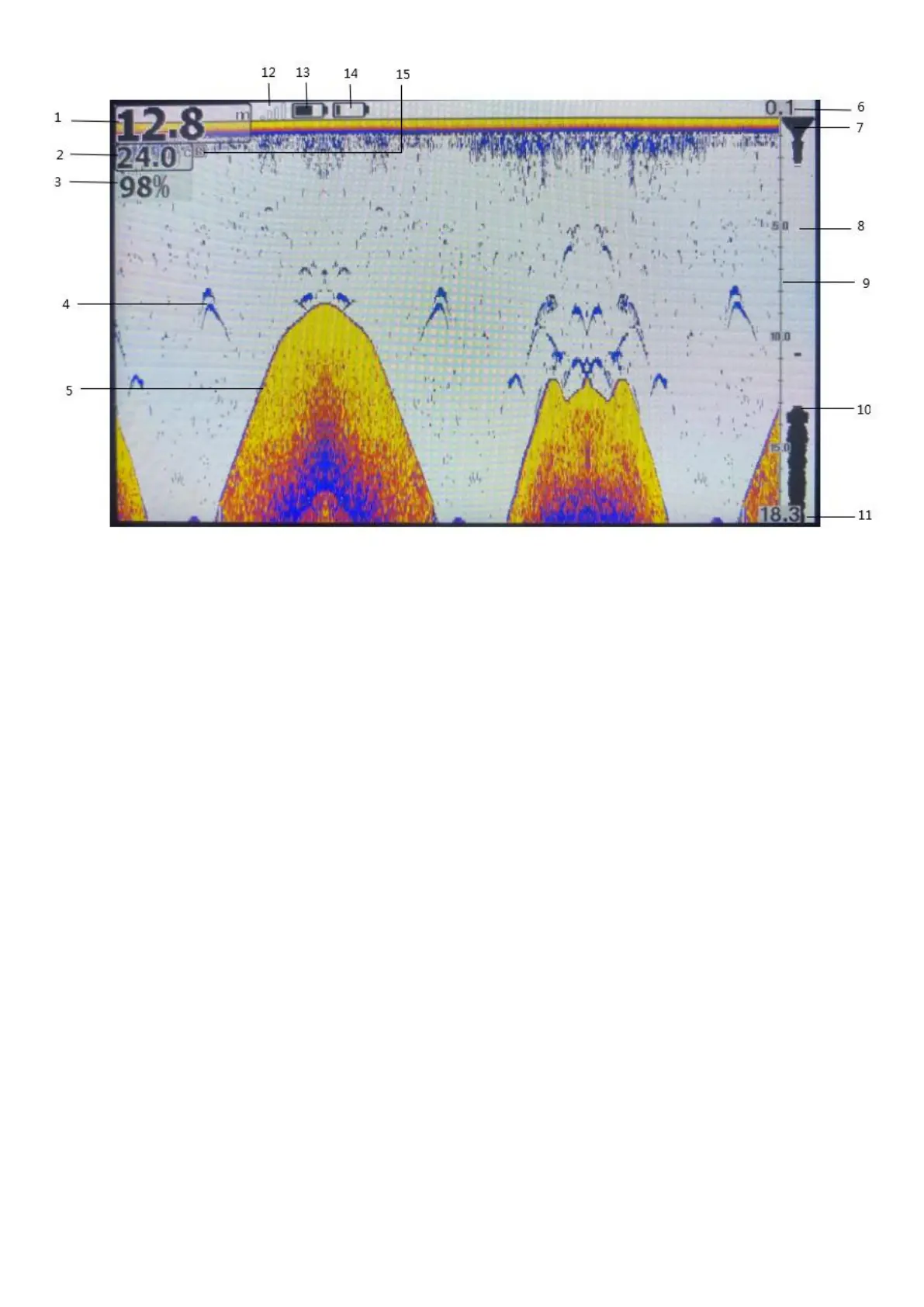
1. Water depth display
2. Water temperature display
3. Sensitivity display
4. Fish bow icon
5. Underwater outline
6. Upper limit of the depth scale(Default 0.1)
7. Water surface identification
8. Current signal chart window
9. Depth scale
10. Underwater identification
11. Lower limit of depth scale
12. Signal strength indication
13. Power display of the receiver
14. Power display of the sonar box
15. Presentation mode flag(Do not display when presentation mode close)
8. Current signal chart(real-time signal: RTS)
The current signal chart window displays the intensity of the latest echo as a horizontal line on the right side of the
display. The wider the horizontal line, the stronger the signal, and the depth at which the echo is located refers to the
depth scale.
9. Menu function Settings
9.1. Menu composition
The main menu of the system consists of three menu groups:
1)Sonar menu group 2)Setting menu group 3)Advanced menu group


 To Next Page
 Loading...