This document provides the user manual for the Carrefour® 52-8001 Ceiling Fan, designed to offer an "Enjoy Intelligent Life" experience.
Function Description:
The Carrefour 52-8001 is a ceiling fan with integrated lighting and remote control capabilities. Its primary functions include:
- Ceiling Fan Operation: Provides air circulation with adjustable wind speeds and directional control (forward and reverse).
- Lighting Control: Features a dual-color light source module with adjustable brightness and color temperature. It also includes a dedicated night light mode.
- Remote Control: All fan and light functions are managed via a dedicated remote control, allowing for convenient operation from a distance.
- Timer Function: Allows users to set a timer for the fan to operate for 1 or 2 hours.
- Pairing Function: The remote control includes a pairing function to ensure proper communication with the fan, especially if the remote control becomes "garbled."
Important Technical Specifications:
- Model Number: 52-8001
- Material: PVC + Iron
- Color: Black / Silver
- Weight: 5.27 KG
- Motor Power: 30W
- Number of Blades: 5
- Lampshade External Diameter: 230mm
- Power Supply: Connects to 110V household wire.
Usage Features:
The ceiling fan is designed for ease of use and installation, with several features enhancing the user experience:
Installation:
- Blade Installation: The blades are secured to the chassis using three screws. The manual illustrates how to remove these screws, install the blades, and then re-secure the chassis.
- Wiring and Remote Controller Driver: The remote controller driver, located on the tray, needs to be connected to the 110V household wire and then to the flat terminal of the fan. A signal line is present but should be ignored for this connection.
- Cross Plate Installation: The cross plate is secured to the ceiling. For wood ceilings, 8 self-tapping screws are used, while for cement ceilings, 4 expansion screws are required. It's crucial to install the cross plate with the 4 screw heads facing downward.
- Tray and Lamp Fixing: The tray is locked using four 4*8 flat-headed screws. These screws also secure the four positions of the cross plate to fix the lamp.
- Light Installation: The dual-color light source module is installed, attaching to the chassis via three reinforced magnets.
- Lampshade Installation: The lampshade is installed by rotating it onto the chassis until it is secure.
Remote Control Operation:
The remote control features several buttons for comprehensive control:
- Main Switch (①): Controls both the ceiling fan and light.
- Light Switch (②): Toggles the light on/off.
- Reverse Speed (③): Changes the fan's rotation direction.
- Forward Speed (④): Changes the fan's rotation direction.
- Color Temperature Switch (⑤): Cycles through different color temperatures.
- Night Light Mode (⑥): Activates a low-intensity night light.
- Pairing Button (⑦ - SETUP): Used to pair the remote control with the fan if communication issues arise. Press "OFF" (hear a "beep"), then long-press "pair code" (hear two "beeps" for successful pairing).
- Infinite Brightness Adjustment and Color Temperature Adjustment (⑧ - +/-): Allows for continuous adjustment of light brightness and color temperature.
- Timing for 2 hours (⑨ - 2H): Sets the fan timer for 2 hours.
- Timing for 1 hour (⑩ - 1H): Sets the fan timer for 1 hour.
- Suspend the Fan (⑪ - STOP): Stops the fan operation.
- Control the Wind Speed (⑫ - 1-6 buttons): Adjusts the fan's wind speed.
Function Description Details (Remote Control):
- Power Off: Short press the power button on the remote.
- Power On/Off (Light): Short press the light button.
- 0-100% Brightness Adjustable: Long press the light button.
- Cycle Switching To Change Color Temperature: Short press the color temperature button.
- 0-100% Color Temperature Adjustable: Long press the color temperature button.
- Timer Function: Short press the timer button to cycle between 1 and 2 hours.
- Night Light Mode: Direct access via a dedicated button.
- Turn On The Ceiling Fan And Adjust The Wind Speed: Use the numbered buttons (1-6) to select the desired wind speed.
- Forward And Backward Curved Rotation: Short press the reverse/forward button.
Maintenance Features:
-
Product Care:
- Always read the manual before installation.
- Avoid using the product in humid environments or high temperatures.
- If any defect is found, immediately stop using the product.
-
Troubleshooting (FAQ):
- Fan/Light/Remote not working:
- Verify correct installation.
- Check wiring terminal contact; pull and plug wires to ensure proper connection.
- Check remote control batteries.
- Attempt to re-pair the remote control (press "OFF," then long-press "pair code"). If unsuccessful, turn off the machine for 1 minute and try again.
- Loud noise from the fan:
- May be caused by magnet debris from transportation. Run the fan for about 10 minutes to see if the noise disappears.
- Check for loose screws inside the shell. Remove the lampshade, light source, and chassis, then turn the fan by hand to shake out any screws.
- If the noise persists, contact support for a replacement.
- 1 or 2 second remote delay: This is due to a motor protection program. The receiver tests motor compatibility upon power supply before starting the fan to ensure durability.
- Screw holes in mounting bracket not matching electrical box: The holes are digitally punched for accuracy. When installing, fix all screws into holes slightly one by one, then tighten them all. This prevents misalignment.
FCC STATEMENT:
The device complies with FCC Rules Part 15. Operation is subject to two conditions: (1) no harmful interference, and (2) acceptance of any interference received. Users are advised that changes or modifications not approved by the responsible party could void their authority to operate the equipment. The equipment has been tested and complies with Class B digital device limits, designed to provide reasonable protection against harmful interference in residential installations. If interference occurs, users are encouraged to reorient/relocate the receiving antenna, increase separation between equipment and receiver, connect equipment to a different circuit, or consult a dealer/experienced radio/TV technician.

 Need help?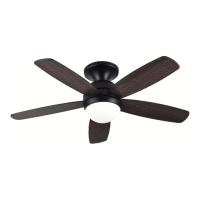

 To Next Page
 General