EasyManua.ls Logo

Carrier 24APA - User Manual

Carrier 24APA
18 pages
Print Icon
To Next Page IconTo Next Page
Loading...
Installation Instructions
24APA
Performancet Series Air Conditioner
with Puronr Refrigerant
1---1/2 to 5 Nominal Tons (Size 18 To 60)
the environmentally sound refrigerant
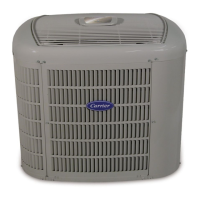
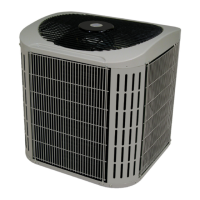
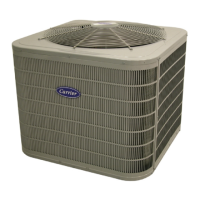
Fig. 1 --- 24APA
NOTE: Read the entire instruction manual before starting the
installation.
TABLE OF CONTENTS
PAGE
SAFETY CONSIDERATIONS 2......................
INSTALLATION RECOMMENDATIONS 2............
INSTALLATION 3--9,14............................
Step 1 -- Check Equipment & Jobsite 3................
Step 2 -- Install on Solid Pad 3......................
Step 3 -- Clearance Requirements 3...................
Step 4 -- Operating Ambient 3.......................
Step 5 -- Install TXV 3 -- 4.........................
Step 6 -- Make Piping Connections 5 -- 7..............
Step 7 -- Make Electrical Connections 7 -- 8............
Step 8 -- Compressor Crankcase Heater 8..............
Step 9 -- Install Electrical Accessories 8..............
Step 10-- Check OCT and OAT Thermistor Attachment 8..
Step 11 -- Start--Up 8 -- 9...........................
Step 12 -- Check Charge 9, 14.......................
GENERAL SEQUENCE OF OPERATION 9............
CONTROL FUNCTIONS
AND SEQUENCE OF OPERATION 10 -- 11.............
TROUBLESHOOTING 11 -- 12........................
FINAL CHECKS 13.................................
CARE AND MAINTENANCE 13......................
SUBCOOLING TABLE 14............................
24 VOLT CONNECTION DIAGRAMS 15 -- 16...........
PURONR REFRIGERANT QUICK REF. GUIDE 17.....


Questions and Answers

  • C
    Carrie FordAug 3, 2025
    What to do if Carrier Air Conditioner shows pressure switch protection error?
    • M
      Mr. Juan DavisAug 4, 2025
      If the Carrier Air Conditioner displays a pressure switch protection error, examine the refrigerant charge, the operation of the outdoor fan, and check for any airflow restrictions on the outdoor coil. Also, verify the indoor airflow.
  • G
    Gabrielle HarrellAug 8, 2025
    How to check for no 230V at the compressor of Carrier 24APA?
    • S
      salinaskellyAug 8, 2025
      If there is no 230V at the compressor of your Carrier Air Conditioner, check the contactor, unit disconnect, or circuit breaker, and inspect the control box wiring.
  • W
    wbennettAug 12, 2025
    What to do for 24V brown out protection in Carrier Air Conditioner?
    • J
      jimmymcfarlandAug 12, 2025
      To resolve a 24V brown out protection issue with your Carrier Air Conditioner, make sure the control voltage is within the acceptable range of 18-30 volts.
  • P
    Penny HarveyAug 16, 2025
    How to fix a systems communication failure in a Carrier 24APA Air Conditioner?
    • J
      john93Aug 16, 2025
      In case of a systems communication failure in your Carrier Air Conditioner, check the wiring to the UI, as well as the indoor and outdoor units.
  • A
    annreedAug 21, 2025
    What to do if Carrier 24APA Air Conditioner shows contactor shorted detection?
    • D
      Denise HarrisonAug 21, 2025
      If the Carrier Air Conditioner detects a shorted contactor, inspect the contactor itself and the control box wiring.
  • A
    Adam LewisAug 25, 2025
    What to do if Carrier 24APA Air Conditioner has control fault?
    • M
      moyeradrianAug 26, 2025
      If a control fault occurs in your Carrier Air Conditioner, the control board should be replaced.
  • K
    Kelly GrayAug 29, 2025
    How to troubleshoot thermistor sensor comparison in Carrier 24APA?
    • C
      Chad MillerAug 29, 2025
      To address a thermistor sensor comparison issue in your Carrier Air Conditioner, use an ohmmeter to test the sensors and inspect their wiring.

Summary

Safety Considerations

Installation Recommendations

Installation Best Practices

Provides 10 key recommendations for optimal installation and performance.

Installation Steps

Initial Installation Steps

Covers jobsite check, pad installation, clearance, and operating ambient requirements.

Install TXV

Detailed instructions for installing the Thermostatic Expansion Valve (TXV).

Make Piping Connections

Guidance on connecting refrigerant piping, including tube sizes and brazing.

Make Electrical Connections

Detailed steps for making safe and correct electrical wiring connections.

Install Accessories & Check Sensors

Install crankcase heater, accessories, and check thermistor attachments.

System Start-Up and Charge Check

Procedures for system start-up and verifying the refrigerant charge.

General Sequence of Operation

Control Functions and Sequence of Operation

Cooling Operation Description

Details on how the unit operates during cooling mode with different thermostats.

Communication & Status Lights

Explanation of the COMM and STATUS indicator lights on the control board.

Crankcase Heater Operation

Information on when the crankcase heater is energized and its purpose.

Outdoor Fan Motor Operation

How the outdoor fan motor operates during normal and fault conditions.

Time Delays Explained

Overview of the various time delays built into the unit's operation.

Utility Interface Function

How the unit interacts with external utility control signals for load management.

Low Ambient Cooling

Provisions and operation modes for cooling at low outdoor temperatures.

Troubleshooting

System Communication Failure

Diagnosing issues when communication between system components fails.

Pressure Switch Protection

How high and low-pressure switches protect the compressor and system.

Control Faults

Identifying and resolving faults related to the outdoor unit control board.

24 V Brown Out Protection

Understanding and addressing issues with low control voltage (brown outs).

Compressor Voltage Sensing

Monitoring compressor voltage to detect potential operational problems.

Compressor Thermal Protection

Troubleshooting compressor thermal cutout or loss of 230V power.

Contactor Issues

Diagnosing contactor shorts and related wiring errors.

No 230 V at Compressor

Troubleshooting lack of 230V power at the compressor terminals.

Temperature Thermistors

Understanding thermistor function and troubleshooting sensor failures.

Thermistor Sensor Comparison

Checking for proper sensor readings and identifying out-of-range conditions.

Failed Thermistor Default Operation

How the system operates when thermistors fail and default settings are used.

Status Codes

Interpreting amber LED flash codes for system diagnostics and fault identification.

Final Checks

Wiring and Tubing Security

Ensuring all wiring and tubing is properly routed and secured.

Service Valve Stem Tightness

Verifying the correct tightness of service valve stem caps.

Owners Manual and Checklist

Leaving documentation and explaining system operation to the owner.

Care and Maintenance

Subcooling Table

Required Liquid-Line Temperature Table

Table correlating liquid pressure and required subcooling temperature for charging.

24 Volt Connection Diagrams

Infinity Control Wiring Diagrams

Wiring diagrams for Infinity Control systems with 4-wire connections.

Standard Thermostat Wiring

Wiring diagrams for non-communicating thermostats with 3-wire connections.

Puron Refrigerant Quick Reference Guide

Carrier 24APA Specifications

General IconGeneral
Model24APA
RefrigerantR-410A
Compressor TypeScroll
Voltage208/230V
Phase1
TypeAir Conditioner
Cooling Capacity24, 000 BTU
HSPF RatingNot Applicable
WeightVaries by unit size
Sound Pressure Level (Indoor)Varies by model
Sound Pressure Level (Outdoor)Varies by model
Indoor Unit Dimensions (H x W x D)Varies by model
Outdoor Unit Dimensions (H x W x D)Varies by model
Indoor Unit WeightVaries by model
Outdoor Unit WeightVaries by model

Related product manuals