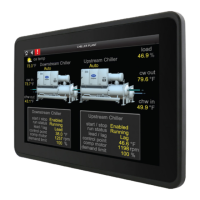
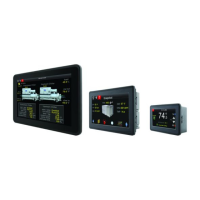
The Carrier TruVu™ ET Display (part no. EQT2) is a touchscreen device designed to interface with Carrier Open controllers, allowing users to view and modify property values, schedule equipment, and monitor trends and alarms without needing to access the system's server. It is available in three sizes: EQT2-4 (4.3 inches, 11 cm), EQT2-7 (7 inches, 17.8 cm), and EQT2-10 (10.1 inches, 25.7 cm).
Function Description:
The TruVu™ ET Display serves as a local interface for Carrier Open controllers. It enables users to:
- View and Change Property Values: Access and modify various operational parameters of connected equipment.
- Schedule Equipment: Create, edit, and view BACnet schedules for time-based control of systems.
- View Trends: Monitor historical data for up to four trending-enabled points on a trend graph, with pinch-zoom functionality and marker details.
- View Alarms: Display active alarms, active faults, return-to-normal events, and manually cleared alarms from the controller. The display can store up to 100 alarms.
- Capture Screenshots: Save screenshots of the display to a connected USB drive.
- Transfer Files: Copy files from a USB drive to the display or view PDF files directly from the USB drive.
- Update Software: Install software updates for the touchscreen via a USB drive.
- Configure Settings: Adjust touchscreen settings such as brightness, screen timeout, device language, communication parameters (BACnet Device Instance, Max Masters, Max Info Frames), router settings (ARC156, MS/TP network numbers), IP settings (IP Network, IP Address, Subnet Mask, Gateway IP Address, UDP Port), and Time Master settings (Time Sync Mode, Time Sync Interval).
- Force Values: For CCN points only, users can force numeric or binary values, with an option to release the force back to automatic control.
Important Technical Specifications:
Power:
- 24 Vdc, 1.0A for all models.
- Can share a DC power supply with a Carrier controller, provided polarity is maintained and the power source is used only for Carrier controllers.
- Must be within 100 feet (30 meters) of its power supply.
Display (TFT):
- EQT2-4: 4.3" Widescreen, 480 x 272 pixels (128 ppi), 400 cd/m² brightness (typ.), 1000:1 contrast ratio (typ.), -75~50(H); -75~75(V) viewing angle, 16.7M (8-bit) max colors.
- EQT2-7: 7" Widescreen, 1024 x 600 pixels (170 ppi), 320 cd/m² brightness (typ.), 1000:1 contrast ratio (typ.), -75~70(H); -75~75(V) viewing angle, 16.7M (8-bit) max colors.
- EQT2-10: 10.1" Widescreen, 1280 x 800 pixels (149 ppi), 350 cd/m² brightness (typ.), 800:1 contrast ratio (typ.), -85~85(H); -85~85(V) viewing angle, 16.7M (8-bit) max colors.
- Touch: Projected Capacitive Multi-Touch (P-CAP) for all models.
Operating Conditions:
- Temperature: -4°F to 140°F (-20°C to 60°C).
- Humidity: 10% to 90% RH (non-condensing).
- Protection: Front IP65 Water and Dust Proof (Rear: IP20).
- Vibration: Tested to IEC60068-2-64.
Storage Temperatures:
- -13°F to 158°F (-25°C to 70°C).
Communication:
- Comm Input: EIA-485 based serial port for controller communication to Rnet.
- USB: Port for upgrades, screen captures, file transfers, and controller communication for i-Vu® XT or TruVu™ controllers (for future use).
- USB OTG: Port for factory programming.
- LAN: RJ-45 Ethernet connection to Service Port on TruVu™ controllers.
System:
- OS: Android 6.0.
- Processor: Freescale Cortex A9 i.MX6 Dual Core 1 GHz.
- System Memory: 1GB LPDDR3 RAM to store variable data and LCD data.
- Storage: 8 GB on-board eMMC Flash memory to store program code and screen file.
Mounting:
- Wall or panel mounting within the building interior.
- Wall mounting kit available for 7" and 10" models only.
Real-time clock:
- 365-day real-time clock/calendar chip, maintaining time and date for a minimum of 72 hours after power loss (at room temperature).
Compliance:
- United States: FCC CFR, Part 15, Class B.
- Canada: Industry Canada Compliant, ICES-003, Class A; cUL Listed UL 916, PAZX7, Energy Management Equipment.
- Europe: CE Mark, UKCA Mark; EN50491-5-2:2009; Part 5-2: EMC requirements for HBES/BACS used in residential, commercial and light industry environment; RoHS Compliant: 2015/863/EU; REACH Compliant.
- Listed by: CE (Class B), FCC (Class B), UL 60950, Vibration tested to EN60068-2-6, IP65 rated (front), IP20 rated (rear).
Usage Features:
- Mounting Flexibility: Can be mounted in a panel with the controller, on a panel door, or on a wall (with kit for 7" and 10" models).
- Interface Selection: On startup, the display prompts for connection type (Rnet, Ethernet Service Port, USB Service Port). This selection is remembered for future power-ons.
- Quick Settings Pane: Swipe down from the top of the touchscreen to access quick settings for brightness, screen timeout, PDF Reader, File Copier, and App Updater.
- Custom Screens: Supports custom-designed screens created with ViewBuilder v7.0 or later.
- Password Protection: Screens can be programmed with different password levels (User, Admin, Factory, No password) for access control.
- Screenshot Functionality: A dedicated camera icon allows for easy screenshot capture, saved to a
/screenshots folder on a USB drive.
- File Management: View PDF files and copy files to/from a USB drive using the File Copier.
- Language Selection: Supports multiple languages for system screens, with custom screens displaying in their original creation language.
- Timeout Settings: Configurable screen timeout and inactivity timeout to power off the screen and log out the user.
Maintenance Features:
- Software Updates: Updates are performed by downloading a zip file and an associated .MD5 file to a USB drive, inserting it into the display, and pressing the Reset button.
- Cache Clearing: The display cache must be cleared before connecting to a controller after installing or upgrading the application.
- Device Information: The "About" screen provides details such as Application Name, ET APP- Kiosk mode, Android OS Version, and EQT2 Build Version.
- Module Status Screen: Provides comprehensive information about the controller, including firmware, network information, communication status, and error conditions, aiding in troubleshooting and maintenance.
- Document Revision History: The manual includes a detailed revision history, listing important changes to the document.

 Need help?

 To Next Page
 General