The Carson MonoZoom™ is a 7 x 21mm monocular designed for portable magnification. This manual provides instructions for its assembly, use, and maintenance, ensuring optimal performance and longevity of the device.
Function Description:
The MonoZoom™ monocular serves as a compact optical instrument for magnifying distant objects. Its primary function is to provide clear, magnified views for various activities such as birdwatching, nature observation, or general sightseeing. The device features a zoom capability, allowing users to adjust the magnification level to suit their viewing needs. It is designed for single-eye use, offering a lightweight and convenient alternative to binoculars.
Important Technical Specifications:
- Model Name: Carson MonoZoom™
- Model Number: ZM-721
- Magnification: 7x (fixed minimum magnification)
- Objective Lens Diameter: 21mm
- Optical System: Monocular
- Zoom Capability: Yes, adjustable magnification via a zoom knob.
- Focusing System: Manual, via a focus knob.
- Eyecup: Twist-up design for comfort and glare reduction, adaptable for eyeglass wearers.
Usage Features:
Assembling Neck Strap:
The monocular comes with a neck strap for convenient carrying and to prevent accidental drops. The assembly process is straightforward:
- Remove Adapter: Twist the adapter counterclockwise to detach it from the monocular.
- Insert Loop: Thread the loop of the neck strap through the designated slot in the adapter.
- Pull Loop Back: Pull the loop back around the adapter to secure it.
- Tighten Loop: Pull the strap back on the loop to tighten it into the adapter, ensuring a secure connection.
- Attach Adapter: Reattach the adapter with the strap to the monocular by twisting it clockwise until secure.
Using Your Monocular:
The MonoZoom™ is designed for ease of use, with features that enhance the viewing experience:
- Eyecup Adjustment:
- To reduce glare and achieve a comfortable viewing distance, twist the eyecup into its outermost position. This extends the eyecup, creating a barrier against ambient light.
- If you wear eyeglasses, twist the eyecup down (inward) to improve the field of view. This brings your eye closer to the eyepiece lens, compensating for the distance created by your eyeglasses and allowing you to see the full image without vignetting.
- Focusing:
- To achieve a clear and sharp image, locate the focus knob on the monocular.
- Turn the focus knob slowly until the image in your view becomes perfectly clear. This adjusts the internal lens elements to compensate for varying distances to the observed object and individual eyesight.
- Zooming:
- The monocular features a zoom capability, allowing you to adjust the magnification level.
- Locate the zoom knob on the device.
- Turn the zoom knob to the desired magnification level. Turning it in one direction will zoom in (increase magnification), while turning it in the opposite direction will zoom out (decrease magnification). This feature provides versatility, allowing users to observe a wider field of view at lower magnifications or focus on fine details at higher magnifications.
Maintenance Features:
Cleaning Monocular:
Proper cleaning is essential to maintain the optical quality and longevity of your MonoZoom™ monocular. Follow these steps carefully:
- Remove Dust and Debris:
- Begin by gently blowing away any loose dust or debris from the lens surfaces.
- Alternatively, use a soft lens brush specifically designed for optics to carefully brush away particles without scratching the lens.
- Remove Dirt, Grease, or Fingerprints:
- For more stubborn dirt, grease, or fingerprints, use a soft microfiber cloth.
- Rub the cloth in a circular motion on the lens surface. Avoid excessive pressure or aggressive rubbing, as this can scratch the lens.
- Important: Never use a coarse cloth or unnecessary rubbing, as this can permanently damage the lens surface.
- Thorough Cleaning (Optional):
- For a more thorough cleaning, a photographic-type lens cleaning fluid can be used.
- Crucially, always apply the cleaning fluid to the cleaning cloth first, never directly onto the lens. Applying fluid directly to the lens can seep into internal components, potentially causing damage or leaving residue.
- Gently wipe the lens with the moistened microfiber cloth in a circular motion.
Warnings:
To ensure the safety of the user and the device, observe the following warnings:
- Moisture Exposure: Do not expose the monocular to excessive moisture. This includes heavy rain, submersion in water, or high humidity environments, which can lead to internal fogging, corrosion, or damage to optical coatings.
- Sun Viewing: Never view the sun directly with this monocular. Viewing the sun, even for a brief moment, can cause severe and permanent eye damage, including blindness. The monocular concentrates sunlight, intensifying its harmful effects.
Customer Service and Warranty:
Carson provides customer support for any difficulties encountered with the MonoZoom™ monocular.
- In the U.S.A.: Email: info@carson.com
- In the U.K.: Email: uksupport@carson.com
- In the E.U.: Email: eusupport@carson.com
For detailed warranty information, users are directed to visit the official Carson website: www.carson.com/warranty. This ensures that users can access support and information regarding potential repairs or replacements under warranty terms.

 Need help?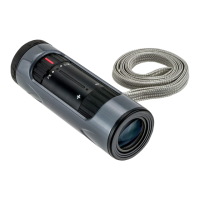

 To Next Page
 General