1-7
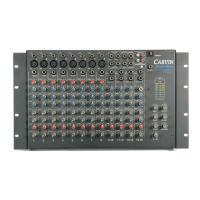
* Eight Sub-Groups with solo and Mute
* Four independent monitor mixes available
* Headphone monitoring of Main or Monitor
* Compact and extremely rugged for road use
* Talkback to Monitors
* 11 step unput gain controls for fast easy set-up
* Channels and Outputs assignable to L&R Stereo Output
* Channel patching on all output channels
*XLR type, balanced, 600 ohm inputs & outputs
SS
SS
EE
EE
CC
CC
TT
TT
II
II
OO
OO
NN
NN
##
##
33
33
--
--
22
22
GG
GG
EE
EE
TT
TT
TT
TT
II
II
NN
NN
GG
GG
TT
TT
OO
OO
KK
KK
NN
NN
OO
OO
WW
WW
TT
TT
HH
HH
EE
EE
FF
FF
EE
EE
AA
AA
TT
TT
UU
UU
RR
RR
EE
EE
SS
SS
OO
OO
FF
FF
TT
TT
HH
HH
EE
EE
MM
MM
XX
XX
--
--
22
22
44
44
88
88
88
88
CC
CC
OO
OO
NN
NN
SS
SS
OO
OO
LL
LL
EE
EE
FF
FF
RR
RR
OO
OO
NN
NN
TT
TT
PP
PP
AA
AA
NN
NN
EE
EE
LL
LL
CC
CC
OO
OO
NN
NN
TT
TT
RR
RR
OO
OO
LL
LL
SS
SS
**
**
**
**
**
**
II
II
NN
NN
PP
PP
UU
UU
TT
TT
CC
CC
HH
HH
AA
AA
NN
NN
NN
NN
EE
EE
LL
LL
SS
SS
**
**
**
**
**
**
11
11
))
))
MM
MM
ii
ii
cc
cc
//
//
LL
LL
ii
ii
nn
nn
ee
ee
SS
SS
ww
ww
ii
ii
tt
tt
cc
cc
hh
hh
* This switch will select between the microphone input and the line
input at the rear of the console. Remember, the line input will accept signals
many times the strength of the mic input and this switch must be properly
selected, depending upon which input best suits the signal source. Mic inputs
typically accept signals from -60dB to -20dB. Line inputs can accept "pre-amp"
signals (i.e. line outputs of tape decks, effects, etc.) of up to 30 volts. You may have
both the line and mic inputs connected at the same time. In a live situation this is
a very effective way in which to select between a tape input or a mic input. For
instance, if you wish to play a tape back during a break you may wish to have
your tape deck inserted into the line inputs of an input already dedicated to a mic
input. This will allow you to switch to the tape source by simply depressing the
Mic/Line switch. The gain control directly below this switch controls the relative
gain from either the mic or line source.
* The MX-2488's line inputs on channels #1 through #8 are normally
used to playback signals from the multi-track recorder.
NN
NN
oo
oo
tt
tt
ee
ee
::
::
The outputs of your (8) track or multi-track recorder
should be connected to the line inputs of channels #1
through #8.
Even when the Mic/Line switch is in the "Mic" position the line inputs inputs of
channels 1 through 8 are paralleled to the tape monitor section of the console, By
depressing the "Tape" switches (directly above the Output Channel Faders -
Outputs #1 through #8), the signals appearing at the line inputs of channels #1
through #8 are routed to the (2) Track Monitor Faders through this interconnect
section. This allows you to listen to the "2-TRK Master" faders by simply
depressing the "Tape" switches at the monitor section of the console. And, you are
able to adjust the volume of the multi-track playback using the "2-TRK" monitor
faders as well as "Pan" them through the stereo field using the "Pan" control
directly above this fader.


 To Next Page
 Loading...