11
4. How to Print (print version)
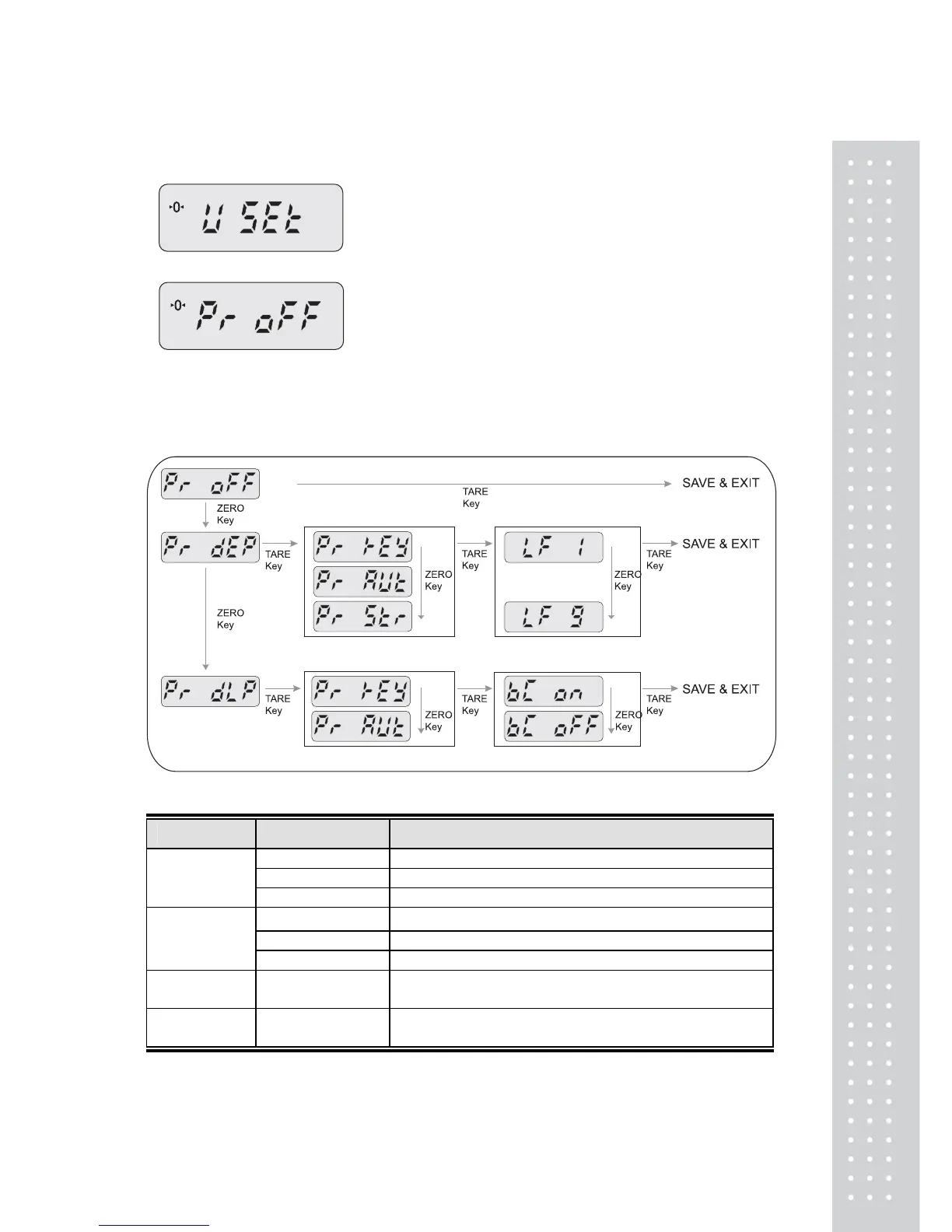
① While pressing the PRINT key, press the POWER key. The display shows “U SEt”.
② Press the TARE key, the display shows “Pr off”.
(If the setiing value already exist in the scale, then it would display as the setting.)
③ You can change the setting by pressing the ZERO key . Press TARE key to save and move next
function setting.
※
MENU DESCRIPTIONS
MENU DISPLAY DESCRIPTIONS
“Pr oFF” Do not use printer.
“Pr DLP” DLP50 printer interface. (Label)
Printer
“Pr DEP” DEP50 printer interface. (Ticket)
“Pr key” Manual print. (DLP, DEP)
“Pr AUt” Auto print when the scale is stable. (DLP, DEP)
Print method
“Pr Str” Ptint continually when the scale is stable. (DEP)
Barcode
(DLP only)
“BC on/off” Print out barcode on/off.
Linefeed
(DEPonly)
LF1~LF9 Linefeed
NET
NET


 To Next Page