
 Need help?
Do you have a question about the CasaCam VS2104 and is the answer not in the manual?
Detailed description of NVR components and their functions.
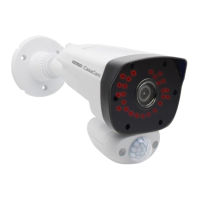
Details the components and functions of the night vision camera.
Details the components and functions of the floodlight camera.
Step-by-step guide to setting up the NVR unit.
Guidance on camera placement considerations and general setup.
Guide for the initial system configuration wizard.
Details different display modes like Quad Mode and Single Channel View.
Describes the elements and indicators shown on the live view screen.
Instructions for logging in, setting up passwords, and password recovery.
Explains the icons and functions available in the main menu toolbar.
How to select, name, and manage audio for individual cameras.
Settings for screen brightness, resolution, and slide show interval.
Information on adding and pairing additional cameras to the NVR.
Basic system settings including date, time, language, and reboot options.
Manages user accounts, username, and password settings.
Displays device model, version, and unique identifier (UID).
Configuration for network connectivity, including DHCP and static IP.
Settings for connecting to and configuring Wi-Fi channels.
Options for auto reboot, scheduling, and manual reboot/shutdown.
Procedures for updating the firmware of the NVR and cameras.
How to restore the system to factory default settings.
Configuration for error alerts and system event logging.
Instructions for downloading and installing the companion mobile app.
Guide on adding the NVR device to the mobile app using UID or QR code.
Explains the interface and icons for controlling the system via the mobile app.
 General
| Image Sensor | 1/2.7" CMOS |
|---|---|
| Video Resolution | 1080p Full HD |
| Wireless | 2.4GHz Wi-Fi |
| Weather Resistance | IP65 |
| Audio | Two-way audio |
| Storage | MicroSD card (up to 128GB) |
| Night Vision | Up to 32ft (10m) |

 To Next Page