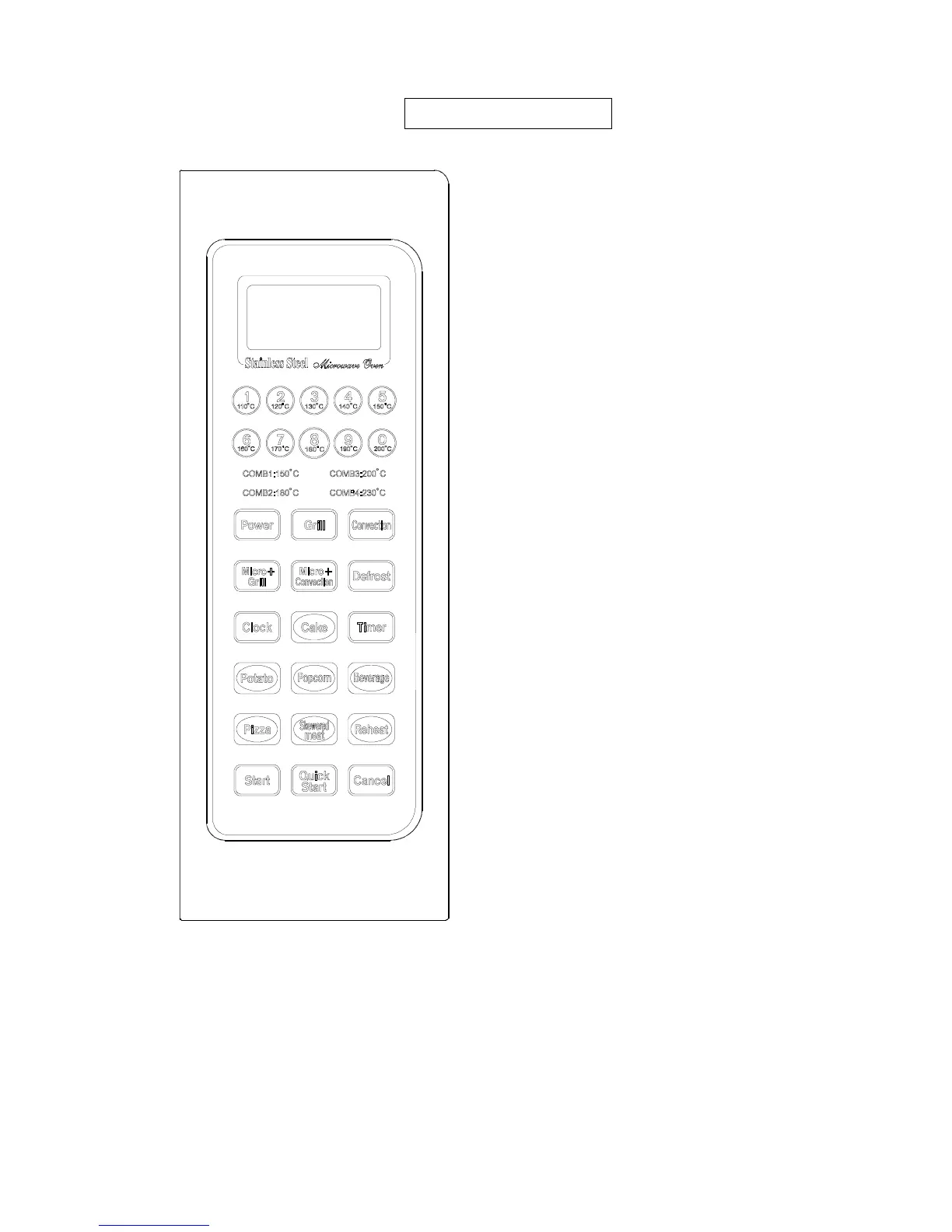
DISPLAY SCREEN
Cooking time, power, indicators and present time are
displayed.
POWER
Press to select microwave power level.
GRILL
Press to set a grill-cooking program.
CONVECTION
Press to program convection cooking.
MICRO + GRILL
Press to select one of two combination cooking settings.
MICRO + CONVECTION
Press to select one of four combination cooking settings.
DEFROST
Touch to defrost food.
CLOCK
Use to set the clock
TIMER
Use to set the oven timer
QUICK COOK BUTTONS
CAKE, POTATO, POPCORN, BEVERAGE, PIZZA,
SKEWERED MEAT, REHEAT
START
Press to start cooking program.
QUICK START
Touch to start the oven quickly at full power
CANCEL
Touch to stop cooking program or clear all previous
settings before cooking starts.


 To Next Page