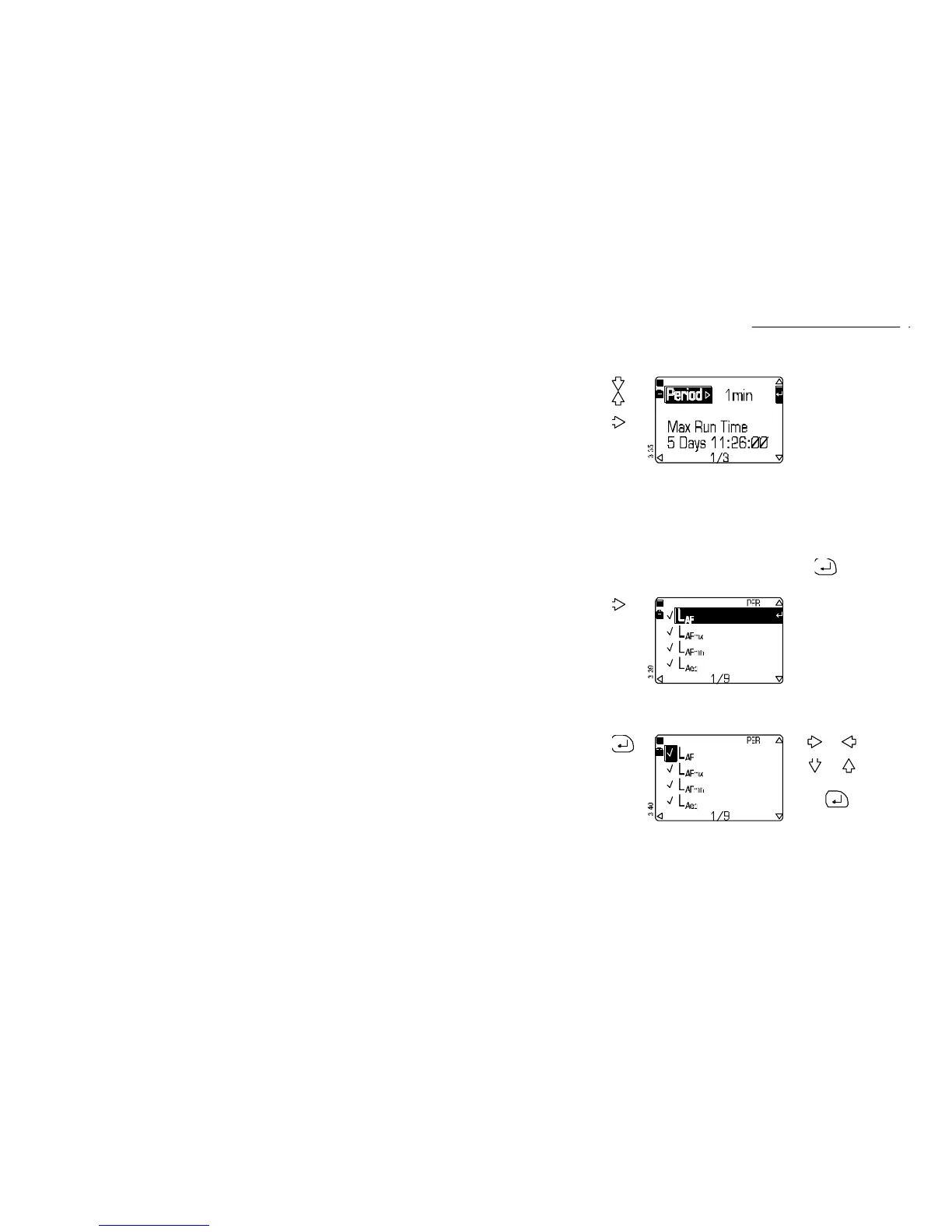
Operation Press Display Shows Comments
9. Select
Period
from the
Setup
screen to
enable
measure-
ment
intervals to
be set
or
then
This screen allows a period
to be specified for regular
sequential measurement.
Period measurement is
available only with a
CEL-490.
The predicted maximum run
time with the currently
selected parameters and
periods and the available
unused memory are also
indicated.
The narrowband measure-
ment period can be set to:
10, 20, 50, 100, 250, 500
milliseconds,
1, 5, 10, 15, 20, 30 seconds,
1, 5, 10 ,15, 20 , 30 minutes,
1 hour, - - - - (=none).
Press to access quick
edit to specify measurement
and periods.
10. Select
Period
Functions
from the
Period
Setup
screen
This screen allows the
following measurement
functions to be specified
(√ =enabled, X =disabled)
using the weightings set in
step 5 above:
L
AF
L
AF50.0
.
L
AFmx
L
AF90.0
L
AFmn
L
AF95.0
L
Aeq
L
AF99.0
L
AF10.0
.
Note that L
Zpk
is not
available as a period
function.
11. If required,
enable (√)
or disable
(X) the
functions
to
enable
quick
edit
mode
Use and to select a
field.
Use and to change
the entry in the field.
Save the settings by
pressing again to
resume normal operation.
CEL-450/490 Operators Handbook - Page 35
Select Mode & Setup



 To Next Page