EasyManua.ls Logo

Casio 5070 - User Manual

Casio 5070
3 pages
Print Icon
To Next Page IconTo Next Page
Loading...
1
Operation Guide 5070
About This Manual
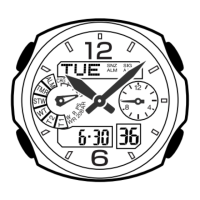
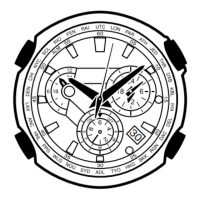
Button operations are indicated using the letters shown
in the illustration.
For the sake of simplicity, the sample displays in this
manual do not show the analog hands of the watch.
Each section of this manual provides you with the
information you need to perform operations in each
mode. Further details and technical information can be
found in the “Reference” section.
Depending on the model of your watch, display text
appears either as dark figures on a light background or
light figures on a dark background.
All sample displays in this manual are shown using dark
figures on a light background.
For indicators, “On” is indicated by a dark indicator on
the positive (dark-on-light) display, and by a light
indicator on the negative (light-on-dark) display.
Press .
Timekeeping Mode World Time Mode Countdown Timer Mode Stopwatch Mode Alarm Mode
Hand Setting Mode
General Guide
Press C to change from mode to mode.
In any mode (except when a setting screen is on the display), press B to illuminate
the display.
Timekeeping
This watch features separate digital and analog timekeeping. The procedures for
setting the digital time and analog time are different.
In the Timekeeping Mode, you can press D to change the display format as shown
below.
Day of the week
Seconds
Month – Day
PM indicator
Hour : Minutes
Day of the Week Month – Day
Hour : Minutes
Press
.
Digital Time and Date
Use the Timekeeping Mode to set and view a digital display of the current time and date.
When setting the digital time, you can also configure settings for summer time
(Daylight Saving Time or DST), your Home City code (the code for the city where you
normally use the watch), the 12/24-hour format, and the illumination duration.
This watch is preset with a number of city codes, each of which represents the time
zone where that city is located. When setting the digital time, it is important that you
select the correct city code for your Home City. If your location is not included in the
preset city codes, select the preset city code that is in the same time zone as your
location.
Note that all of the times for the World Time Mode city codes are displayed in
accordance with the digital time and date settings you configure in the Timekeeping
Mode.
After you correctly set your Home City time and date, you can set the watch up for
timekeeping with a different city code simply by changing the Home City code in the
Timekeeping Mode.
To set the digital time and date
1. In the Timekeeping Mode, hold down A until the
seconds start to flash, which indicates the setting
screen.
2. Press C twice to move the flashing to the Home City
code setting (see the illustration below), and then use
B and D to select the code you want.
Make sure you select your Home City code before
changing any other setting.
For full information on city codes, see the City Code
Table.
3. Press C to move the flashing in the sequence shown below to select the other settings.
Seconds DST Home City Code Hour Minutes
Day Month Year 12/24-Hour FormatIllumination Duration
Screen To do this:
Reset the seconds to
00
Toggle between Daylight Saving Time (
ON
) and
Standard Time (
OF
)
Change the Home City code
Change the hour or minutes
Toggle between 12-hour (12H) and 24-hour
(24H) timekeeping
Change the year
Change the month or day
Select one second ( ) or three seconds ( )
as the illumination duration
Do this:
Press D.
Press D.
Use D (east) and B (west).
Use D (+) and B ().
Press D.
Use D (+) and B ().
Press D.
4. When the setting you want to change is flashing, use B and D to change it as
described below.
5. Press A to exit the setting screen.
Resetting the seconds only (without changing the DST, Home City code, hour, or
minute setting) causes the analog minute hand setting to be adjusted automatically.
See Digital Time Daylight Saving Time (DST) Setting below for details about the
DST setting.
The 12-hour/24-hour timekeeping format you select in the Timekeeping Mode is
applied in all modes.
For details about illumination duration, see Illumination.
Digital Time Daylight Saving Time (DST) Setting
Daylight Saving Time (summer time) advances the digital time setting by one hour
from Standard Time. Remember that not all countries or even local areas use Daylight
Saving Time.
To toggle the Timekeeping Mode digital time between DST and Standard Time
1. In the Timekeeping Mode, hold down A until the seconds
start to flash, which indicates the setting screen.
2. Press C once to display the DST setting screen.
3. Press D to toggle between Daylight Saving Time (
ON
displayed) and Standard Time (
OF
displayed).
4. Press A to exit the setting screen.
The DST indicator appears on the Timekeeping, Alarm,
and Hand Setting Mode to indicate that Daylight Saving
Time is turned on.
Setting the Analog Time
Perform the procedure below when the time indicated by the analog hands does not
match the time of the digital display.
To adjust the analog time
1. In the Timekeeping Mode, press C five times to enter
the Hand Setting Mode.
2. Hold down A until the current digital time starts to
flash, which indicates the analog setting screen.
3. Press D to advance the analog time setting by
20 seconds.
Holding down D advances the analog time setting at
high speed.
If you need to advance the analog time setting a long way, hold down D until the
time starts advancing at high speed, and then press B. This locks the high-
speed hand movement, so you can release the two buttons. High-speed hand
movement continues until you press any button. It will also stop automatically
after the time advances 12 hours or if an alarm (daily alarm, Hourly Time Signal,
or countdown beeper) starts to sound.
4. Press A to exit the setting screen.
The watch will automatically adjust the minute hand slightly to match its internal
second count when you exit the setting screen.
To return to the Timekeeping Mode, press C.
DST indicator
MA0905-EA

Question and Answer IconNeed help?

Do you have a question about the Casio 5070 and is the answer not in the manual?

Overview

This document describes the CASIO Operation Guide 5070, a watch with both digital and analog timekeeping capabilities, offering a range of functions including world time, countdown timer, stopwatch, and alarms.

Function Description

The watch provides comprehensive timekeeping and utility features:

  • Timekeeping Mode: Displays the current digital time and date. Users can configure settings such as Daylight Saving Time (DST), Home City code, 12/24-hour format, and illumination duration. The watch is pre-set with city codes representing different time zones. Analog hands also display the current time, and a procedure is available to synchronize them with the digital display if they become mismatched. The display can toggle between Day of the Week, Month-Day, and Hour:Minutes formats.
  • World Time Mode: Digitally displays the current time in 27 cities (29 time zones) around the world. Users can scroll through city codes to view different times. The DST/Standard Time setting can be toggled for the currently displayed city code, affecting only that specific city.
  • Countdown Timer Mode: A timer that can be set from one minute to 60 minutes. An alarm sounds when the countdown reaches zero. It features an auto-repeat function, which restarts the countdown automatically up to eight times, and a progress beeper that signals the countdown's progress at various intervals. The progress beeper provides short beeps at the top of each countdown minute starting from five minutes before the end, at 30 seconds before the end, and for the last 10 seconds. If the countdown start time is six minutes or greater, it also beeps for the final 10 seconds before the five-minute mark.
  • Stopwatch Mode: Measures elapsed time, split times, and two finishes with 1/100 second accuracy. The display range is 59 minutes, 59.99 seconds. The stopwatch continues to run and restarts from zero after reaching its limit until stopped. It can operate even when exiting the Stopwatch Mode.
  • Alarm Mode: Allows setting five independent Daily Alarms. Four are one-time alarms, and one is a snooze alarm, which repeats every five minutes. An Hourly Time Signal can also be activated, causing the watch to beep twice every hour on the hour. Alarms sound for approximately 20 seconds.
  • Illumination: An LED (light-emitting diode) illuminates the display for easy reading in the dark. The illumination duration can be set to either one second or three seconds.

Important Technical Specifications

  • Accuracy: ±30 seconds a month at normal temperature.
  • Digital Timekeeping:
    • Hour, minutes, seconds, p.m. (PM), month, day, day of the week.
    • Time formats: 12-hour and 24-hour.
    • Calendar system: Full Auto-calendar pre-programmed from 2000 to 2039.
    • Other: 3 screen formats (Day of the Week, Month - Day, Hour: Minutes); Home City code (one of 31 city codes); Daylight Saving Time (summer time)/Standard Time.
  • Analog Timekeeping: Hour, minutes (hand moves every 20 seconds).
  • World Time: 27 cities (29 time zones). Other: Daylight Saving Time/Standard Time.
  • Countdown Timer:
    • Measuring unit: 1 second.
    • Countdown range: 60 minutes.
    • Countdown start time setting range: 1 to 60 minutes (1-minute increments).
    • Other: Auto-repeat timing; Progress beeper.
  • Stopwatch:
    • Measuring unit: 1/100 second.
    • Measuring capacity: 59'59.99".
    • Measuring modes: Elapsed time, split time, two finishes.
  • Alarm: 5 daily alarms (4 one-time alarms, 1 snooze alarm); Hourly Time Signal.
  • Illumination: LED (light-emitting diode); selectable illumination duration (approximately 1 second or 3 seconds).
  • Battery: Two silver oxide batteries (Type: SR726W).
  • Battery Life: Approximately 2 years on type SR726W (assuming alarm operation 20 seconds per day and one illumination operation 1.5 seconds per day).

Usage Features

  • Mode Navigation: A dedicated button allows users to change between different modes (Timekeeping, World Time, Countdown Timer, Stopwatch, Alarm, Hand Setting).
  • Setting Screens: Settings are typically adjusted by holding down a button until digits flash, then using other buttons to change values or toggle options.
  • Scrolling: Buttons are used to scroll through data on the display in various modes and setting screens. Holding these buttons down enables high-speed scrolling.
  • Auto Return Feature: If a screen with flashing digits is left unattended for two or three minutes, the watch automatically exits the setting screen.
  • Initial Screens: When entering World Time or Alarm Mode, the watch displays the data that was last viewed.
  • DST Setting: Daylight Saving Time advances the digital time by one hour from Standard Time. The DST indicator appears on the display when DST is active.
  • Analog Hand Adjustment: A specific procedure is available to adjust the analog hands to match the digital time, including a high-speed hand movement option for significant adjustments.
  • Alarm Control: Alarms can be turned on/off, and the alarm tone can be stopped by pressing any button. The snooze alarm can be canceled by displaying the Timekeeping Mode setting screen or any setting screen during its 5-minute interval.
  • Countdown Timer Control: The countdown timer can be started, paused, resumed, and reset to its starting value.
  • World Time Synchronization: All World Time city codes are displayed in accordance with the digital time and date settings configured in the Timekeeping Mode, based on Greenwich Mean Time (GMT) differential and Coordinated Universal Time (UTC) data.

Maintenance Features

  • Battery Replacement: The full automatic calendar may need to be reset after battery replacement.
  • Illumination Precautions: Frequent use of illumination runs down the battery. Illumination automatically turns off when an alarm sounds. The light may be hard to see under direct sunlight.

Casio 5070 Specifications

General IconGeneral
BrandCasio
Model5070
CategoryWatch
LanguageEnglish

Related product manuals