EasyManua.ls Logo

Casio BABY-G - User Manual

Casio BABY-G
28 pages
Print Icon
To Next Page IconTo Next Page
Loading...
Contents
Precautions
Operating Precautions
User Maintenance
Battery
Mobile Link Precautions
Before Getting Started...
General Guide
Watch Face and Display Indicators
Navigating Between Modes
Cycling Between Timekeeping Mode Digital
Display Contents
Shifting Hands to Read the Digital Display
Charging
Viewing the Face in the Dark
Useful Features
Linking with a Phone
Getting Ready
Auto Time Adjustment
Configuring Reminder Settings
Configuring World Time Settings
Adjusting Hand Alignment
Phone Finder
Configuring Watch Settings
Changing the Home City Summer Time Setting
Checking the Watch Charge Level
Recording Your Current Location (TIME &
PLACE)
Connection
Connecting with a Phone
Disconnecting from Your Phone
Unpairing
If you purchase another phone
Time Adjustment
Using Watch Operations to Adjust the Time
Setting
Using the Watch in a Medical Facility or
Aircraft
World Time
Using CASIO WATCHES to Configure World
Time City Settings
Checking World Time
World Time City Setting
Swapping Your Home Time and World Time
Alarm
Using CASIO WATCHES to Configure Alarm
Settings
Configuring Alarm Settings
Enabling the Hourly Time Signal
Turning Off an Alarm or the Hourly Time Signal
Moving to Another Time Zone
Stopwatch
Split Times and Lap Times
Measuring Elapsed Time
Measuring a Split Time
Measuring Lap Times
Timer
Using CASIO WATCHES to Configure Timer
Settings
Setting the Countdown Start Time
Using the Timer
Reminder
Creating a Reminder
Checking Reminder Details
Hand Alignment Adjustment
Using CASIO WATCHES to Adjust Hand
Alignment
Adjusting Hand Alignment
Other Settings
Specifying the Day of the Week Language
Enabling the Button Operation Tone
Configuring Power Saving Function Settings
Resetting Watch Settings
Other Information
City Table
Summer Time Table
Supported Phones
Specifications
Copyrights and Registered Copyrights
Troubleshooting
Watch Operation Guide 5659
1
MA2307-ED
OPUM-F
© 2021 CASIO COMPUTER CO., LTD.

Table of Contents

Question and Answer IconNeed help?

Do you have a question about the Casio BABY-G and is the answer not in the manual?

Summary

Precautions

Operating Precautions

Essential operating guidelines, including water resistance and band care for safe watch usage.

Band Care and Maintenance

Details on band care, potential issues like skin irritation, and when to stop using a band.

Temperature Precautions

Guidelines on avoiding extreme temperatures to prevent watch malfunction and LCD issues.

Impact Precautions

Information on watch durability against impact and specific shock-resistant models.

Magnetism Precautions

Warning about magnetic fields affecting watch accuracy and components.

Electrostatic Charge Precautions

How electrostatic charges can affect watch display and electronic components.

Chemicals Precautions

Avoid contact with solvents and chemicals that can damage watch parts.

Storage Precautions

Proper storage methods to maintain watch condition and prevent discoloration.

Resin Components Precautions

Care and handling of resin parts to prevent discoloration and damage.

Leather Band Precautions

Advice on storing and caring for leather bands to prevent color transfer and discoloration.

Metal Components Precautions

How to clean and care for metal parts to prevent rust and maintain appearance.

Bacteria and Odor Resistant Band

Information on the benefits and care of bacteria and odor resistant bands.

Liquid Crystal Display Readability

Notes on potential difficulties in reading the LCD from certain angles.

User Maintenance

Guidance on how to clean and maintain the watch and its band for optimal performance.

Dangers of Poor Watch Care

Warnings about risks associated with neglecting watch maintenance, such as rust and premature wear.

Battery Precautions

Information regarding the special rechargeable battery and its care.

Mobile Link Precautions

Legal Precautions for Mobile Link

Compliance with radio laws and restrictions for using the watch in specific areas.

Precautions When Using Mobile Link

Guidelines for maintaining a stable connection between the watch and phone.

Stopping Radio Wave Emission

How to stop the watch from emitting radio waves when necessary.

Disabling Auto Time Adjustment

Instructions on how to disable automatic time synchronization with a phone.

Before Getting Started

Watch Features Overview

An introduction to the watch's main functionalities like Phone Linking, World Time, Alarm, Stopwatch, and Timer.

General Watch Guide

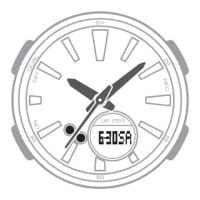
Identifies the main analog and digital components of the watch face.

Watch Face and Display Indicators

Explains the meaning of various indicators displayed on the watch face.

Navigating Between Modes

Navigating Between Modes

How to cycle through different watch modes (Timekeeping, Alarm, World Time, Timer, Stopwatch).

Timekeeping Digital Display Contents

How to change the information displayed in the Timekeeping Mode.

Shifting Analog Hands

How to move the analog hands to improve visibility of the digital display.

Connecting with a Phone

Steps to establish a Bluetooth connection between the watch and smartphone.

Charging the Watch

Low Battery Indicators

Explains what happens when the battery is low or dead, including function limitations.

Dead Battery Procedures

Steps to take when the watch battery is dead or nearly dead.

Charging Time Guidelines

Approximate charging times required for different light levels and durations.

Charge Recovery Times

Details the time needed to recover battery charge from dead to full under various light conditions.

Power Saving Function

Recovering from Power Saving

How to exit power saving modes by pressing a button or exposing to light.

Viewing the Face in the Dark

Turning On Illumination

Instructions on how to activate the LED light for illumination.

Specifying the Illumination Duration

How to set the duration for which the illumination stays on.

Useful Features via Phone Connection

Auto Time Adjustment Feature

How the watch automatically adjusts its time using a connected phone.

World Time City Selection

How to select World Time cities using the phone app.

Recording Anniversaries and Appointments

How to set reminders for important dates using the phone app.

Linking with a Phone

Getting Ready to Link with Phone

Prerequisites for linking, including app installation and Bluetooth activation.

Pairing the Watch with a Phone

Step-by-step guide to pair the watch with the CASIO WATCHES phone app.

Auto Time Adjustment

Using Auto Time Adjustment

How the watch automatically adjusts its time four times daily based on phone data.

Important Auto Time Adjustment Conditions

Situations where auto time adjustment might not occur, like distance or system updates.

Adjusting Hand Alignment

How to correct analog hand alignment if it differs from the digital time.

Triggering Immediate Time Adjustment

Triggering Immediate Time Adjustment

How to manually initiate time synchronization between the watch and phone.

Configuring Reminder Settings

Configuring Reminder Settings

Steps to check and manage reminders set via the CASIO WATCHES app.

Configuring World Time Settings

Selecting a World Time City

Procedure to select a World Time city using the CASIO WATCHES phone app.

Configuring Summer Time Setting

Configuring Summer Time Setting

How to set summer time to Auto, OFF, or ON for a selected city.

Swapping Home and World Time

Swapping Home and World Time

How to exchange the Home City time with the selected World Time City time.

Adjusting Hand Alignment

Adjusting Hand Alignment

Using the phone app to correct analog hand alignment when it is off.

Phone Finder Function

Phone Finder Function

How to use the watch to trigger a sound on your phone to locate it.

Configuring Watch Settings

Configuring Watch Settings

How to configure various watch settings like alarm and timer via the phone app.

Checking Watch Charge Level

Checking Watch Charge Level

How to check the battery charge status using the CASIO WATCHES app.

Changing Home City Summer Time

Changing Home City Summer Time

How to adjust the summer time setting for the Home City through the phone app.

Recording Current Location

Recording Current Location

How to record the watch's current location and time on the phone.

Viewing Recorded Location on Map

How to view recorded location information on a map using the CASIO WATCHES app.

Connection Management

Connecting with a Phone

Steps to connect the watch to a paired phone.

Important Connection Notes

Important notes regarding connection limits and troubleshooting the CASIO WATCHES app.

Disconnecting from Phone

Disconnecting from Phone

How to terminate the Bluetooth connection between the watch and phone.

Unpairing Watch and Phone

Deleting Pairing from CASIO WATCHES App

Steps to delete pairing information from the CASIO WATCHES phone application.

Deleting Pairing Information from Watch

Deleting Pairing Information from Watch

How to remove pairing information from the watch itself.

Time Adjustment Options

Important Time Adjustment Notes

Notes on disabling connections in specific environments like aircraft.

Adjusting Time Using Watch Operations

Setting a Home City

How to select a Home City and configure summer time settings on the watch.

Configuring Summer Time Setting (Watch Operation)

Configuring Summer Time Setting (Watch Operation)

How to manually set summer time (Auto, OFF, ON) directly on the watch.

Setting Time and Date Manually

Setting Time and Date Manually

Step-by-step guide to manually set the time, date, and other timekeeping elements.

Switching Time Format (12;24 Hour)

Switching Time Format (12;24 Hour)

How to toggle between 12-hour and 24-hour time display formats.

Using Watch in Medical Facility or Aircraft

Using Watch in Medical Facility or Aircraft

How to disable auto time adjustment to avoid interference in sensitive areas.

World Time Function

Using CASIO WATCHES for World Time

How to configure World Time cities using the CASIO WATCHES app.

World Time City Setting

How to select a World Time city and configure its summer time setting.

Checking World Time

How to display the current time for a selected World Time City.

Configuring Alarm Settings

Configuring Alarm Settings

Steps to set up, enable, or disable alarms and the hourly time signal.

Swapping Home and World Time

Swapping Home and World Time

How to exchange the Home City time with the currently displayed World Time.

Alarm Function

Alarm Function

Information on how alarms work, including muted sounds and stopping alarms.

Enabling Hourly Time Signal

Enabling Hourly Time Signal

How to turn the hourly chime signal on or off.

Turning Off Alarm or Hourly Signal

Turning Off Alarm or Hourly Signal

Steps to stop an active alarm or hourly time signal.

Moving to Another Time Zone

Before Boarding for Time Zone Change

Steps to configure World Time and disable auto time adjustment before travel.

After Arriving for Time Zone Change

Steps to take after arriving, including swapping times and enabling auto adjustment.

Stopwatch Function

Split Times and Lap Times

Explains the concepts of split time and lap time measurements in the stopwatch.

Measuring Elapsed Time

Measuring Elapsed Time

How to start, stop, resume, and reset the stopwatch for elapsed time.

Measuring Lap Times

Measuring Lap Times

How to record lap times while using the stopwatch.

Timer Function

Using CASIO WATCHES for Timer Settings

How to set the timer's start time using the CASIO WATCHES app.

Setting Countdown Start Time

Setting Countdown Start Time

How to set the start time for the countdown timer, up to 60 minutes.

Using the Timer

Using the Timer

How to perform timer operations like starting, pausing, resuming, and stopping.

Reminder Function

Creating a Reminder

How to create reminders using CASIO WATCHES app after pairing.

Checking Reminder Details

Checking Reminder Details

How to view upcoming and today's reminders from the watch.

Adjusting Hand Alignment Manually

Adjusting Hand Alignment Manually

How to manually adjust analog hand alignment if it's off from the digital display.

Specifying Day of Week Language

Specifying Day of Week Language

How to select one of six languages for the day of the week display.

Enabling Button Operation Tone

Enabling Button Operation Tone

How to enable or disable the audible tone when pressing watch buttons.

Configuring Power Saving Settings

Configuring Power Saving Settings

How to enable or disable the watch's power saving features.

Resetting Watch Settings

Resetting Watch Settings

How to return all watch settings to their initial factory defaults.

City Table

City Table

A list of cities, their time zone offsets, and summer time information.

Summer Time Table

Summer Time Table

Details on when summer time switching occurs for various cities.

Supported Phones

Supported Phones

Information on where to find a list of compatible phones for the watch.

Watch Specifications

Watch Specifications

Technical details including accuracy, timekeeping, world time, stopwatch, timer, and alarm capabilities.

Mobile Link Specifications

Mobile Link Specifications

Details on Bluetooth connectivity, frequency, range, and supported mobile link features.

Copyrights and Registered Trademarks

Copyrights and Registered Trademarks

Legal information regarding trademarks and registered copyrights.

Troubleshooting: Pairing Issues

Unable to Establish Initial Pairing

Steps to resolve problems encountered when trying to pair the watch with a phone.

Phone Model and App Compatibility

Verifying phone model support and CASIO WATCHES app installation.

Phone Bluetooth Settings Check

Ensuring correct Bluetooth configuration on the phone for connection.

Troubleshooting: Reconnection Issues

Watch Not Reconnecting After Disconnect

Addressing issues where the watch fails to reconnect after being disconnected.

Phone Airplane Mode Interference

How phone's Airplane Mode affects watch connectivity.

Bluetooth Enabled;Disabled Issues

Resolving connection problems after changing phone's Bluetooth status.

Phone Turned Off Issues

Steps to take when connection fails after turning the phone off and on.

Timer Countdown Interference

How an active timer countdown can prevent phone connection.

Troubleshooting: Phone-Watch Connection

Unable to Establish Connection

Steps to retry pairing if connection fails, including restarting phone and watch.

Re-pairing After Deleting Information

Procedure for re-pairing the watch after deleting existing pairing data.

Troubleshooting: Auto Time Adjustment

When Does Watch Adjust Time?

Details the scheduled times for automatic time adjustments.

Auto Time Adjustment Not Performed

Reasons why auto time adjustment may not occur and how to fix it.

Time Not Displayed Correctly

Solutions for incorrect time display, possibly due to phone signal issues.

Hand Alignment Issues

How to address misalignment between analog hands and digital time display.

Troubleshooting: Alarms and Hourly Time Signal

Alarm;Hourly Signal Not Sounding

Checks for battery status and ensuring the alarm/signal is enabled.

Hand Movement and Indications

Identifying Current Watch Mode

How to return to or navigate between different watch modes.

All Hands Stopped and Buttons Not Working

Troubleshooting steps for a completely unresponsive watch, likely due to battery.

Hands Moving at High Speed

Explains why hands might move fast, such as during power recovery or time adjustment.

Hands Stopped, Buttons Not Working (Recovery)

What to do when hands are stopped and buttons don't work due to charge recovery.

Time Off by Specific Amount

How incorrect city settings can cause significant time discrepancies.

Time Off by One Hour or 30 Minutes

How incorrect summer time settings can cause minor time discrepancies.

Hand Alignment vs. Digital Time Difference

How magnetism or impact affects hand alignment compared to the digital display.

Other Troubleshooting Resources

Other Troubleshooting Resources

Information on where to find additional help or support for the watch.

Overview

This document is an operation guide for the CASIO Watch 5659, a timepiece with a range of features designed for daily use, travel, and personal organization. The watch combines traditional analog timekeeping with a digital display and offers advanced connectivity through Bluetooth, allowing it to link with a smartphone for enhanced functionality.

Function Description

The CASIO Watch 5659 primarily functions as a timekeeping device, displaying both analog and digital time. Its core features include:

  • Timekeeping Mode: This is the default mode, showing the current time and date. The watch can display time in either 12-hour or 24-hour format and automatically adjusts for summer time.
  • Phone Linking (Mobile Link): The watch connects to a Bluetooth-capable smartphone via the "CASIO WATCHES" app. This connection enables automatic time adjustment, configuration of various watch settings, and access to smartphone-dependent features.
  • Auto Time Adjustment: When linked with a phone, the watch automatically adjusts its time settings four times a day according to a preset schedule (e.g., 12:30 a.m., 6:30 a.m., 12:30 p.m., and 6:30 p.m.). Users can also trigger an immediate time adjustment manually.
  • World Time: The watch can display the current time in any of 38 time zones around the globe, including Coordinated Universal Time (UTC). When connected to the "CASIO WATCHES" app, users can select from approximately 300 cities as their World Time City and configure automatic summer time switching. The watch also allows swapping between Home Time and World Time, useful when traveling.
  • Alarm: The watch supports up to five independent alarms and an hourly time signal. Alarms sound for 10 seconds when the set time is reached. Alarm settings can be configured either directly on the watch or through the "CASIO WATCHES" app.
  • Stopwatch: This mode allows for measuring elapsed time, split times, and lap times, up to 60 minutes in one-second units.
  • Timer: A countdown timer can be set from 1 second up to 60 minutes. An alarm sounds when the countdown reaches zero. Timer settings, including the countdown start time, can be configured via the "CASIO WATCHES" app.
  • Reminder: Users can create reminders for appointments, anniversaries, or other events using the "CASIO WATCHES" app. The watch will display a "REM" indicator and show reminder details (dates, days of the week, and titles) on its digital display. Up to five reminders can be registered.
  • Hand Alignment Adjustment: If the analog hands are out of alignment with the digital time, they can be adjusted manually through watch operations or automatically via the "CASIO WATCHES" app.
  • Phone Finder: This feature allows users to trigger a tone on their smartphone, even if it's in vibrate mode, making it easier to locate a misplaced phone.
  • Recording Current Location (TIME & PLACE): When connected to a phone, the watch can record the current latitude, longitude, date, and time in the phone's memory, which can then be viewed on a map within the "CASIO WATCHES" app.
  • Power Saving Function: To conserve battery life, the watch enters a power-saving state when left in a dark location. In Level 1, the digital display goes blank, but phone connection is still possible. In Level 2, all hands stop, the display goes blank, and all functions are disabled.
  • Illumination: The watch features an LED light for illuminating the face and digital display in the dark. Users can select an illumination duration of either 1.5 or 3 seconds.
  • Button Operation Tone: The watch can be configured to emit a tone when buttons are pressed, which can be enabled or disabled.

Usage Features

The CASIO Watch 5659 is designed for intuitive operation, combining physical buttons with smartphone integration for ease of use.

  • Mode Navigation: The watch has four buttons (A, B, C, D). Pressing button (C) cycles through the different watch modes (Timekeeping, Alarm, World Time, Timer, Stopwatch). Holding down (C) for at least one second returns the watch to the Timekeeping Mode.
  • Digital Display Cycling: In Timekeeping Mode, pressing button (A) cycles through various digital display contents, such as seconds, day of the week/date, and hours/minutes. When paired with a phone, it can also display reminders.
  • Hand Shift Feature: To improve readability of the digital display, the analog hands can be temporarily shifted out of the way by holding down button (B) and pressing (C). The hands will automatically return to normal timekeeping positions after about an hour of inactivity or by pressing (C) again while holding (B).
  • Smartphone Connectivity: To link with a phone, users must install the "CASIO WATCHES" app and enable Bluetooth on their phone. Pairing involves holding down button (C) on the watch until "CNCT" and the Bluetooth indicator flash, then following the app's instructions. Disconnecting is as simple as pressing any watch button.
  • Setting Configuration via App: Many settings, including World Time cities, alarm times, timer start times, and reminder details, are more easily configured through the "CASIO WATCHES" app, which offers a user-friendly interface.
  • Medical Facility/Aircraft Mode: In environments where radio wave emission is restricted, users can disable auto time adjustment and Bluetooth connectivity by following a specific procedure, ensuring compliance with regulations.
  • Summer Time Switching: The watch supports automatic summer time switching for its Home City and World Time cities when set to "Auto" via the app or watch operations.
  • Charge Level Check: The current charge level of the watch's rechargeable battery can be checked using the "CASIO WATCHES" app.

Maintenance Features

The CASIO Watch 5659 requires regular care to maintain its performance and appearance, especially given its water resistance and various material components.

  • Water Resistance: Watches marked "WATER RESIST" or "WATER RESISTANT" are designed for daily use, with varying degrees of resistance (5BAR, 10BAR, 20BAR) indicating suitability for activities like hand washing, swimming, windsurfing, and skin diving. It's crucial not to operate buttons or the crown while the watch is submerged or wet. After exposure to seawater, rinse the watch with plain water.
  • Gasket Replacement: To maintain water resistance, gaskets should be replaced periodically (every two to three years) by an authorized CASIO service center.
  • Battery Replacement: The special rechargeable battery is not user-replaceable. Any battery replacement should be performed by an authorized CASIO service center.
  • Charging: The watch is solar-powered, charging its rechargeable battery when the solar panel (watch face) is exposed to light. To ensure optimal charging, place the watch in a bright location when not wearing it, and avoid blocking the face with clothing. Avoid charging in extremely high-temperature environments to prevent burn injury or damage.
  • Cleaning:
    • General: Regularly wipe the watch and band with a soft cloth to remove dirt, sweat, and moisture.
    • Metal/Resin with Metal Parts: Use a soft toothbrush with a weak solution of water and mild neutral detergent (or soapy water). Rinse thoroughly with water and wipe dry with a soft absorbent cloth. When cleaning, wrap the watch case with plastic wrap to prevent contact with detergent.
    • Resin Band: Wash with water and wipe dry with a soft cloth. Smudges may appear but do not affect skin or clothing.
    • Leather Band: Wipe clean with a soft cloth to remove water and sweat. Avoid prolonged exposure to direct sunlight or dirt, which can cause discoloration.
  • Crown/Button/Bezel Operation: Periodically rotate the crown and rotary bezel, and press buttons to ensure proper operation and prevent future problems.
  • Storage: If not using the watch for an extended period, clean it thoroughly and store it in a cool, dry place. Avoid storing wet watches with other items to prevent color transfer.
  • Band Care: Avoid tightening the band too tightly to prevent skin irritation. Ensure enough room for a finger between the band and wrist. Regularly inspect the band for signs of deterioration (loss of flexibility, cracks, discoloration, looseness, or pin issues) and seek professional inspection or replacement if abnormalities are noticed.
  • Temperature Extremes: Avoid leaving the watch in very high or very low temperatures, as this can cause timekeeping inaccuracies, malfunction, or LCD display issues.
  • Impact: While designed for daily impact, strong impacts can cause malfunction. Shock-resistant models (G-SHOCK, BABY-G, G-MS) are suitable for activities with strong vibrations.
  • Magnetism: Keep analog/combination watches away from strong magnetic fields (e.g., speakers, magnetic necklaces, cell phones) to prevent timekeeping inaccuracies. Very strong magnetism from medical equipment should be avoided as it can damage electronic components.
  • Electrostatic Charge: Very strong electrostatic charge can cause incorrect time display or damage to electronic components.
  • Chemicals: Avoid contact with thinners, gasoline, solvents, oils, fats, cleaners, adhesives, paints, medicines, or cosmetics containing such ingredients, as they can cause discoloration or damage to resin, leather, and other parts.
  • Rust Prevention: Clean dirt from metal components to prevent rust formation, even on stainless steel or plated parts. Wipe metal components exposed to sweat or water with a soft, absorbent cloth and allow to dry in a well-ventilated area.
  • Resetting Watch Settings: The watch settings (including pairing information) can be reset to factory defaults via a specific procedure in the Timekeeping Mode. This will delete pairing information, requiring re-pairing if a phone connection is desired.

Casio BABY-G Specifications

General IconGeneral
BrandCasio
ModelBABY-G
CategoryWatch
Shock ResistanceYes
MovementQuartz
Case MaterialResin
AlarmYes
StopwatchYes
Countdown TimerYes
Band MaterialResin
Display TypeDigital
BacklightYes
Battery Life2-10 years (Varies by model)

Videos

How To Set Time Casio Baby-G 3252 3189

How To Setting Time Casio Baby-G BA-110 Watch

Related product manuals