EasyManua.ls Logo

Casio Casiotone CT-660 - Page 2

Casio Casiotone CT-660
28 pages
Print Icon
To Next Page IconTo Next Page
To Previous Page IconTo Previous Page
Loading...
1,
General
Guide
9ee09s00
O
©
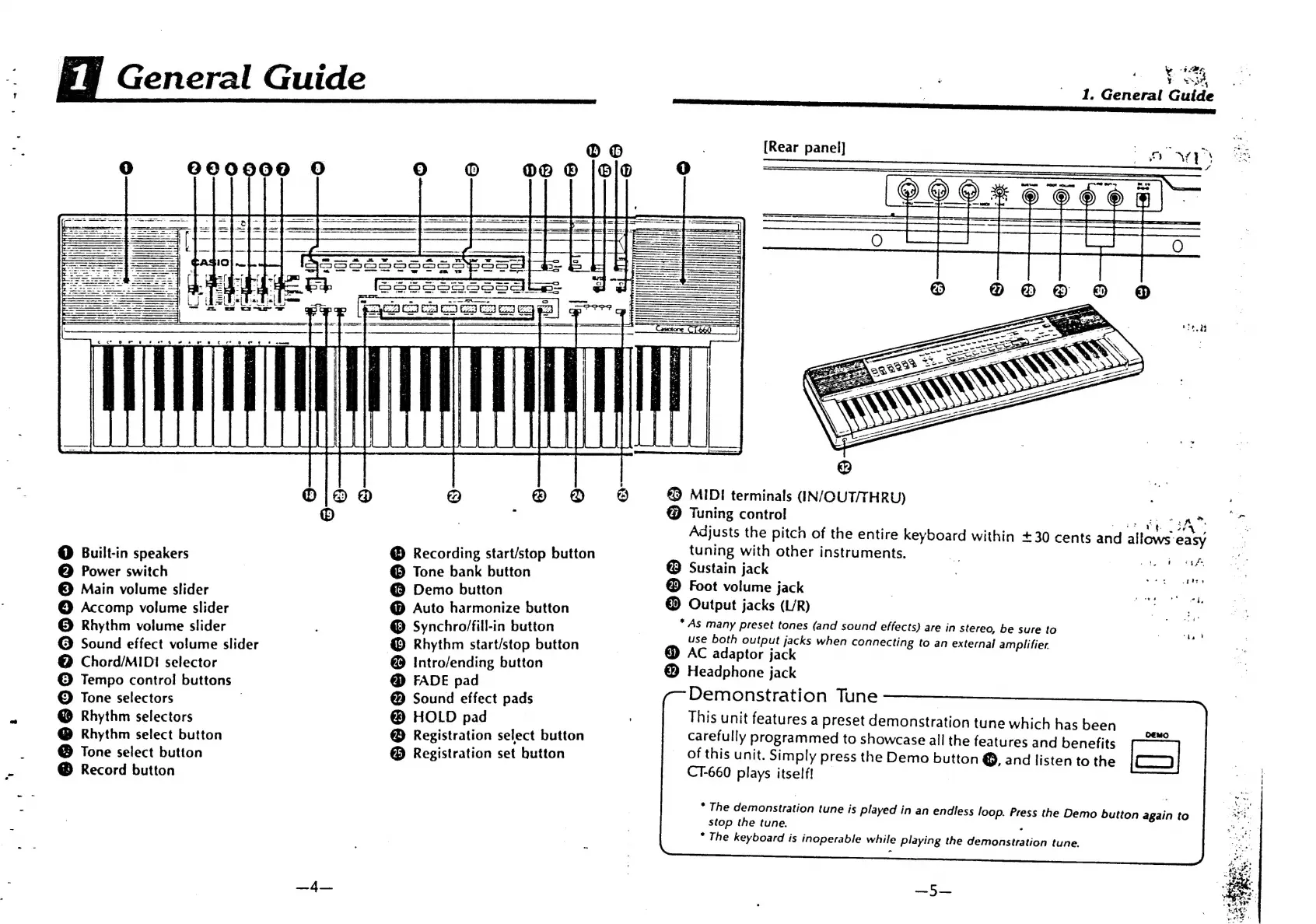
Built-in
speakers
Power
switch
Main
volume
slider
©
Accomp
volume
slider
®
Rhythm
volume
slider
©
Sound
effect
volume
slider
@
Chord/MIDI
selector
©
Tempo
control
buttons
©
Tone
selectors
|
@
Rhythm
selectors
@
Rhythm
select
button
Tone
select
button
@
Record
button
Recording
start/stop
button
@
Tone
bank
button
@
Demo
button
@
Auto
harmonize
button
@
Synchro/fill-in
button
@
Rhythm
start/stop
button
@
Intro/ending
button
@
FADE
pad
@
Sound
effect
pads
@
HOLD
pad
Registration
select
button
®
Registration
set
button
4
ye
Be
ae
her
YO
SSA7,
'
1.
General Guide
|
{Rear
panel]
£9
MIDI
terminals
(IN/OUT/THRUV)
@
Tuning
control
a.
;
ee
;
eng
x
ee
ee:
:
Adjusts
the
pitch
of
the
entire
keyboard
within
+30
cents
and
allows
easy
tuning
with
other
instruments.
@
Sustain
jack
®
Foot
volume
jack
@
Output
jacks
(L/R)
*
As
many
preset
tones
(and
sound
effects)
are
in
stereo,
be
sure
to
use
both
output
jacks
when
connecting
to
an
external
amplifier.
@
AC
adaptor
jack
@
Headphone
jack
Demonstration
Tune
This
unit
features
a
preset
demonstration
tune
which
has
been
carefully
programmed
to
showcase
all
the
features
and
benefits
of
this
unit.
Simply
press
the
Demo
button
@,
and
listen
to
the
CT-660
plays
itself!
=
*
The
demonstration
tune
is
played
in
an
endless
loop.
Press
the
Demo
button
again
to
stop
the
tune.
.
*
The
keyboard
is
inoperable
while
playing
the
demonstration
tune.
>
i
iy
fe
-ftre
“hb

Related product manuals