EasyManua.ls Logo

Casio Casiotone CT-660 - Page 8

Casio Casiotone CT-660
28 pages
Print Icon
To Next Page IconTo Next Page
To Previous Page IconTo Previous Page
Loading...
fe
Me
a
er
er,
i
Dang
RL
ees
“ale
Patt)
ee
eee
ae’
is
“ee
peed
me
pat
=e
gee
tT
Pik
i
OP
oie
>
he
a
wh
ae
ieee
ae
emma:
.
»
alge
-
2
ae’
oe
BAC.
A
TE
ne
Fig
oes!
wey
es
Sar
ike
ease
z
Bo
F'4
verte
se
Reese
ae
o
fl
BR
ae
eeaee
5
oe
aes
Bie
De
ietey
:
Tye
;
Sy
en
a
to
5
ile
Yer
rs
¥
ap
neipPietie
‘a
me,
Tl
-
4.
Preset
Tones
1
e
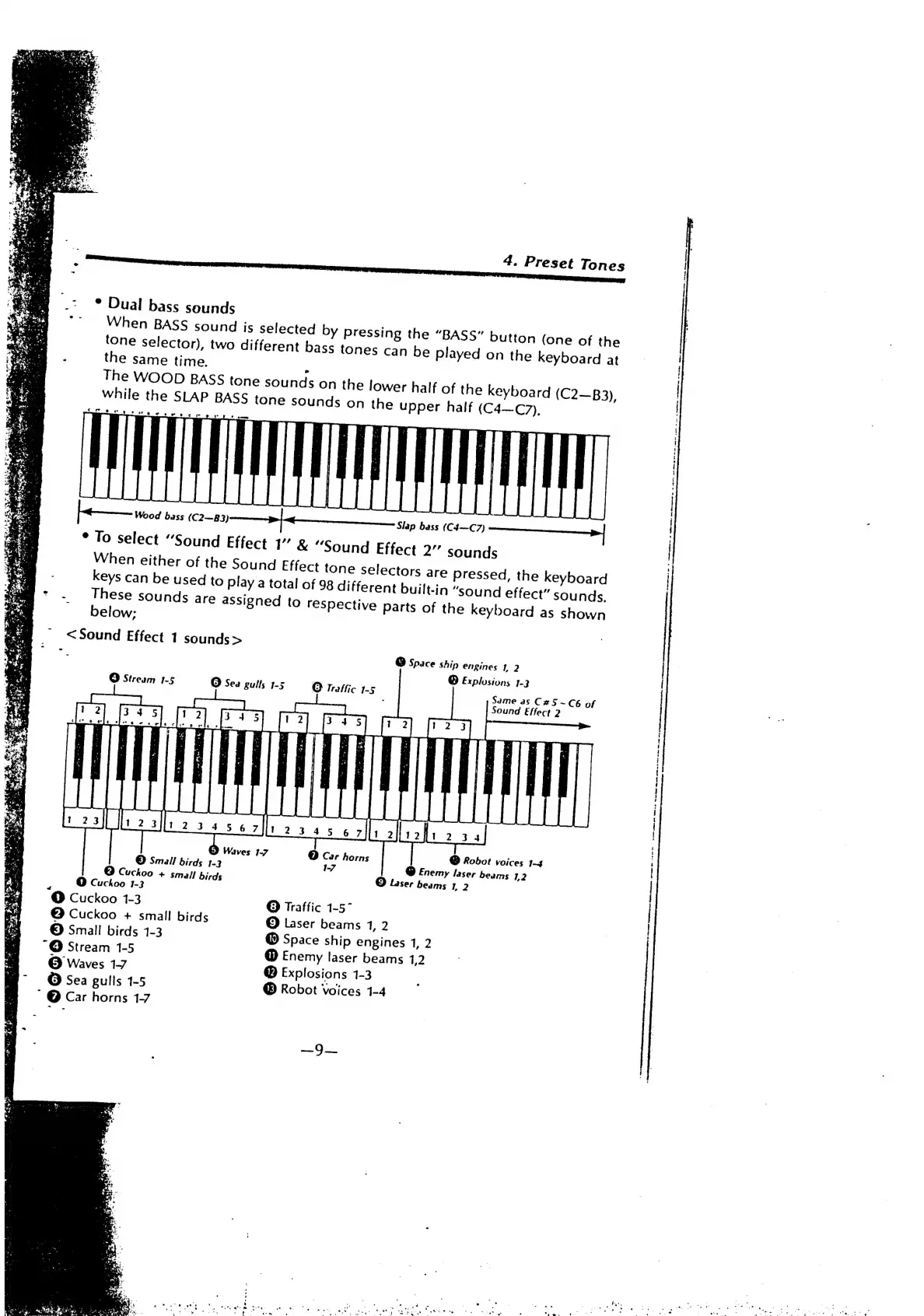
Dual
bass
sounds
When
BASS
sound
is
selected
by
pressing
the
“BASS”
button
(one
of
the
played
on
the
keyboard
at
tone
selector),
two
different
bass
tones
can
be
:
the
same
time.
The
WOOD
BASS
tone
sounds
on
the
lower
half
of
the
k
while
the
SLAP
BASS
ton
eyboard
(C2—B3),
sounds
on
the
upper
half
(C4—C7),
Slap
bass
(C4—C7)
*
To
select
“Sound
Effect
1”
&
“Sound
Effect
2”
sounds
When
either
of
the
Sound
Effect
tone
selectors
are
Pressed,
the
keyboard
keys
can
be
used
to
play
a
total
of
98
different
built-in
“sound
effect”
sounds,
*
.
These
sounds
are
assigned
to
respective
Parts
of
the
keyboard
as
shown
<Sound
Effect
1
sounds
>
be
@
Space
Ship
engines
1,
2
©
Explosions
3-3
O
Stream
1-5
O
Sea
gulls
1-5
O
Traffic
1-5
Same
as
C#5~C6
of
Sound
Effect
2
Dy
Waves
1-7
©
Car
horns
©
Small
birds
1-3
1-7
©
Cuckoo
+
small
birds
O
Cuckoo
1-3
‘@
Cuckoo
1-3
@
Cuckoo
+
small
birds
©
Small
birds
1-3
“@
Stream
1-5
©
Waves
1-7
©
Sea
gulls
1-5
~
@
Car
horns
1-7
@
Robot
voices
1-4
@
Enemy
laser
beams
1,2
©
Laser
beams
1,
2
@
Traffic
1-57
©
Laser
beams
1,
2
@
Space
ship
engines
1,
2
@
Enemy
laser
beams
1,2
Explosions
1-3
@
Robot
Voices
1-4

Related product manuals