EasyManua.ls Logo

Casio Casiotone MT-68 - Page 9

Casio Casiotone MT-68
28 pages
Print Icon
To Next Page IconTo Next Page
To Previous Page IconTo Previous Page
Loading...
;
PREP
Se
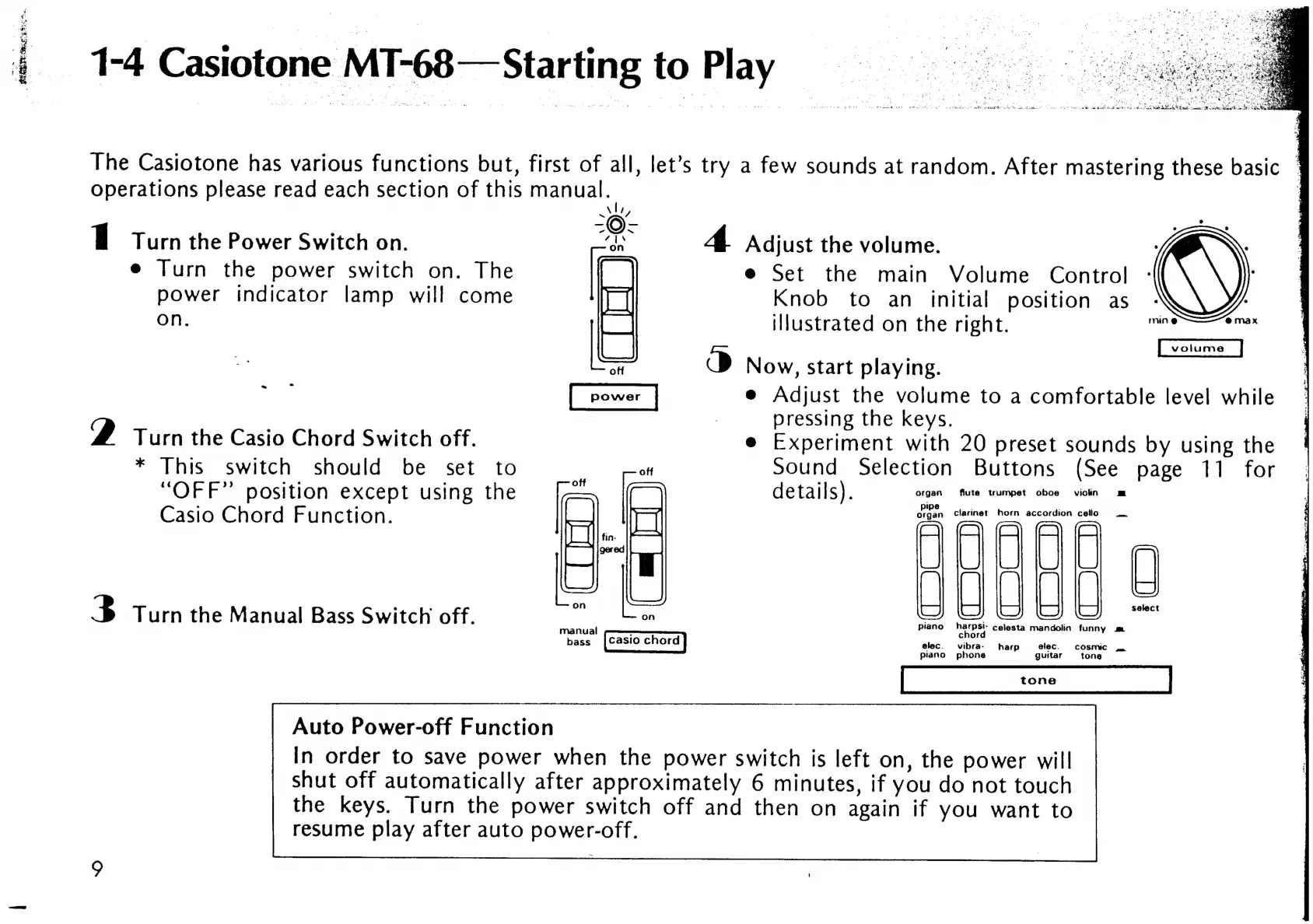
1-4
Casiotone
MT-68—Starting
to
Play
The
Casiotone
has
various
functions
but,
first
of
all,
let’s
try
a
few
sounds
at
random.
After
mastering
these
basic
operations
please
read
each
section
of
this
manual.
WwW,
1
Turn
the
Power
Switch
on.
ne
yt
Adjust
the
volume.
e
Turn
the
power
switch
on.
The
f
e
Set
the
main
Volume
Control
power
indicator
lamp
will
come
Knob
to
an
initial
position
as
on.
illustrated
on
the
right.
ilies
l
att
O
Now,
start
playing.
~
e
Adjust
the
volume
to
a
comfortable
level
while
pressing
the
keys.
2
Turn
the
Casio
Chord
Switch
off.
e
Experiment
with
20
preset
sounds
by
using
the
*
This
switch
should
be
set
to
;
oft
Sound
Selection
Buttons
(See
page
11
for
“OFF”
position
except
using
the
:
(
details).
organ
flute
wumpet
oboe
viotn
Casio
Chord
Function.
organ.
clarinet
horn
accordion
ceilo
B
Turn
the
Manual
Bass
Switch
off.
L
i i
i
H H
ee
Seer
piano
pri
ney
celesta
mandolin
funny
m
:
chor
bass
[Casio
chord
elec.
vibra-
harp
elec.
cosmic
piano
phone
guitar
tone
Auto
Power-off
Function
In
order
to
save
power
when
the
power
switch
is
left
on,
the
power
will
shut
off
automatically
after
approximately
6
minutes,
if
you
do
not
touch
the
keys.
Turn
the
power
switch
off
and
then
on
again
if
you
want
to
resume
play
after
auto
power-off.

Related product manuals