EasyManua.ls Logo

Casio fx-350HB - Page 4

Casio fx-350HB
40 pages
Print Icon
To Next Page IconTo Next Page
To Previous Page IconTo Previous Page
Loading...
important
|
In
no
event
shall
CASIO
Computer
Co.,
Ltd.
be
liable
to
anyone
for
special,
collateral,
incidental,
or
conse-
quential
damages
in
connection
with
or
arising
out
of
the
purchase
or
use
of
these
materials.
Moreover,
CASIO
Computer
Co.,
Ltd.
shall
not
be
liable
for
any
claim
of
any
kind
whatsoever
against
the
use
of
these
materials
by
any
other
party.
¢The
contents
of
this
manual
are
subject
to
change
without
notice.
¢No
part
of
this
manual
may
be
reproduced
in
any
form
without
the
express
written
consent
of
the
manufacturer.
Contents
1/GENERAL
GUIDE
.....................cccececceesnceeenes
5
2/ORDER
OF
OPERATIONS
AND
LEVELS........
10
3
/
CORRECTIONS.
...........
ccc
cece
eee
n
cece
encceeeenees
11
4/OVERFLOW
OR
ERROR
CHECK
..................
12
5
/
POWER
SUPPLY
..............ccc
cece
esecce
reece
nevese
13
6/
SPECIFICATIONS
...............0c.cccccccccccceeeceres
15
7/NORMAL
CALCULATIONS
.......................
127
8/FUNCTION
CALCULATIONS
.....................
149
9/STANDARD
DEVIATIONS
.....................00.
170
ey
1/GENERAL
GUIDE
1-1
Power
ON/OFF
To
turn
your
unit
on,
press
Egon.
To
turn
your
unit
off,
press
(Ff).
Auto
power-off
function
This
unit
automatically
switches
off
if
not
operated
for
approximately
6
minutes.
Power
can
be
restored
by
pressing
the
Q%§on
key.
Memory
contents
and
mode
setting
are
retained
even
when
power
is
switched
off.
1-2
The
keyboard
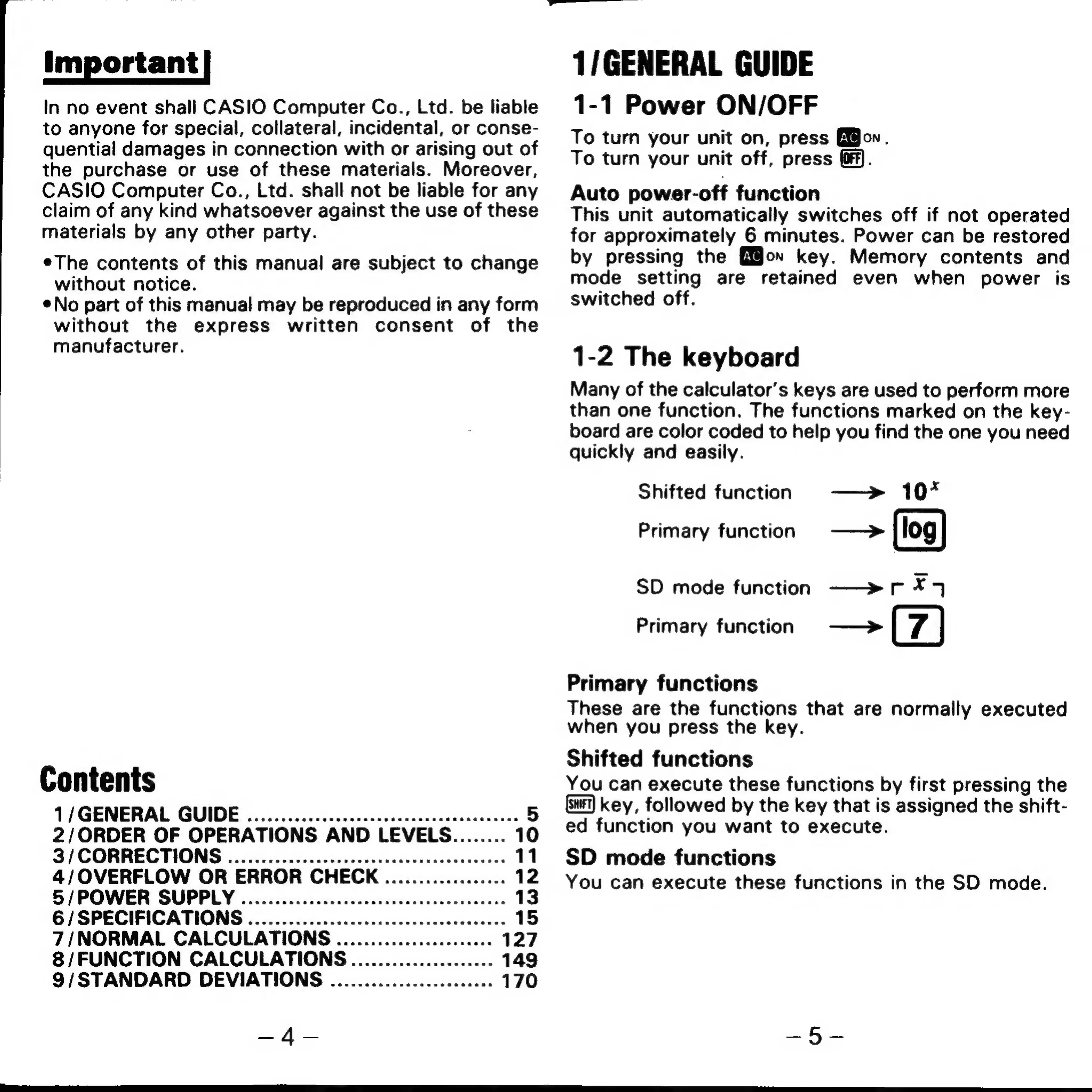
Many
of
the
calculator’s
keys
are
used
to
perform
more
than
one
function.
The
functions
marked
on
the
key-
board
are
color
coded
to
help
you
find
the
one
you
need
quickly
and
easily.
Shifted
function
—>
10*
Primary
function
——>
SD
mode
function
—>r
*74
Primary
function
——>
Primary
functions
These
are
the
functions
that
are
normally
executed
when
you
press
the
key.
Shifted
functions
You
can
execute
these
functions
by
first
pressing
the
key,
followed
by
the
key
that
is
assigned
the
shift-
ed
function
you
want
to
execute.
SD
mode
functions
You
can
execute
these
functions
in
the
SD
mode.

Related product manuals