EasyManua.ls Logo

Casio fx-350HB - Page 5

Casio fx-350HB
40 pages
Print Icon
To Next Page IconTo Next Page
To Previous Page IconTo Previous Page
Loading...
1-3
Modes
When
using
this
calculator,
it
is
necessary
to
select
the
proper
mode
to
suit
your
calculation
requirements.
This
can
be
done
by
using
the
key
in
combination
with
the
number
keys.
(Refer
to
plate
below
the
display.)
(woe)(=]:
SD
is
displayed.
Standard
deviation
calcu-
lation.
{roo}
(0):
COMP
mode.
General
calculations,
including
function
calculations.
(woe](4]:
DEG
is
displayed.
Specifies
measurement
in
‘degrees’.
(woo):
RAD
is
displayed.
Specifies
measurement
in
“radians’’.
foo]
(6]:
GRA
is
displayed.
Specifies
measurement
in
“‘grads’’.
(wo)(7]:
FIX
is
displayed.
Specifies
number
of
decimal
places
from
O
to
9.
(wn)
8]:
SCl
is
displayed.
Specifies
number
of
signifi-
cant
digits
1
to
10.
(voor)
9]:
Cancels
‘’FIX’’
and
‘‘SCI"’
specifications.
This
operation
also
changes
the
range
of
the
expo-
nent
display
(see
page
7).
eYou
can
use
fwo)(4)
through
in
combination
with
the
COMP
Mode
and
SD
Mode.
The
unit
of
angular
measurement
is
retained
when
you
switch
power
off.
©Make
sure
you
press
the
§%§
key
before
making
fua)(4)
through
settings.
eo
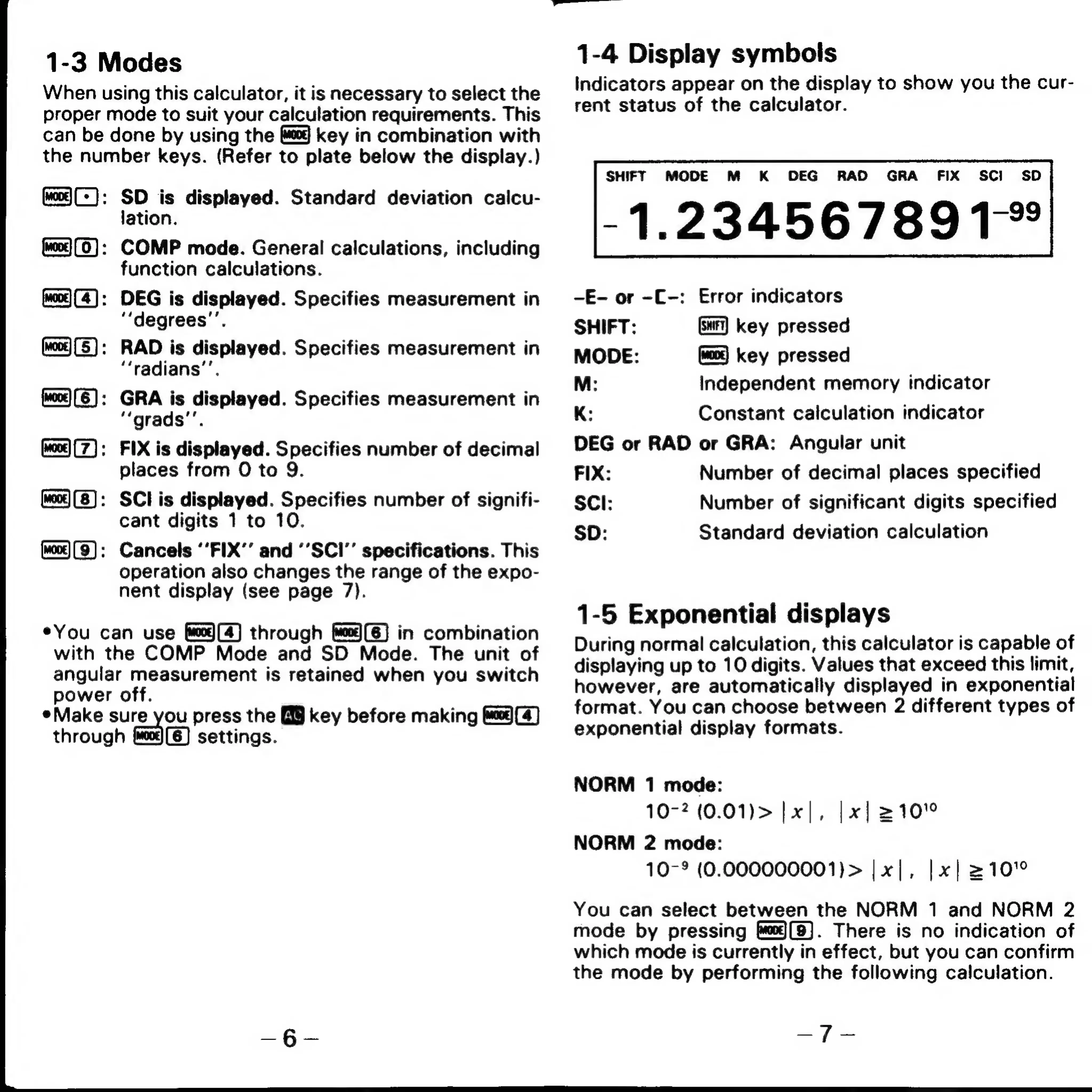
1-4
Display
symbols
Indicators
appear
on
the
display
to
show
you
the
cur-
rent
status
of
the
calculator.
SHIFT
MODE
M
K
DEG
RAD
GRA
FIX
SCI
SD
-1.23456789T*
-E-
or
-C-:
Error
indicators
SHIFT:
Gar]
key
pressed
MODE:
key
pressed
M:
Independent
memory
indicator
K:
Constant
calculation
indicator
DEG
or
RAD
or
GRA:
Angular
unit
FIX:
Number
of
decimal
places
specified
SCI:
Number
of
significant
digits
specified
SD:
Standard
deviation
calculation
1-5
Exponential
displays
During
normal
calculation,
this
calculator
is
capable
of
displaying
up
to
10
digits.
Values
that
exceed
this
limit,
however,
are
automatically
displayed
in
exponential
format.
You
can
choose
between
2
different
types
of
exponential
display
formats.
NORM
1
mode:
10-2
(0.01)>
|
x
NORM
2
mode:
10-9
(0.000000001)>
|x|,
|x|
210"°
You
can
select
between
the
NORM
1
and
NORM
2
mode
by
pressing
f)(8).
There
is
no
indication
of
which
mode
is
currently
in
effect,
but
you
can
confirm
the
mode
by
performing
the
following
calculation.
,
|x|
210°
eT
ae

Related product manuals