EasyManua.ls Logo

Casio fx-350HB - Page 6

Casio fx-350HB
40 pages
Print Icon
To Next Page IconTo Next Page
To Previous Page IconTo Previous Page
Loading...
182008
—
ee
(NORM
2
mode)
(All
of
the
example
in
this
manual
show
calculation
results
using
the
NORM
1
mode.}
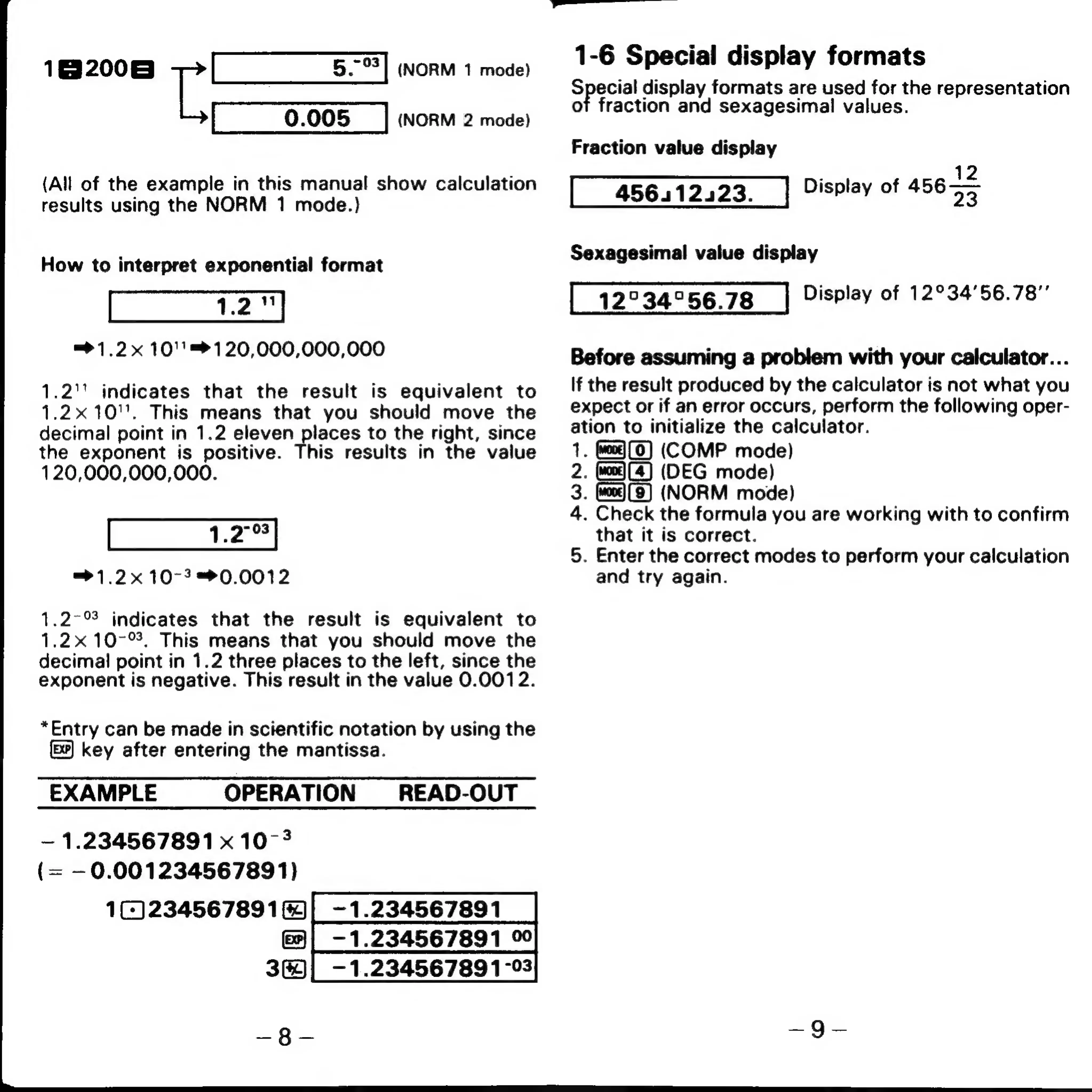
How
to
interpret
exponential
format
=>
1.2x
10''=120,000,000,000
1.2''
indicates
that
the
result
is
equivalent
to
1.2x10''.
This
means
that
you
should
move
the
decimal
point
in
1.2
eleven
places
to
the
right,
since
the
exponent
is
positive.
This
results
in
the
value
120,000,000,000.
=>1.2x
10-3
=0.0012
1.2-%
indicates
that
the
result
is
equivalent
to
1.2x
10-°.
This
means
that
you
should
move
the
decimal
point
in
1.2
three
places
to
the
left,
since
the
exponent
is
negative.
This
result
in
the
value
0.0012.
*Entry
can
be
made
in
scientific
notation
by
using
the
key
after
entering
the
mantissa.
EXAMPLE
OPERATION
_READ-OUT
—
1.234567891
x
10-4
(=
—0.001234567891)
1234567891
-1.234567891
-—
1.234567891
%
3)
|_-1.234567891-93
1-6
Special
display
formats
Special
display
formats
are
used
for
the
representation
ot
fraction
and
sexagesimal
values.
Fraction
value
display
12
ispl
f
456——
Sexagesimal
value
display
12°
34°56.78
Display
of
12°34'56.78”’
Before
assuming
a
problem
with
your
calculator...
If
the
result
produced
by
the
calculator
is
not
what
you
expect
or
if
an
error
occurs,
perform
the
following
oper-
ation
to
initialize
the
calculator.
.
(wea)
(0)
(COMP
mode)
.
(wo)
(4)
(DEG
mode)
:
(NORM
mode)
.
Check
the
formula
you
are
working
with
to
confirm
that
it
is
correct.
.
Enter
the
correct
modes
to
perform
your
calculation
and
try
again.
ao
PWN