EasyManua.ls Logo

Casio fx-350HB - Page 7

Casio fx-350HB
40 pages
Print Icon
To Next Page IconTo Next Page
To Previous Page IconTo Previous Page
Loading...
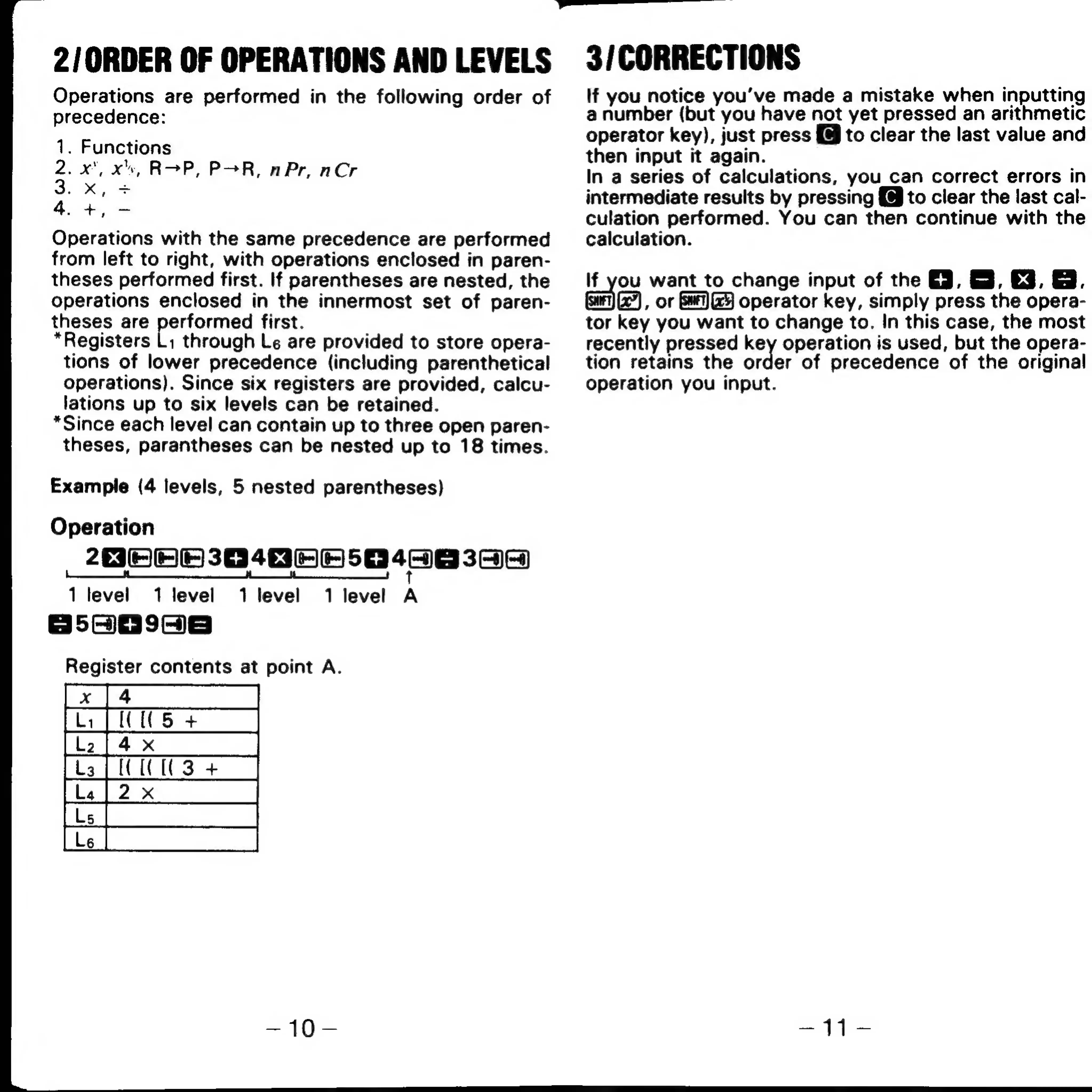
2/ORDER
OF
OPERATIONS
AND
LEVELS
Operations
are
performed
in
the
following
order
of
precedence:
1.
Functions
2.
x",
xv,
ROP,
POR,
n
Pr,
nCr
3.
xX,
+
4.+,-
Operations
with
the
same
precedence
are
performed
from
left
to
right,
with
operations
enclosed
in
paren-
theses
performed
first.
If
parentheses
are
nested,
the
operations
enclosed
in
the
innermost
set
of
paren-
theses
are
performed
first.
*Registers
Li
through
Le
are
provided
to
store
opera-
tions
of
lower
precedence
(including
parenthetical
operations).
Since
six
registers
are
provided,
calcu-
lations
up
to
six
levels
can
be
retained.
*Since
each
level
can
contain
up
to
three
open
paren-
theses,
parantheses
can
be
nested
up
to
18
times.
Example
(4
levels,
5
nested
parentheses)
Operation
2032
34h
Se
4ee
369
1
level
1
level
1
level
1
level
A
S555998
Register
contents
at
point
A.
Cnc
ee
iS
+
(U3
+
Sa
7
a
—10-
een
ee
3/CORRECTIONS
If
you
notice
you’ve
made
a
mistake
when
inputting
a
number
(but
you
have
not
yet
pressed
an
arithmetic
operator
key),
just
press
{@
to
clear
the
last
value
and
then
input
it
again.
In
a
series
of
calculations,
you_can
correct
errors
in
intermediate
results
by
pressing
{@
to
clear
the
last
cal-
culation
performed.
You
can
then
continue
with
the
calculation.
If
you
want
to
change
input
of
the
@,
&,
€3.
B.
a),
or
operator
key,
simply
press
the
opera-
tor
key
you
want
to
change
to.
In
this
case,
the
most
recently
pressed
key
operation
is
used,
but
the
opera-
tion
retains
the
order
of
precedence
of
the
original
operation
you
input.
—~1-