EasyManua.ls Logo

Casio MA-1 - Page 6

Casio MA-1
18 pages
Print Icon
To Next Page IconTo Next Page
To Previous Page IconTo Previous Page
Loading...
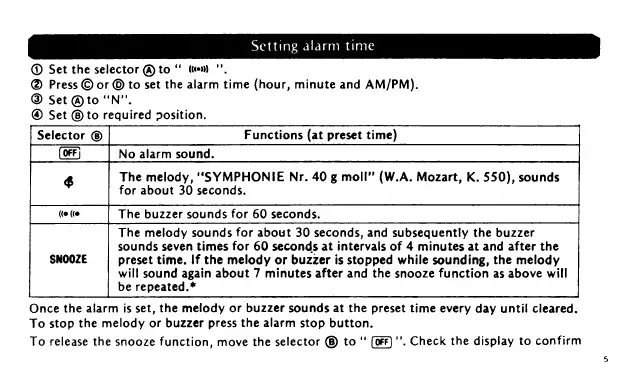
Setting
alarm
time
@
Set
the
selector
@
to
tem
"”.
Press
©
or
©
to
set
the
alarm
time
(hour,
minute
and
AM/PM).
@
Set
@to
'N”.
@
Set
©
to
required
osition.
Selector
Functions
(at
preset
time)
No
alarm
sound.
pe
The
melody,
“SYMPHONIE
Nr.
40
g
moll”
(W.A.
Mozart,
K.
550),
sounds
for
about
30
seconds.
Once
the
alarm
is
set,
the
melody
or
buzzer
sounds
at
the
preset
time
every
day
until
cleared.
To
stop
the
melody
or
buzzer
press
the
alarm
stop
button.
To
release
the
snooze
function,
move
the
selector
®
to“
’’,
Check
the
display
to
confirm
The
buzzer
sounds
for
60
seconds.
The
melody
sounds
for
about
30
seconds,
and
subsequently
the
buzzer
sounds
seven
times
for
60
seconds
at
intervals
of
4
minutes
at
and
after
the
preset
time.
If
the
melody
or
buzzer
is
stopped
while
sounding,
the
melody
will
sound
again
about
7
minutes
after
and
the
snooze
function
as
above
will
be
repeated.*

Related product manuals