The Casio PCR-T2300 and PCR-T2400 are electronic cash registers designed for retail environments, offering a comprehensive suite of features for sales transactions, reporting, and programming. These models are accompanied by a detailed "User's Manual" that covers operation and programming, indicating their suitability for businesses requiring robust point-of-sale capabilities. The manual's table of contents suggests a structured approach to learning and using the device, from basic functions to advanced configurations and troubleshooting.
Function Description:
At its core, the Casio PCR-T2300/T2400 serves as an electronic cash register, facilitating the recording of sales, calculation of totals, and management of transactions. Its primary function is to streamline the sales process, providing businesses with an efficient tool for customer checkout. This includes registering items, calculating taxes, handling various payment methods, and printing receipts. Beyond basic sales, the device offers extensive programming capabilities, allowing businesses to customize its operation to specific needs, such as setting up departments, programming Price Look-Up (PLU) codes, and configuring various system settings.
The cash register is equipped to handle a wide range of daily operations. Users can register items in departments, which likely involves assigning prices, tax rates, and other attributes to different product categories. The ability to perform "Basic setups and registrations" suggests that initial configuration, such as setting the date, time, and perhaps basic tax parameters, is straightforward. For more complex scenarios, "Other registrations" might include functions like discounts, returns, voids, or special transaction types.
A crucial aspect of any cash register is its reporting capability. The Casio PCR-T2300/T2400 provides "Daily sales reports," which are essential for tracking business performance, reconciling cash drawers, and making informed decisions. These reports likely summarize sales by department, PLU, payment type, and possibly other metrics, offering a snapshot of the day's transactions.
The manual also highlights "Advanced programmings and registrations," indicating that the device is highly configurable. This includes "Advanced registrations" for more complex transaction types or operational settings, and "Character settings" for customizing display messages or receipt text. "Advanced programmings" likely refers to a deeper level of customization, allowing users to tailor the cash register's behavior to specific business rules or workflows.
A significant feature is the ability to program "functions of departments and PLUs in a lump" or "individually." This flexibility allows businesses to efficiently set up a large number of items with similar characteristics or to fine-tune individual item settings as needed. This is particularly useful for businesses with extensive product inventories.
The device also supports "Printing programmed data," which is invaluable for verifying configurations and maintaining records of the cash register's settings. This can include lists of departments, PLUs, and other programmed parameters. Furthermore, "Printing various sales reports" suggests a range of reporting options beyond just daily summaries, potentially including hourly reports, period reports, or reports by specific operators.
Important Technical Specifications:
While specific technical specifications like processor speed, memory, or display type are not detailed in the table of contents, the mention of "Specifications" at the end of the manual indicates that this information is available. However, several functional aspects can be inferred:
- Drawer Size: The image on the cover explicitly states "(M size drawer)," indicating that the cash register comes with a medium-sized cash drawer for storing currency and coins. This is a practical specification for physical space and cash handling capacity.
- Connectivity: The inclusion of "Using an SD card" points to data storage and transfer capabilities. SD card functionality is typically used for backing up programmed data, loading new programming, or exporting sales data for analysis on external systems. This suggests a modern design with data management features beyond simple paper printouts.
- Printing: The numerous references to "printouts" and "printing" confirm that the device includes an integrated thermal printer for receipts and reports. The quality and speed of this printer would be detailed in the specifications section.
- Keyboard Layout: The availability of "a free keyboard layout designer" (mentioned in the additional information) suggests that the physical keyboard is programmable and customizable. This is a significant feature for optimizing workflow and ease of use for different businesses.
- Display: While not explicitly mentioned, an electronic cash register of this type would undoubtedly feature a display for showing transaction details, programming menus, and operator prompts. The type (e.g., LCD, VFD) and number of lines/characters would be in the specifications.
Usage Features:
The manual outlines a user-friendly approach to operating the cash register, starting with "Getting started" and "Getting to know your cash register." This suggests an intuitive initial setup and learning curve.
- Ease of Use: The section "How to use your cash register" likely covers basic transaction steps, such as item entry, payment processing, and receipt generation. The emphasis on "How to read the printouts" is crucial for operators to understand the information provided on receipts and reports.
- Preparation for Operation: "Before opening your store" indicates a checklist or set of procedures to be followed at the start of each business day, such as clearing previous day's totals, setting the date, or performing initial cash drawer counts.
- Registration Flexibility: The ability to register items in departments and program PLUs (both in bulk and individually) offers significant flexibility for businesses with varying product ranges and pricing strategies.
- Reporting for Business Insight: The availability of "Daily sales reports" and "various sales reports" provides critical data for business analysis, inventory management, and financial reconciliation.
- SD Card for Data Management: The "Using an SD card" feature simplifies data backup, restoration, and transfer, enhancing the device's utility for data-driven operations and ensuring business continuity.
- Customization: "Character settings" and advanced programming options allow businesses to tailor the cash register's interface and functionality to their specific operational needs, improving efficiency and user experience.
- Troubleshooting Guidance: The section "Before you consider it as a problem" is a valuable usage feature, guiding users through common issues and potential solutions before requiring professional support, thereby minimizing downtime.
Maintenance Features:
While a dedicated "Maintenance" section isn't explicitly listed, several aspects of the manual imply maintenance-related features:
- Troubleshooting: The "Before you consider it as a problem" section serves as a first line of defense for maintenance, guiding users through basic troubleshooting steps that can often resolve minor issues without external intervention. This empowers users to perform simple diagnostic checks.
- Data Backup: The "Using an SD card" feature is a critical maintenance tool, allowing users to back up all programmed data. This protects against data loss due to power outages, system malfunctions, or accidental resets, making it easier to restore the cash register to its operational state.
- Programming Verification: "Printing programmed data" acts as a maintenance check, allowing users to review and verify the current settings of departments, PLUs, and other configurations. This helps in identifying and correcting any programming errors that might affect daily operations.
- Physical Maintenance (Inferred): Although not detailed, typical cash register maintenance would involve cleaning the printer, display, and keyboard, and ensuring the cash drawer operates smoothly. The manual's comprehensive nature suggests that such basic physical maintenance guidelines would likely be covered within the "Getting started" or "How to use your cash register" sections, or in a dedicated "Care and Cleaning" subsection within the full manual.
- Software/Firmware Updates (Inferred): While not explicitly stated, modern electronic cash registers often support firmware updates to introduce new features or fix bugs. The SD card functionality could potentially facilitate such updates, although this would be detailed in the full specifications or advanced programming sections.
In summary, the Casio PCR-T2300/T2400 is a versatile electronic cash register designed for efficient retail operations. Its comprehensive manual indicates a strong focus on user-friendliness, extensive customization options, robust reporting, and practical data management features, making it a suitable choice for businesses seeking a reliable and adaptable point-of-sale solution.

 Need help?
 General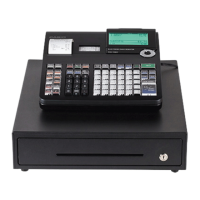

 To Next Page


