Operation Guide PQ-75
2
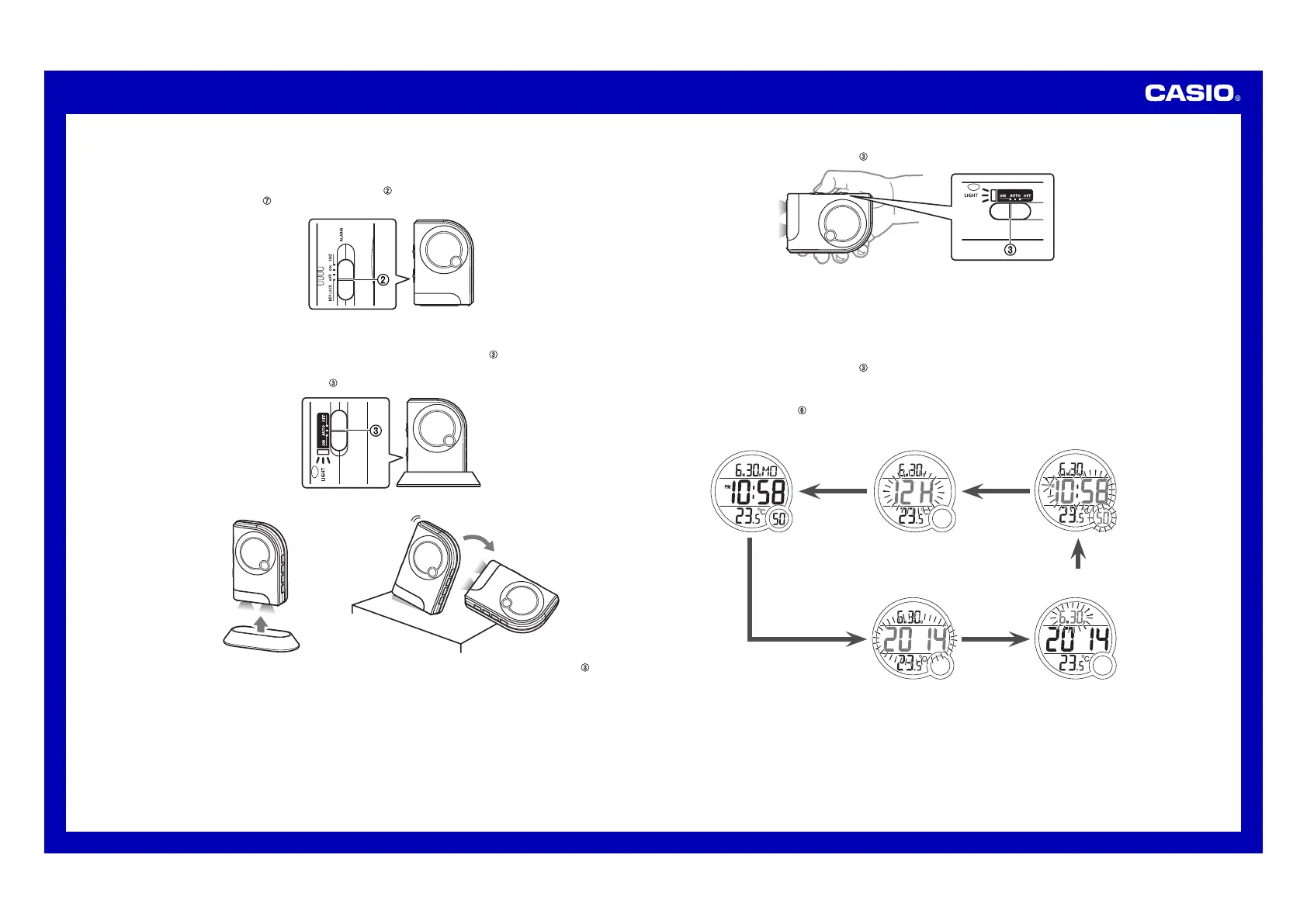
Locking Clock Buttons
You•can•lock•the•buttons•o f•t he• clock•to•protect•against•unintentional•operation•when•packing•the•clock•in•a•bag,•
or•while•using•the•clock’s•LED•light•for•illumination,•etc.
Slide•the•ALARM SNZ/ON/OFF, KEY LOCK switch•(
2)•to•the•KEY•LOCK•position.
••• The•RESET button•(
7)•remains•enabled•while •clock•buttons•are•locked.
2
Using the LED Flashlight for Illumination
You•can•select•the•LED•flashlight•mode•using•the•LIGHT ON/AUTO/OFF switch• (3).
To have the LED light turn on whenever the clock is removed from the stand
Set•the•LIGHT ON/AUTO/OFF switch•(3)•in•the•AUTO•position•and•place•the •clock•onto•the•stand.
3
Remove•the•clock•from•t he• stand•will•cause•the•LED•light•to•light•for•about•two•minutes.
••• If•you•want•the•LED•light• to• remain•on•longer•than•two•minutes,•set•the•LIGHT ON/AUTO/OFF switch•(3)•in•
the•ON•position.
Note•that•the•LED•light •will•turn•on•even•if•the•clock•accidentally•tips•over•f rom•a•vertical•position.•Be•sure•to•use•
the•stand•when•standing•up•the•clock•in•a•vertical•position.
To keep the LED light lit
Slide•the•LIGHT ON/AUTO/OFF switch•(3)•to•the•ON•position.
3
••• Do•not•forget•to•turn•o ff• the •LED•l ight.•Leaving•the•LED•light•on•not•only•shortens•battery•life,•it•can•also•cause•
its•batteries•to•leak•a nd• damage•the•clock.
••• If•the•LED•flashlight•does•not•turn•on•when•expected,•replace•its•batteries•a s•s oon•as•possible.
Caution!
LED Flashlight Precaution
Do•not•look•directly •into•the•LED•flashlight.•Doing•so•can•cause•eye•injury.
To disable the LED light
Slide•the•LIGHT ON/AUTO/OFF switch•(3)•to•the•OFF•position.
USING THE CLOCK
1.•Press•the•SET button•(6)•to•cycle•through•the•setting•screens•as•shown• below.
Normal Timekeeping Screen 12-hour/24-hour Timekeeping
Screen
Time Setting Screen
Month and Day Setting
Screen
Year Setting Screen


 To Next Page