Head
thistretgat.cunies
ou
ae
es
eee
ies
Timekeeping
Function.......
Pir
FUROHOM
3o.a8oo5s
x
scp
sacaicceititeslusistewua
bck
thons
dawn aast
dace
eared
inputting
Characters
2.0)
.a2hapheleited
fouatis
alae
dg
nieuaucns
ese
BQ
Re
Ca
ING
CBG:
ciateidinascaccesetiactoigeicatreutaadialatenetude
wad
eee
aes
Editing
Data
..........
sia
veils
Lasonanecedahngeharbontoanieatte
Kade
cnasinvtviaawckhageeceniaaes
E-
Secret.
MEMOry
Area
oo...
cee
ceecseeeeeeeteeeeneeee
Pit
Lieani
aera
acne
ie
E-
Euro.
Conversion
Mode
(SF-3300ER/3600ER)
............ccccccsceseseeseeeee
E-
Conversion
Mode
(SF-3300A/3305A/3600A)
00.0...
ccecccceetscsseseseeenenees
Memory
Capacity
Display
........00.ccceecceeiesssecnnecneseeeeneeceneeeeenenseeesteeens
Calculator
Mode
........e
eee
ceeeneeeteeees
Secuieetwaleteaceres
Sp
Siac
tah
etisaceieenss
ta:
E-2
About
the
Power
Supply
.........
seobe
pea
oe
~B
MIGSSA
OES
csietiics
Nested
whiein
dees
eee
sc
E-24
World
Time
City
Table
.......ccecceceseseeseeenens
ee
puree
a
:
es
a
Specifications
..........00...
wa
eeacaeneieanenetea
ueeteeetses
tel
os
oe
E-26
@
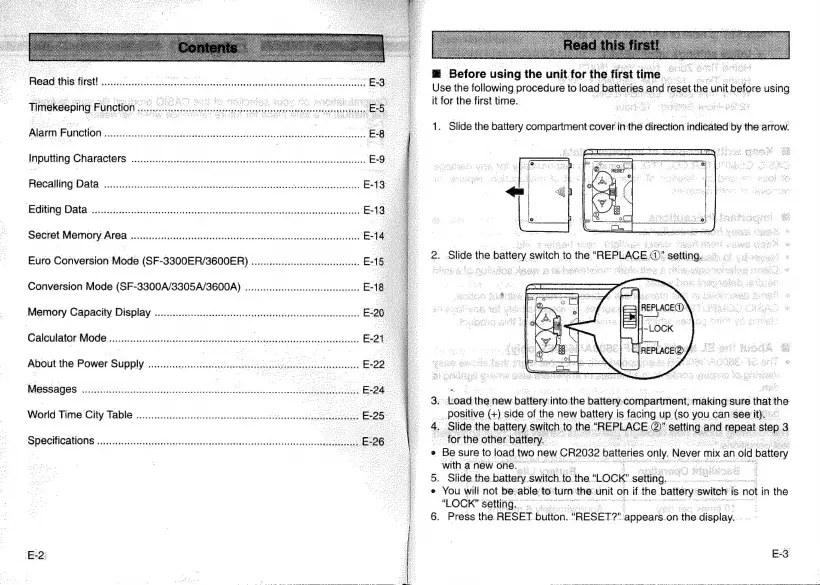
Before
using
the
unit
for
the
first
time.
Use
the
following
pieces
to
load
batteries
¢
nd
reset
the
|
unit
before
using
3.
Load
the
new
battery
into
the
battery
compartment,
makingsure
that
Ane
__.positive
(+)
side
of
the
new
battery
is
facing
up
(so
you
can
see
it.
4.
Slide
the
battery
switch
to
th
“REPLACE
@)’
setting
and
epeat
step
3
"for
the
other
battery.
e
Be
sure
to
load
two
new
CR2032
batteries
only.
Never
mix
an
old
battery
with
a
new
one.
i
:
5.
Slide.the
battery.
$witch
to.
the.
‘LOCK’
setting.
e
You
will
not
be
able
to’
turn
the.
unit
on
if
the
silat
‘switch:
is
not
in
the
“LOCK”
setting.
6.
Press
the
RESET
button.
“RESET?”
appears.
on.
‘the.
display.


 To Next Page