EasyManua.ls Logo

Casio SF-3300A - Page 3

Casio SF-3300A
14 pages
Print Icon
To Next Page IconTo Next Page
To Previous Page IconTo Previous Page
Loading...
Home
Time
Zone:
‘New
York.
P
(NYC).
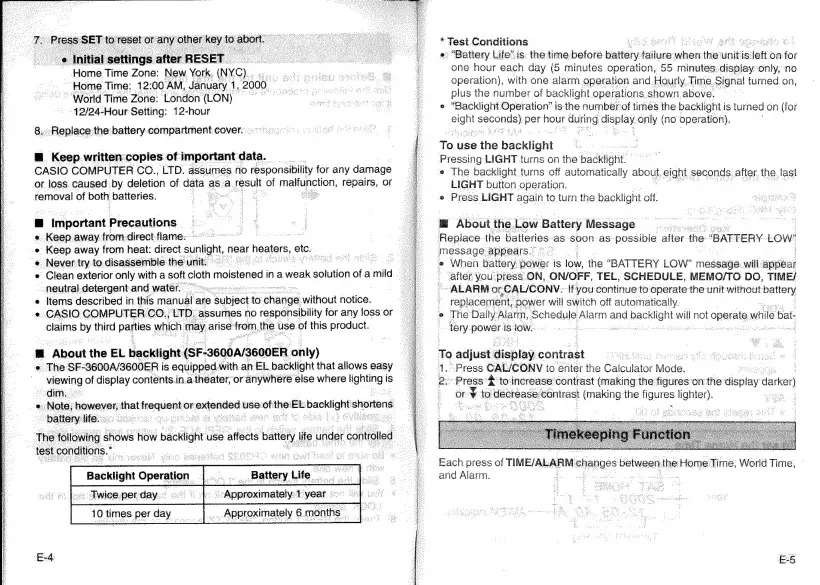
Home
Time:
12:
00-AM,
January
1,
"2000.
“World
Time
Zone:
London
(LON)
»
“42/24-Hour
Setting:
12-hour
8.
Replace
the
battery
compartment
cover.o
°°:
M@
Keep
written
copies
of
important
¢
data.
CASIO
COMPUTER
CO.,
LTD.
assumes
no
responsibility
for
any
damage
or.
loss
caused
by
deletion
of
data
«
as.
a.
2
result
of
a
UNEHOn
repairs,
or
removal
of
both
batteries.
Beet
Se
m
Important
Precautions
«
Keep
away
from-direct-flame:-
Basse
Keep
away
from
heat:
direct
sunlight,
near
cited
etc.
.
Never
try:
to.
disassenible
the
unit.
FENG
OS
:
Clean
exterior
only
with
a
soft
cloth
“outoned?
ina
cweak
solution
i
a
mild
neutral-detergent
and-water.
Items
described
in
this
manual
are
subject
to
‘change
without
notice.
¢
CASIO
COMPUTER
CO.,LTD.
‘assumes
no
responsibility
for
any
loss
or
claims
by
third
parties
which
may
arise
ieee
the.
use
of
this
product.
*
@
@
@
About
the
EL
backlight
(SF-3600A/3600ER
only)
«
The
SF-3600A/3600ER
is
equipped.
with
an
EL
backlight
that
allows
easy
viewing
of
display
contents.in.a
theater;
or
anywhere
else
where
lighting
i
is
dim:
«Note;
howeyer;
that:
——
or.
contented:
use:
us
thos
EL
ae
shortens
battery
life:
renee
The
suuline
&
shows
how
backlight
use
affects
batte
test
conditions.”
; |
oe
oy
atiag:
se
iiGe
idilileed
_.
Battery
Life
<—
5
Backlight
Operation
sy
Pe
_~
Twice
perday.
<<
©
|
«Approximately:1
year
“Tories
per
day
|
Approximately
6
months
|
*
Test
Conditions
Pi
SNR:
MOBS
ga
cks
ets,
cee
of
«
“Battery
Life’is:
the
time-before
biatiery
pluses
when
ths
unit
is:
sletto
on
fo
one
hour
each
day
(5
minutes
operation,
55
minutes:
display°only,
no
operation),
with
one
alarm.operation
and.
Hourly.
Time
Signal
turned
on,
plus
the
number
of
backlight
operations
shown.
above.
e
“Backlight
Operation’
is
the
number
of
times
the
backlight
i
is
turned
on
(for
Ac
Scnonne
oe
hour
als
cane
only
(no
operation).
To.
use
the
backlight
Pressing
LIGHT
turns
on
the
Backlight
e
The
backlight
turns
off
automatically
about,
eight
seconds.
after.
the
last
LIGHT
button
operation.
¢
Press
LIGHT
again
to
turn
the
backlight
off.
@
About
the.
Low
Battery
Message
Replace.
the
batteries
as
soon
as
possible
after
the
“BATTERY
LOW
message
appears.
e
When
battery.
power
is
ion
the
“BATTERY
LOW”
message.
will
appear
after
you
pres$
ON,
ON/OFF,
TEL,
SCHEDULE,
MEMO/TO
DO,
TIME/
ALARM
or
CAL/CONV:
If
you
continue
to
operate
the
unit
without
pared)
;
:
teblecarttte
power
will
switch
off
automatically.
7
The
Daily'Alarm,
Schedule
Alarm
and
sen
will
not
operate
while
bat-
tery
POWEE
is
low.
To
adjust
display:
contrast
“Press
CAL/CONV
to
enter
the
Calculator
Mode.
Press
#
to’
increase:
contrast
(making
the'figurés’on
the
display
darker)
©
OF
nF
tc
to
decreas:
contrast
pmaking
the
Nourse
lighter).
Each
press
of
TIME/ALARM
ohanges
between,
ibe
Home
Time,
World
Time,
and
Alarm.
5

Related product manuals