EasyManua.ls Logo

Casio SF-3300A - Page 4

Casio SF-3300A
14 pages
Print Icon
To Next Page IconTo Next Page
To Previous Page IconTo Previous Page
Loading...
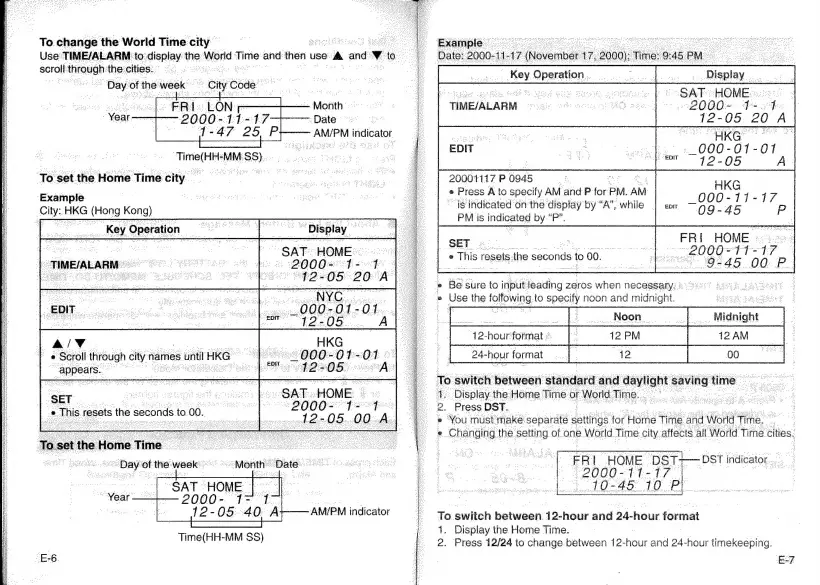
To
change
the
World
Time
city
:
|
Use
TIME/ALARM
to:
display
the
World
Time-and
then
use
>
and
to
|
scroll
‘orauab
thecities:
=.
-
"Day
of
the
week
=
‘oiye
Code
_
=
ER.
Le
i
np
PGMs
Month
-
Year.
Date
AM/PM
indicator
LON
Time(Hieh
“MM
89),
To
set
the
Home
Time
city
Example
City:
HKG
(Hong
Kong)
Key
Operation
Display
SAT
HOME
Se
98
200
Ovi
fl
4:
ogee
aed
TIME/ALARM
-
A/V
ee
*
Scroll
through
cs
names
Ertl
HKG
ae
appears.
eee
ae
ae
oe
aa
nora
|
“20002°°1=
1
vod2>05-00
SET
a
This
resets
the
seconds
to.
00.
A
AM/PM
indicator
Time(HH-MM
SS)
-E-6
Ce
eee
7
-
J
@
Wis
rasets-t
ihe
seconds
to
00,
Example
ccna
erent
scones
Date:
2000-11-
-17
(November
17,
2000):
Time:
9:
45
BPM
a
ae
‘Dieclay
“SAT
HOWE
2000
+94
12-05
20
A
_
Key
Operation
TIME/ALARM
20001117
P
0945
;
e
Press
A
to
specify
AM
and
P
for
PM.
AM
is
indicated
on
the
display
by
“A”,
while
PM
is
indicated
by
“P”.
FRI
HOME
==.
2000=11=
147
“9-45
00
P
SET
;
Be
sure
to
input
leading
zeros
when
necessary:
®
Use
the
folfowing
to
al
noon
and
midnight.
a
PM
a
AM
4
To.
switch
between
standard
and
Havlight
saving
time
1.
Display
the
Home
Time.
or
World
Time...
2.
Press
DST.
«
You
must
make
separate
settings
for
Home
Ti
ime
and
World
Time.
°
°
Changing
the
setting
of
one
World
Time
city
affects.
all
World
Time.
cities,
12-hour
format
»
24-
hour
format
FAL
HOME
DST+
2000-11-17
|
10-45
10
Pl.
-DST
indicator...
od
To
switch
between
as,
and
24-hour
format
1.
Display
the.
Home
Time.
2.
Press 12/24
to
change.between
12-hour
and
24-hour
timekeeping.
Ev

Related product manuals