EasyManua.ls Logo

Casio SF-3300A - Page 5

Casio SF-3300A
14 pages
Print Icon
To Next Page IconTo Next Page
To Previous Page IconTo Previous Page
Loading...
ns
unds
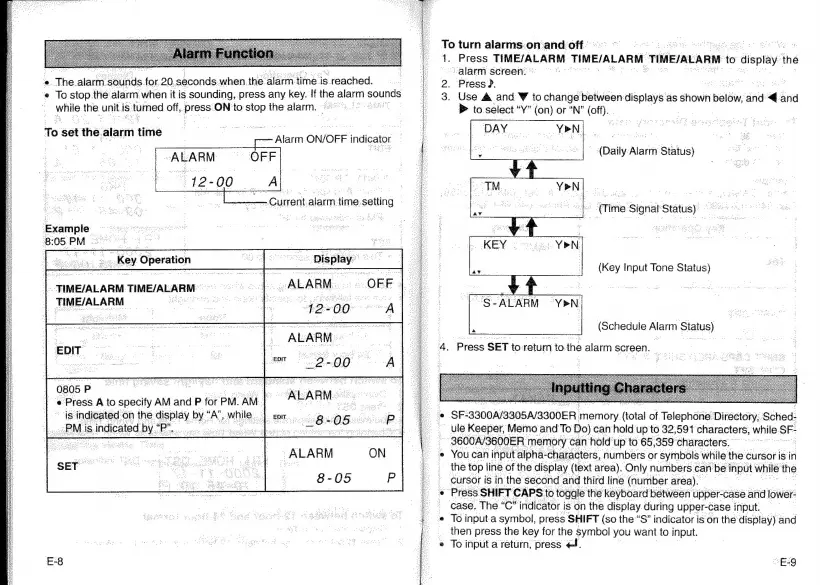
for.20.seconds.when.
the
alarm
time
is
reached.
while
the.
unit.
is
turned
off,
press
ON
to
stop
the
alarm.
|
To
cat
the.
lait
time
Alarm
ON/OFF
indicator
Example
8:05.PM
=
|
|
.
.
Key
Operation
°°
Display:
TIME/ALARM
TIME/ALARM
TIME/ALARM
0805
P
e
Press
A
to
specify
AM
and
P
for
PM.
‘AM.
is
indicated
on
the
display.
Be
“A
while
|
om...
~PMis
indicated
Py
stele
cats
y
Hae
8
-05
E-8
‘e
Tostop.
the
alarm
when
itis
sounding,.press
any
key.
If
the
alarm
vival
:
Current
alarm
time.setting
-
To
turn
alarms.:on
and
off
41.
Press
TIME/ALARM
TIME/ALARM
TIME/ALARM-
to
display
the
alarm
screen:
2.
Press
?.
3.
Use
&
and
¥
to
change
between
displays
as
shown
wld,
aha
a
and
A.
®
to
select
“Y”
(on)
or
“N’
(off).
~
(Daily
Alarm
Status)
(Time
Signal
Status)
(Key
Input
Tone
Status)
“S-ALARM
YPN
(Schedule
Alarm
Status)
Press
SET
to
return
tothe
alarm
screen.
SF-3300A/3305A/3300ER
memory
(total
of
Telephone
Directory;
Sched-
ule
Keeper,
Memo
and
To
Do)
can
hold
up
to
32,591
characters,
while
SF-
3600A/3600ER
‘memory
can
hold
up
to
65,359
characters.’
You
can
input
alpha-characters,
numbers
or
symbols
while
the
cursor
is
in
the
top
line
of
the
display
(text
area).
Only
numbers
can
be
input
while
the
cursor
is
in
the
second
and
third
line
(number
area).
Press
SHIFT
CAPS
to
toggle
the
keyboard
between
upper-case
and
lower-
case.
The
“C”
indicator
is
on
the
display
during
upper-case
input.
To
input.
a
symbol,
press
SHIFT
(so
the
“S”
indicator
is
on
the
display)
and
then
press
the
key
for
the
symbol
you
want
to
input.
To
input
a
return,
press
</.
“EQ

Related product manuals