EasyManua.ls Logo

Casio SF-3300A - Page 6

Casio SF-3300A
14 pages
Print Icon
To Next Page IconTo Next Page
To Previous Page IconTo Previous Page
Loading...
e
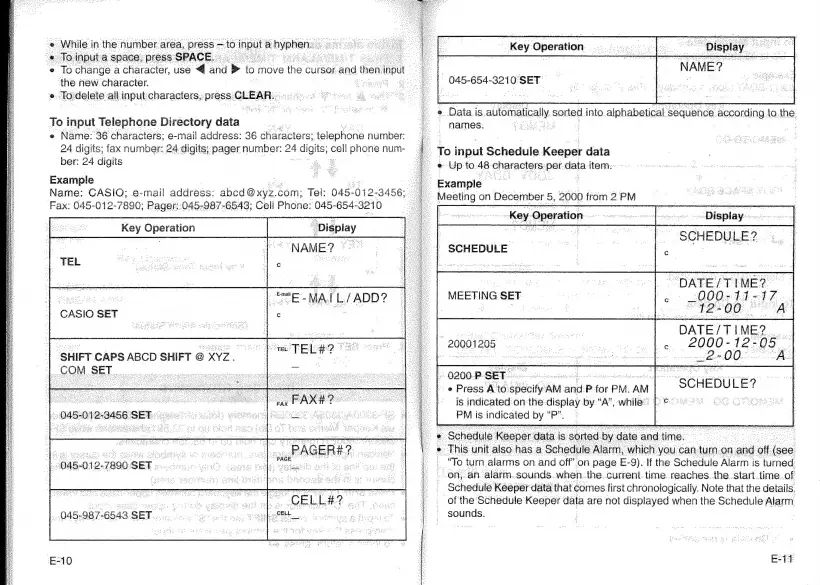
While
in
the
number
area,
press
to
input
a
hyphen.
B
o
input:
a
space,
press:
SPACE.
‘e
To
change
a
character,
use
ahd
>
to
move
the
cursor
and
then
input
the
new
character.
«.
To
delete:
al
input
characters,
press
CLEAR.
io
To
input
Telephone
Directory
data
'
e
Name:
36
characters;
e-mail
address:
36
characters:
telephone
number:
24
digits;
fax
number:
24
digits;
pager
number:
its;
cell
phone
num-
ber:
24
digits
2
8
Example
Name:
CASIO;
e-mail
address:
sseaowye.
com;
Tel:
045-012-
3456;
Fax:
045-012-7890;
Pager::045-987-6543;
Cell
Phone:
045-
654-3210
Key
Operation
"Display
oe
MA
IL/
eae
c
CASIO
SET
SHIFT
CAPS
ABCD
SHIFT
@
XYZ.
ae
COM
SET
:
_
Ones
3456
SET.
045-012-7890
SET
grew
.
a
ee
+i
ee
ney
045-987-6543.
SET
vec
tece
he
not
wo
FAG
oa
Example
|
SCHEDULE
Key
Operation
045-654-3210
SET
e
Datais
auloniatically
sorted
into
alphabetical
sequence.
‘according.
fo.the:
~
names:
_
To
input
Schedule
Keeper
data
e
Up
to
48
onpraeters
eu
data
item:
lll
on
December
5,
2000
from
2PM
Key
Sngration
wee
oo
Display
SCHEDULE?
“DATE/TIME?
e000:
441
4
Z.
12-00
A
DATE/TIME?
.
2000-12-05
e200
MEETING
SET.
©
20001205
0200.P-
SET
--@
Press
Ato:
adolf
AM:
‘and:
P
for
PM.
AM
is
indicated
on
the
display
by
“A”,
while.
PM
's
indicated
ei
ue
:
~
SCHEDULE?
:
‘To
turn
alarms
on
and
off”
on
page
E
-9),
if
the
Scnadule
Alan
is
forked
on,
an.
alarm.sounds
when.
the..current.time.reaches.
the.
start.time.of
_
Schedule
Keeper
data
that
comes
first
chronologically.
Note
that
the
details
of
the
Schedule
Keeper
data
are
not
displayed
when
the
Schedule
Alarm
sounds.

Related product manuals