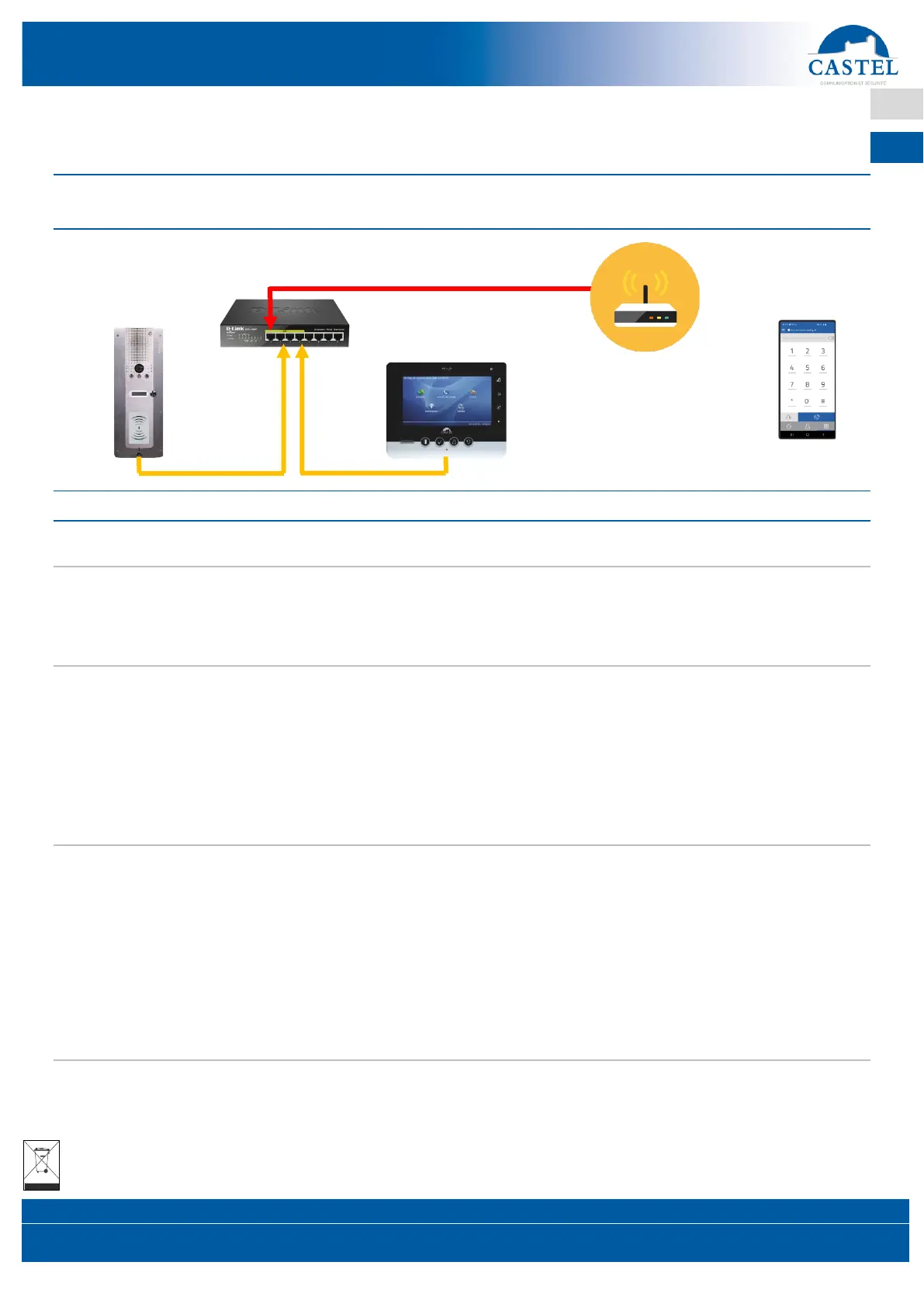
FUNCTIONAL DIAGRAM 2: A CALL FROM THE DOOR ENTRY STATION TO
THE MONITOR + CALL OVERFLOW TO A SMARTPHONE
PROCEDURE TO FOLLOW
Connect your switch to your internet box or local network (with internet access)
Your door entry station needs to be connected to the internet so that calls can be overflowed to the CASTELSip
mobile app, in case the monitor does not answer.
This can be done via the configuration of your internet box, or via your local network, if it already has internet access.
Installing your monitor
Connect the intercom monitor to one of the PoE/PoE+ ports on the switch provided (ports 1 to 4).
It will probably be necessary to change the network settings of the monitor to match the settings of your internet
modem. It may also be needed to use DHCP mode (or a static IP address by manually entering your internet box’s
settings on your monitor).
For simplicity, we recommend using the static IP address method.
When installing and connecting your intercom monitor, please refer to the technical data sheet included.
Installing your door entry station
Connect the door entry station to one of the PoE/PoE+ ports on the switch provided (ports 1 to 4).
It will probably be needed to change the network settings of the door entry station to match the settings of your
internet box. It may also be needed to use DHCP mode (or a static IP address by manually entering your internet
box’s settings on your door entry station).
For simplicity, we recommend using the static IP address method.
Then configure the call button of the monitor to call the IP address of the entry station.
When installing and connecting your door entry station, please refer to the technical data sheet included.
Call overflow to Smarphone (CASTEL Sip App) and Bluetooth access control configuration
Refer to the CASTEL SIP pack quick set-up guide for instructions on configuring your smartphone and door
entry station calls overflow configuration.
Refer to the BLE intercom station user guide for setting up Bluetooth Access Control.


 To Previous Page
 Loading...