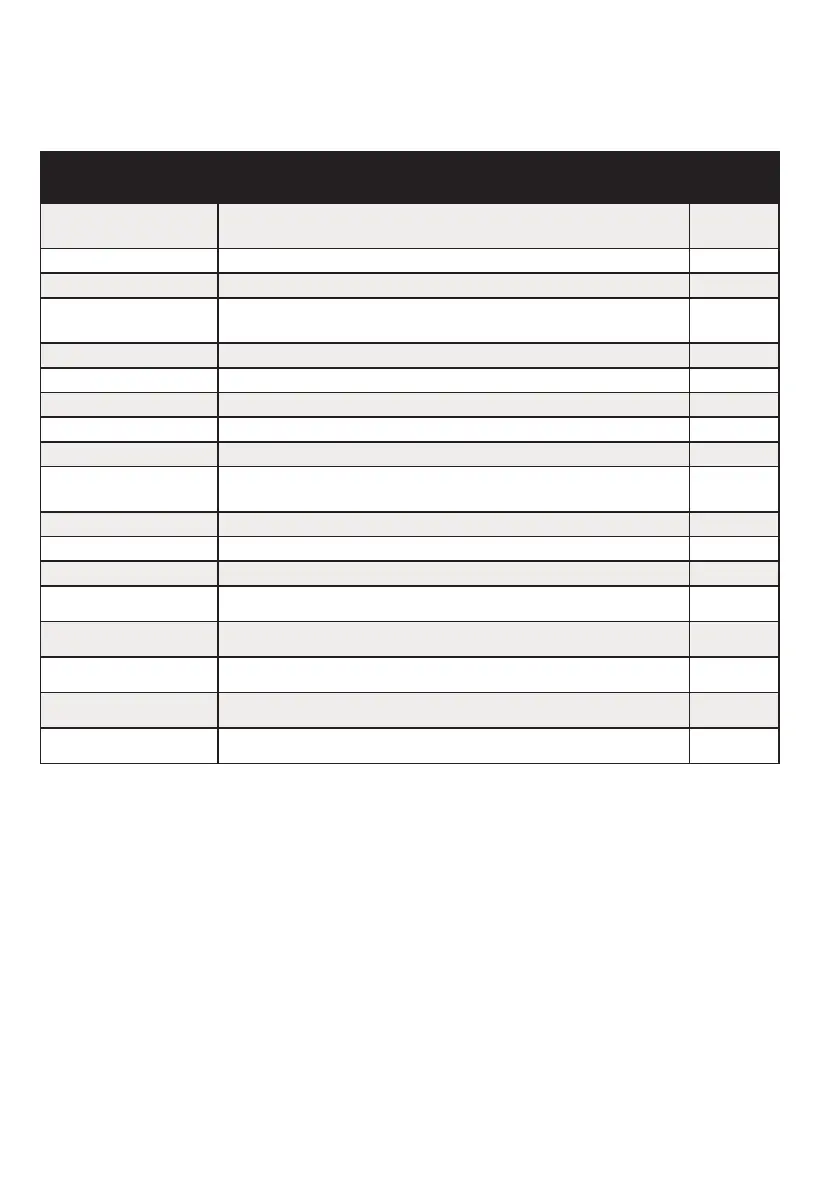
Q
uick Find Guide
Main Menu Item Description Page
Software
Revision
Control panel version number 10
Wiring Choice Double Pole, DEOL 4K7,2K2 or 4K7, 4K7. 10
Change Inputs Inputs types, part sets, attributes and input names 11
Assign Keypads/
Readers
Keypad and reader addresses and keypad names 12
System Displays Sign on message and ‘Display when set’ function. 13
Change Timers Entry, Exit, Siren Time, Re-arm no, Fire Siren Time 13
Set Date & Time Year, Month, Day, Hours and Minutes 14
Exit Modes Timed, Final Door, Timed/Final 14
Change Codes Master Manager Code, Engineers Code 15
Volume Control
Entry, Exit, Alarm, Fire, 24hr, Chime, Intelligent Set,
E/E Keypads Only option.
16
Alarm Response First Alarms for each level set 17
Change Outputs Bell, Strobe, PGM, and XPGMs outputs 17
Intelligent Set Intelligent set 18
Site Options Strobe at Set and 2 Key Hold Up 18
Review Logs The control panel logs 19
Engineer Tests Walk Test, Test Siren and Test Outputs 20
Diagnostics View PSU’s, View Inputs and Calibration 22
Clean Start Resetting the panel back to default 23


 To Next Page