6 7
6 7
4. Add distilled water in each cell until battery acid reaches level specified by battery manufacturer. This
helps purge excessive gas from cells. Do not overfill. For a battery without cell caps (maintenance
free), carefully follow manufacturer’s charging instructions.
5. Study all battery manufacturer’s specific precautions, such as removing or not removing cell caps
while charging, and recommended rates of charge.
Charger Location
• Locate charger as far away from battery as cables permit.
• Never place charger directly above battery being charged; gases from battery will corrode and damage
charger.
• Never allow battery acid to drip on charger.
• Never operate charger in a closed-in area or restrict ventilation in any way.
• Marine batteries must be removed and charged on shore.
• Do not set a battery on top of charger.
Charging Using the Supplied Battery Clips
WARNING: A spark near the battery may cause an explosion. To reduce the risk of a spark near
the battery, position AC and DC cords away from hood, door, or moving engine parts.
1. Insert the double barrel tip of the battery clamp cable into the double barrel tip of the battery charger
cable (male-to-female and female-to-male). Then plug the battery charger’s power cord into an AC
outlet. The power LED will light blue to indicate that the charger is plugged in and ready.
2. Check polarity of battery posts. Positive (POS, P, +) battery post usually has larger diameter than
negative (NEG, N, –) post.
3. Determine which post of battery is grounded (connected) to the chassis. If negative post is grounded
to chassis (as in most vehicles), see 4. If positive post is grounded to the chassis, see 5.
4. For negative-grounded vehicle, connect positive (red) clamp from battery charger to positive (POS,
P, +) ungrounded post of battery. Connect negative (black) clamp to vehicle chassis or engine block
away from battery. Do not connect clip to carburetor, fuel lines, or sheet-metal body parts. Connect
to heavy gauge metal part of the frame or engine block.
5. For positive-grounded vehicle, connect negative (black) clamp from battery charger to negative
(NEG, N, –) ungrounded post of battery. Connect positive (red) clamp to vehicle chassis or engine
block away from battery. Do-not connect clip to carburetor, fuel lines or sheet-metal body parts.
Connect to a heavy gauge metal part of the frame or engine block.
Note:
If the clamps are incorrectly connected with regard to polarity, the reverse polarity/fault LED ( ) will light.
Unplug the charger; then remove the clamps. Reconnect the clamps properly.
6. When the unit is properly connected and charging, the battery charging LED ( ) will light yellow to
indicate the battery is charging.
7. When the charging complete LED ( ) lights green, the battery is fully charged.
When disconnecting charger, disconnect AC cord, remove clamp from vehicle chassis, and then remove
clamp from battery terminal.
Charging Using the 12 Volt DC Accessory Plug
1. Insert the double barrel tip of the 12 volt DC accessory plug cable into the double barrel tip of the
battery charger cable (male-to-female and female-to-male). Then plug the battery charger’s power
cord into an AC outlet. The power LED will light blue to indicate that the charger is plugged in and
ready.
2. Insert the tip of the 12 volt DC accessory plug into the vehicle’s 12 volt DC accessory outlet. Rotate
the adapter slightly to make sure there is good contact.
3. When the unit is properly connected and charging, the battery charging LED ( ) will light to indicate
the battery is charging.
4. When the charging complete LED ( ) lights, the battery is fully charged.
When disconnecting charger, disconnect AC cord, and then remove the 12 volt DC accessory plug from
the vehicle accessory outlet.
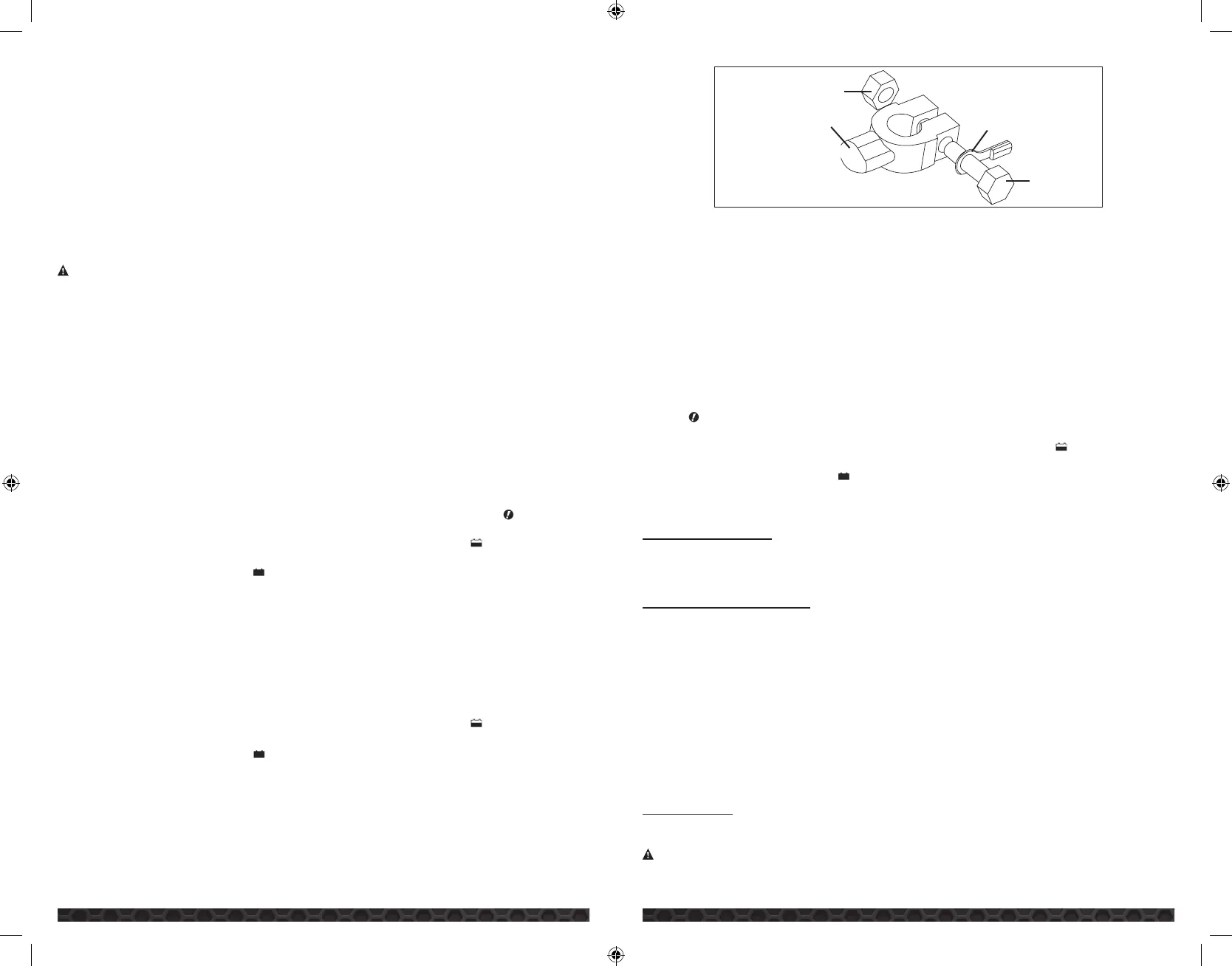
Connecting and Charging the Battery with the Terminal Rings
CONNECTING THE CHARGER WITH TERMINAL RINGS
The charger’s output leads have crimped, color-coded terminal rings (RED-POSITIVE and BLACK-
NEGATIVE). These rings connect directly to the corresponding connectors on the battery posts.
NUT
CONNECTOR
TERMINAL RING
BOLT
1. Remove the nuts from the bolts of the battery post’s connectors.
2. Position the RED terminal on the bolt of the POSITIVE battery post connector.
3. Position the BLACK terminal on the NEGATIVE post connector; then replace the nuts.
IMPORTANT:
If there is any problem connecting the output leads, check with a reputable autosupply
store or contact the Customer Service Department toll-free at 855-806-9228 (855-806-9CAT) for
assistance in finding an appropriate connection device for your particular application.
CHARGING WITH THE TERMINAL RINGS
1. With the ring terminals connected to the battery and with ring terminal connector held as far away
from the battery as practical, insert the double barrel tip of the terminal ring cable into the double
barrel tip of the battery charger cable (male-to-female and female-to-male). Then plug the battery
charger’s power cord into an AC outlet. The power LED will light blue to indicate that the charger is
plugged in and ready.
Note:
If the terminal rings are incorrectly connected with regard to polarity, the reverse polarity/fault
LED ( ) will light. Unplug the charger; then remove the ring terminals. Reconnect the ring terminals
properly.
2. When the unit is properly connected and charging, the battery charging LED ( ) will light yellow to
indicate the battery is charging.
3. When the charging complete LED ( ) lights green, the battery is fully charged.
When disconnecting charger, disconnect AC cord, and then remove the terminal rings from battery
terminals.
TROUBLESHOOTING
Unit Not Charging
• Check that the charger is properly connected to a live 120 volt AC outlet.
• If the battery to be charged has fallen below 2 volts, the battery cannot be recharged with this unit.
CARE AND MAINTENANCE
Storage
• Store the unit in a clean, dry, cool place when not in use.
• Clean the unit casing and cords (as necessary) with a dry (or slightly damp) cloth. Ensure that unit is
completely disconnected from battery and power source before cleaning.
• To maintain the operating condition and maximize the life of the charger cords, always coil them
loosely for storage. Do not wrap them around the unit or crimp them with a tight band.
Fuse Replacement (12 Volt DC Charging Adapter)
1. Remove plug from accessory outlet. Remove the gold cap by turning counter clockwise and lifting off.
2. Remove center pin and spring. Remove fuse.
3. Replace fuse with same type and size fuse (8 amp).
4. Replace center pin and spring inside plug.
5. Replace gold cap by turning clockwise.
ACCESSORIES
Recommended accessories for use with this unit may be available from the manufacturer. If you need
assistance regarding accessories, please contact the manufacturer at 855-806-9228 (855-806-9CAT).
WARNING:
The use of any accessory not recommended for use with this appliance could be
hazardous.
CBC4W_ManualENSP_041414.indd 6-7 4/14/2014 10:20:45 AM


 To Next Page
 Loading...