Application and Installation Guide EMCP 4 SCADA Data Links
©2013 Caterpillar
All rights reserved. Page 47
EMCP 4 Application and Installation Guide for information on configuring and reading the configuration of
analog inputs.
Over Modbus, both the sensor reading and the converted measurement data can be read. For analog
input #1, the sensor reading is found in the Analog Input #1 Sensor Value (648) register, and the
measurement data in Analog Input #1 Data Value (652-653) registers.
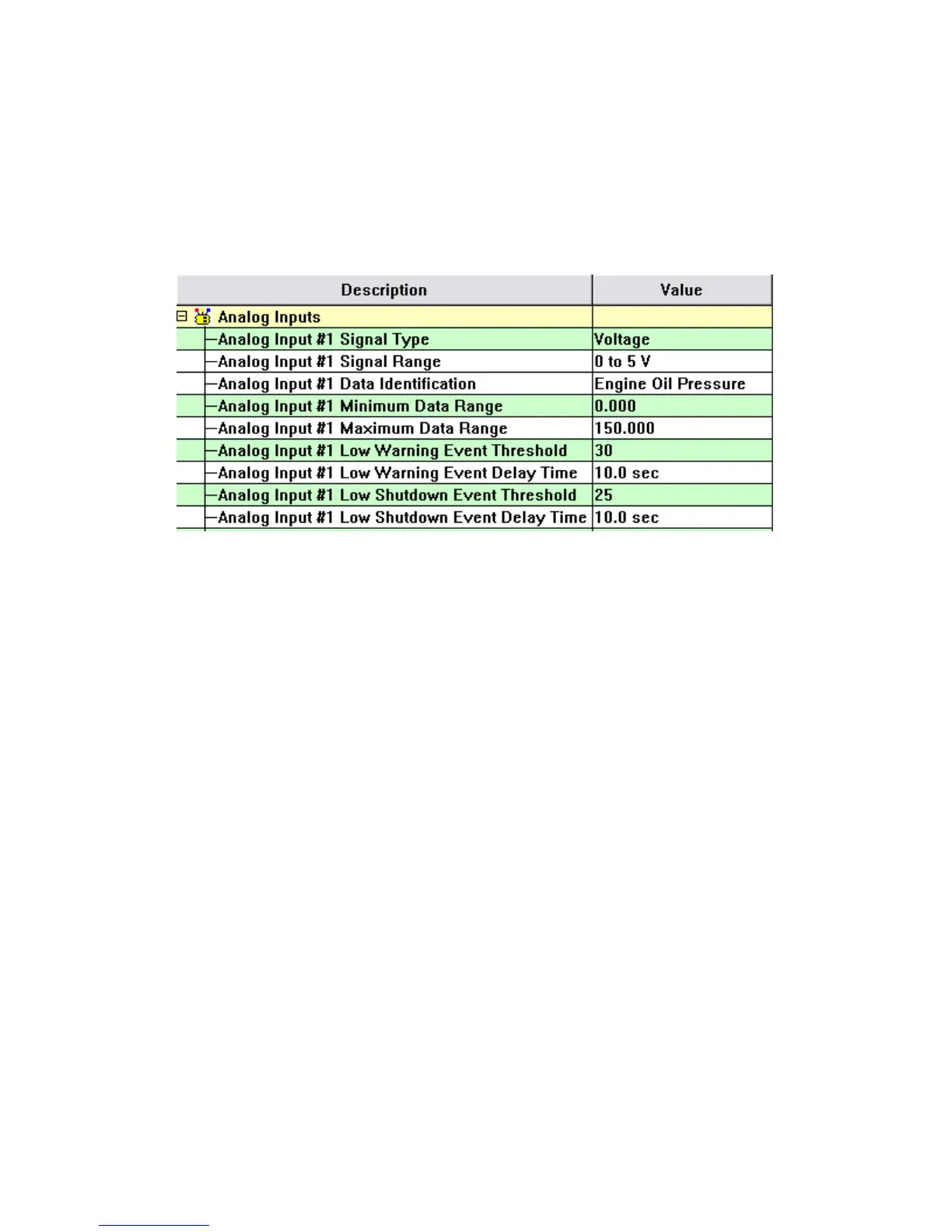
For this example, assume that the configuration is as shown:
Also suppose that the actual oil pressure is 30 kPa. First reading the sensor value…
Request: 0x 01 03 02 87 00 01 xx xx
0x 01 = slave address of EMCP 4
0x 03 = function code (Read Registers)
0x 02 87 = Analog Input #1 Sensor Value
0x 00 01 = register count
Response: 0x 01 03 02 01 10 xx xx
0x 02 = byte count (2 bytes = 1 register)
0x 01 10 = 272. 272 / 16 - 16 = 1 V.
This indicates that the sensor reading was 1 Volt. Next reading the data value…
Request: 0x:01 03 02 8B 00 02 xx xx
0x 01 = slave address of EMCP 4
0x 03 = function code (Read Registers)
0x 02 8B = Analog Input #1 Data Value
0x 00 02 = register count
Response: 0x 01 03 04 7D 80 1E 00 xx xx
0x 04 = byte count (4 bytes = 2 registers)
0x 7D 80 1E 00 = 2,105,548,288. 2,105,548,288 / 256 - 8,224,768 = 30 kPa.
This indicates that the data value, which is oil pressure, is 30 kPa. The below figure graphically confirms
that this is correct, based on the analog input configuration.


 To Next Page
 Loading...