Cat
®
S50 Smartphone User Manual
1
Welcome to the Cat
®
S50 Smartphone
The S50 4G smartphone is designed for the outdoors, with features to cope with challenging
environments. It’s certied to the highest industry standard for ruggedness, IP67, so it’s
waterproof and the screen can even be used with wet ngers. It has excellent scratch-resistant
glass, is dustproof and can withstand being dropped from a height of 1.22m. It also has a quad
core (1.2Ghz) processor running the latest version of Android (KitKat) with access to Google
Play meaning there is no compromise between performance and protection.Complementing
the durable design features, the S50 boasts performance enhancing applications enabling
you to enjoy web browsing, messaging, music and more with its high capacity battery and
expandable memory of up to 64GB.
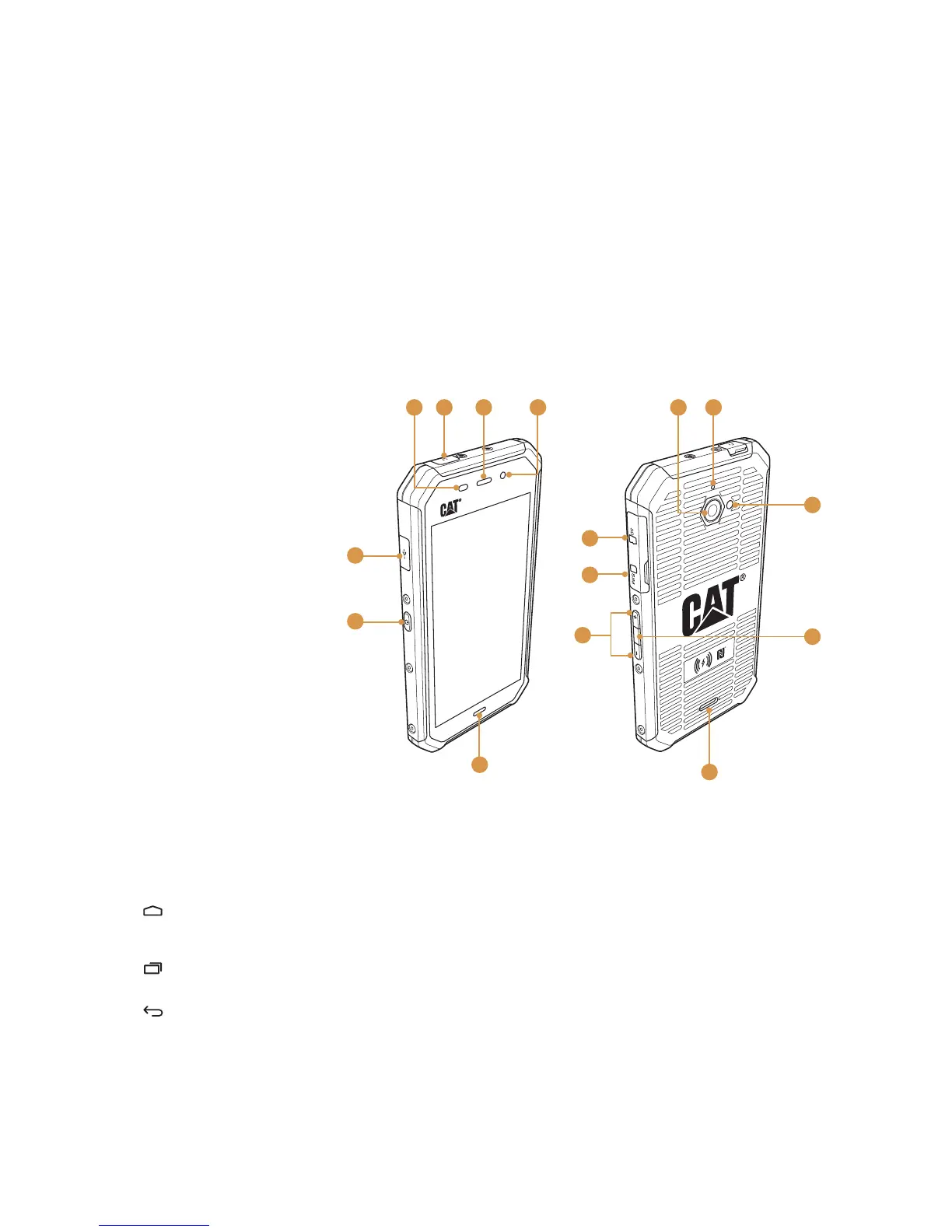
Getting to Know Your Mobile Phone
Phone at a Glance
Key Functions at Your Fingertips
Power button
Press to turn on your mobile phone. •
Press and hold to open the Phone options menu. •
Press to lock or wake the screen when your mobile phone is on.•
Home key
( - soft key)
Touch at any time to display the Home screen. •
A long touch of the Home key will display the Google icon, slide up to •
touch the icon to launch Google search or Google Now.
Recent Apps key
( - soft key)
Touch to list the recent applications used.
Back key
( - soft key)
T• ouch to display the previous screen you were working in.
Use to • close onscreen keyboard.
Camera key
When in the camera app, press the Camera Key to instantly take your
pictures. The Camera Key also has other functionalities when the camera
app is not in use.
Google Music Player – When the device is unlocked, a short press twice of •
the Camera Key will launch the Google Music Player
Flashlight – A long press (2 seconds) of the Camera Key will turn on the •
ashlight, even if the device is locked. Another long press of the Camera
Key will turn the ashlight off.
1. Ambient light and
proximity sensor
2. Headphone port
3. Earpiece
4. Front camera
5. Rear camera
6. Microphone
7. LED ash
8. Camera key
9. Speaker
10. Volume buttons
11. SIM card slot
12. MicroSD card slot
13. Power button
14. USB port



 To Next Page
 Loading...