Getting Started with Your Mobile Phone
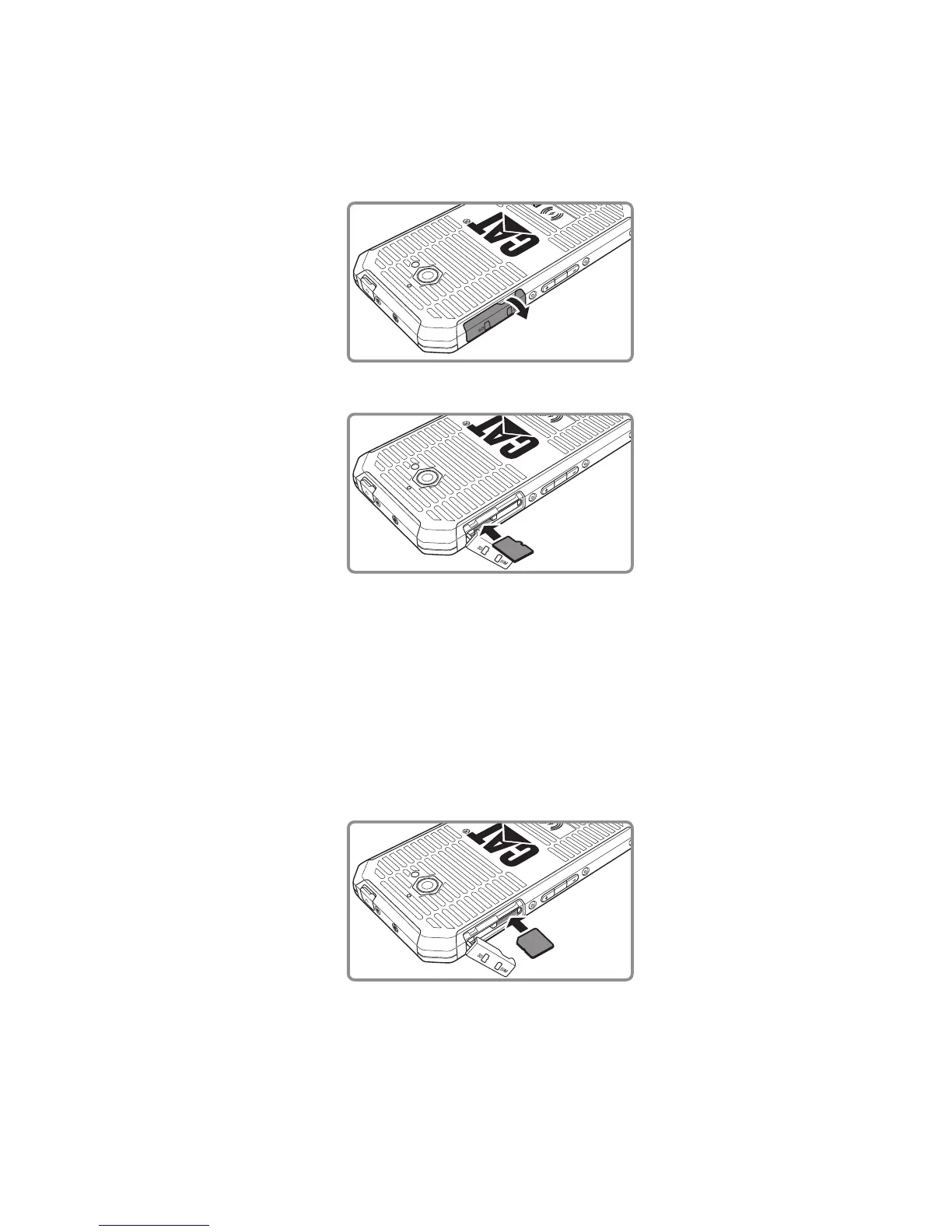
Installing a Memory Card
1. Open the memory/SIM card slot cover.
2. Insert a microSD card as shown.
Note:
Insert the microSD card with the gold contacts facing down, push the memory card all the way until ∙
you hear a locking sound.
To remove the microSD card, press against the edge of the memory card and release it. ∙
Do not force the microSD card as this could damage the memory card or slot. ∙
Installing a micro SIM card
1. Open the memory/SIM card slot cover.
2. Insert the SIM card card as shown.
Note:
The gold contacts must be facing down on the micro SIM card with the cut off corner on the top ∙
left. Insert the micro SIM card into slot until you hear a locking sound.
To remove the micro SIM card, press the SIM card inwards and release quickly and draw the card ∙
out to remove.
Do not force the micro SIM card as this could damage the memory card or slot. ∙
This device does not support Nano SIM card. ∙



 To Next Page