VECTOR
VECTOR USER GUIDE 9
VECTOR DOCK
DEVICE IGNITION & DOCK BEHAVIOUR
• The Vector Dock is designed to improve
eficiency of use in the ield
• Turning the dock on with devices connected
enables device ignition mode
• Device data download is enabled in
Ignition mode
• Devices will start recording when removed from
the dock
• When devices are re-connected to the dock,
they will stop recording and return to
Ignition mode
• Device data download is enabled in
Ignition mode
• When dock is turned off, devices will also
turn off
• Dock will shutdown automatically after a period
of inactivity to conserve battery power
• Full dock functionality can be used on mains or
battery power
VECTOR
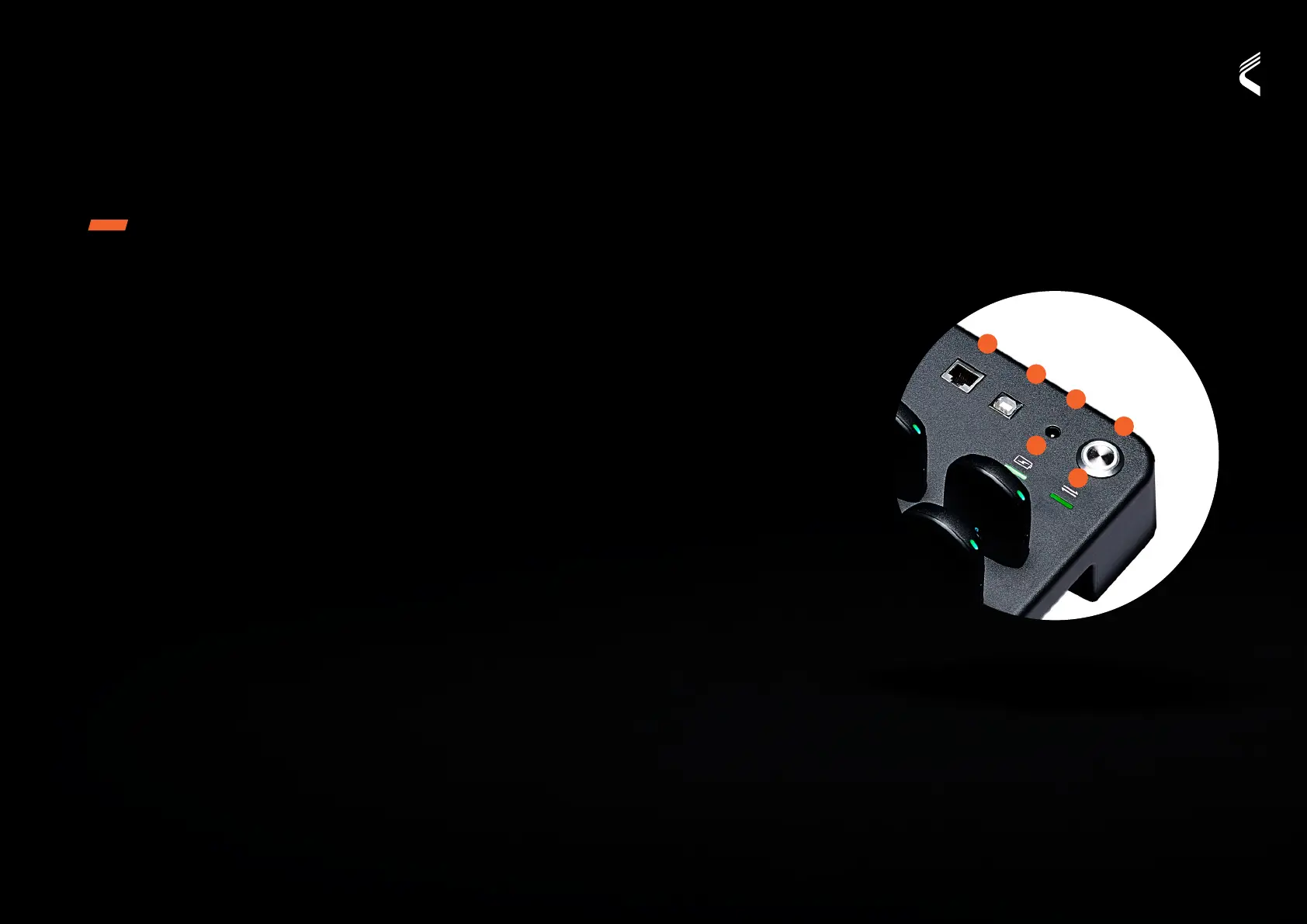
INDICATORS
Power Status
• On Battery Power - Green > 30min remaining,
Red - Low power < 30min remaining
• On Mains Power - Red - Charging,
Green - Fully Charged
Data Connection
• Green (slow lash) - Dock connected to
PC and communicating
• Green (fast lash) - Dock connected to
PC and transferring data
1
2
3
4
5
6
1. ETHERNET
2. USB
3. POWER INPUT
4. POWER BUTTON
5. BATTERY
6. NETWORK


 To Next Page
 Loading...